Draft AI
Updated:
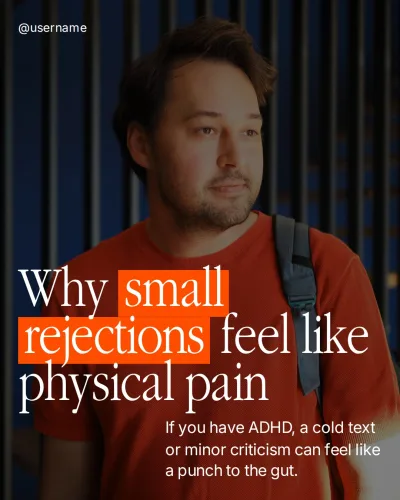
What is a hook for Reels
A hook is the opening line of a short video, delivered through spoken audio, on-screen text, or both. In the first few seconds, it tells the viewer exactly what the clip covers and why to keep watching.
A hook is not clickbait. Instead of misleading viewers to stop scrolling, it makes a specific promise that the rest of the video delivers.
Types of hooks
Pick the type by what your video does: points out a mistake, corrects a myth, explains something odd, lists steps, tells a story, asks a question or shows a result.
Mistake
This format fits topics where your audience makes an error that slows their progress. Pointing out the misstep makes viewers pause to check whether they are making the same error.
Example: "If you cut carbs completely, your evening cravings will ruin your calorie deficit."
Myth
Use a myth hook when widespread advice in your field is outdated, incomplete, or wrong. The video then answers the obvious question: what is true instead.
Example: "Everyone says you must stop eating after six, but timing matters much less."
Intrigue
This angle fits explanations of confusing patterns or overlooked details that most people struggle with. It signals that you are about to share an insider explanation for a familiar frustration.
Example: "Nobody tells you why the scale jumps three pounds after one salty dinner."
Number and list
A numbered hook works best when organizing complex information into distinct steps or red flags. Giving a specific count helps viewers gauge how much information to expect before the video begins.
Example: "Three quiet signs your calorie deficit is actually too aggressive right now."
Story
Use a story hook to ground an educational point in a real-world scenario or a common customer journey. Tell only a case that really happened, with the client’s permission.
Example: "A client came to me eating 1,200 calories and still not losing weight."
Question
A question hook works when your audience is settling for an ineffective alternative to reach their goals. Confronting viewers with a direct question forces them to reflect on their daily choices.
Example: "Why are you still drinking diet teas instead of hitting your daily protein?"
Result
This type fits case studies and breakdowns where the outcome contradicts expectations or avoids a common sacrifice. Name only an outcome that really happened.
Example: "How my client lost four inches off her waist without cutting family dinners."
Hook formulas you can fill in
A formula is a hook with blanks. Replace each underlined hint with a detail from your own video.
Mistake
- Stop doing common habit if you actually want to desired outcome.
- Most your audience fail at skill because they ignore this basic step.
- You are wasting time on activity instead of focusing on core priority.
- Here is why your project keeps failing despite all your hard work.
- Never do common mistake without checking key factor first.
Myth
- You do not need common requirement to achieve desired result.
- Industry experts keep pushing common method, but it rarely works.
- Believing that popular belief is quietly hurting your area of growth.
- Everyone assumes skill requires rare resource, but that is false.
- No, quick fix will not solve your core problem.
Intrigue
- There is an unusual reason why your audience struggles with problem.
- What actually happens to your asset when you stop routine task?
- This small change completely transformed how I handle major challenge.
- Hardly anyone talks about how first factor directly impacts second factor.
- If unfavorable scenario happens, follow this rule instead of panicking.
Number and list
- number subtle signs that your asset is starting to fail.
- Here are number practical adjustments that immediately improved my workflow.
- Test your current strategy against these number basic requirements.
- Avoid these number costly traps whenever you tackle task.
- These number overlooked frameworks helped me master skill.
Story
- When I first launched my project, I made an embarrassing mistake.
- I wasted timeframe following flawed advice before seeing any real progress.
- Losing my key asset forced me to completely rebuild my system.
- After struggling with obstacle for timeframe, I finally discovered what worked.
- My biggest breakthrough in field happened right after failing at milestone.
Question
- Why is your audience still struggling to resolve problem?
- Are you making this critical mistake with your current process?
- What would happen if you stopped routine activity entirely?
- How much time do you actually waste on low-value task?
- Can you spot the major flaw in this example scenario?
Result
- How I reached milestone in timeframe without relying on common shortcut.
- A simple shift in my routine helped me achieve specific outcome.
- I eliminated my frustrating issue by focusing strictly on core priority.
- Applying strategy took my asset from initial state to target milestone.
- Here is how I generated number positive result in just timeframe.
A formula is a starting point; check the result against your video using the checklist below.
How to adapt a hook to your video
A template gives you a reliable structure, but it only works when it reflects what actually happens on screen. Follow these steps to tailor an opening line to your footage.
- Start from what the video actually shows or says. Identify the single lesson, demonstration, or takeaway before choosing any words.
- Pick the type that matches it. Match a problem-solving video to a mistake hook, or a step-by-step tutorial to a number and list hook.
- Replace general words with details from your video. Name the specific person, setting, or number featured in your footage.
- Cut to one sentence you can say in one breath. Remove unnecessary background details so the line delivers cleanly on camera.
- Check it against the video. Ensure the visual action in the first three seconds confirms the spoken opening.
A worked example
A generic hook must be reshaped to describe the exact scene without exaggerating the outcome.
Original hook: "Three inexpensive items that instantly upgrade your living room workout setup."
Adapted hook: "Three desk stretches that ease lower-back tightness after sitting all morning."
- Items to stretches: "Inexpensive items" becomes "desk stretches" because the clip demonstrates physical movements instead of reviewing gear.
- Living room to desk: "Living room workout setup" becomes "sitting all morning" to target the viewer's specific daily posture.
- Upgrade to relief: "Instantly upgrade" becomes "ease lower-back tightness" to describe temporary comfort without promising a permanent medical cure.
Check that the hook matches the video
Review the completed clip against these points before publishing to avoid misleading viewers.
- The video answers the question or keeps the promise from the hook.
- The answer comes soon, not in the last seconds.
- The numbers in the hook match the video, such as showing three distinct exercises when the hook promises three.
- The spoken line and on-screen text don't contradict each other.
- The line contains no claim you can't back up.
If the hook promises more than the video gives, rewrite the hook, not the video.


 Maya | Course Creator Coach