How AI Simplifies Social Media Scheduling
Managing social media can feel overwhelming, but AI tools are changing the game. These tools save time by automating repetitive tasks, analyzing audience behavior to post at optimal times, and maintaining content consistency across platforms. Businesses like Salesforce have saved thousands of hours annually, while others report increased engagement and clicks. AI takes care of captions, hashtags, scheduling, and even audience interaction, helping you focus on growth and strategy.
Key benefits include:
- Automating routine tasks like captions and scheduling
- Ensuring consistent branding across platforms
- Using audience data to optimize posting times
Draft AI is one such tool that simplifies scheduling in just four steps: account setup, content generation, customization, and calendar management. Plans range from free for beginners to enterprise-level for large teams, making it accessible for all. If manual posting is taking up too much time, AI can streamline your process and improve results.
How to Automate your Social Media Posts with AI | Save weekly auto scheduling post
Why AI Makes Social Media Scheduling Easier
AI has turned social media scheduling into a seamless, behind-the-scenes process. Instead of hopping between platforms multiple times a day, you can now schedule content in bulk and let AI handle the rest. This not only saves time but also boosts results by identifying the best-performing content and the ideal times to post. Here's how AI simplifies routine tasks, ensures consistency, and tailors your schedule to your audience.
Automating Routine Tasks
The most time-consuming part of managing social media isn’t the strategy - it’s the repetitive tasks. Writing captions, picking hashtags, resizing images, and scheduling posts can quickly pile up. AI steps in to handle these tasks, generating captions, suggesting hashtags, and publishing posts across platforms so you don’t have to stay glued to your screen.
74% of marketers report saving significant time by automating these tasks. For example, in 2025, Heartland Dental managed over 800 accounts across 850 U.S. locations, saving 780 hours annually and achieving a 5:1 ROI. Similarly, Zenith International cut campaign setup time from several days to under an hour by using bulk imports and templates for a global luxury brand operating in 35 markets and over 20 languages.
"The best way to take advantage of social media automation tools is to assign them repetitive tasks that require little mental effort." - Rami Zaki, Senior Account Executive, Viola Communications
AI also handles engagement automation through tools like chatbots and auto-responders, which manage routine FAQs and direct messages. Since 83% of consumers expect brands to respond within a day, these automated responses keep your audience engaged while freeing up your team for more complex interactions. Additionally, automated reporting can save about 20 minutes a day by eliminating the need for manual data exports and spreadsheet updates.
Maintaining Content Consistency Across Platforms
Keeping a consistent posting schedule while maintaining your brand’s voice across multiple platforms can be a challenge. AI simplifies this by learning your brand’s tone and applying your visual branding - like colors, fonts, and logos - to every post.
It also adjusts content to fit the style of each platform without altering the core message. For instance, a post on a professional network might sound formal, while the same message could be playful and conversational on a visual platform. AI-powered tools even perform real-time checks for grammar, sentiment, and adherence to brand guidelines, catching mistakes before they go live.
Consistency is key to building trust and engagement. High-performing marketers are more than twice as likely to use AI compared to those who struggle with social media management. By automating these processes, your content flow stays steady - even during busy periods or across different time zones.
Personalized Scheduling Based on Audience Data
One-size-fits-all advice like "post on Wednesdays at 2:00 PM" doesn’t account for your audience’s unique habits. AI changes the game by analyzing past interactions - likes, shares, comments - to determine when your audience is most active. This data-driven approach ensures posts go live at the times when they’re most likely to get noticed.
AI can even create visual heat maps showing when your audience is active throughout the day, helping you fine-tune your posting schedule. It also recognizes that the best times to post vary by platform. For example, a professional network might see peak activity during work hours, while casual platforms might perform better in the evening.
How to Use Draft AI for Social Media Scheduling

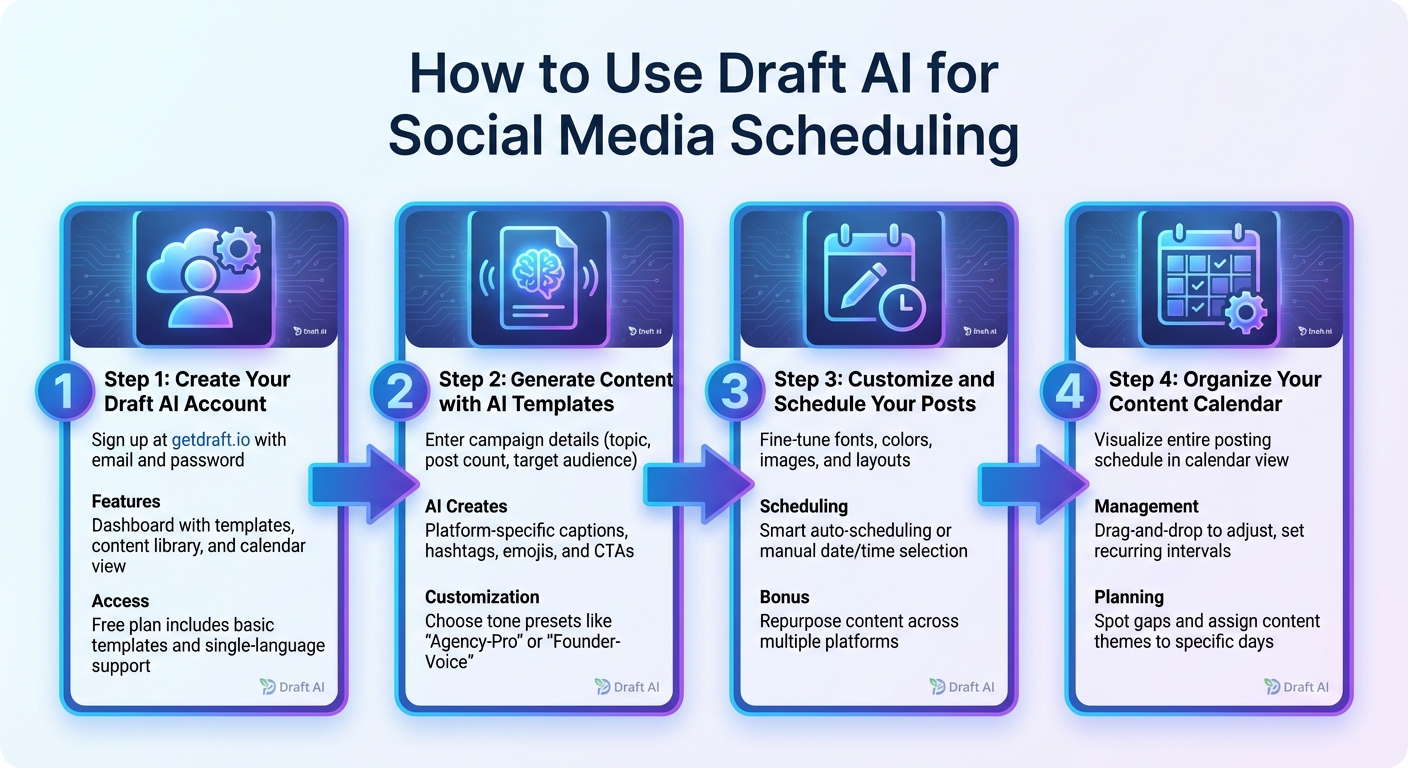
4 Steps to Schedule Social Media Content with Draft AI
Draft AI simplifies social media scheduling by automating repetitive tasks, making it easier to create and plan content. With a user-friendly setup, you can craft posts that align with your brand, schedule them efficiently, and stay consistent - all without needing technical know-how. Here’s how to build a complete content calendar in just four steps.
Step 1: Create Your Draft AI Account
Head over to Draft AI and sign up with your email and a password. Once logged in, explore the dashboard, which includes templates, a content library, and a calendar view. The free plan gives you access to basic templates and single-language support to get started.
Step 2: Generate Content with AI Templates and Writing Styles
Kick off your campaign by entering details like your topic, the number of posts you want, and your target audience. Draft AI will then craft a content strategy with post ideas tailored to your needs, such as educational reels, polls, or thought-leadership carousels. It also generates platform-specific elements like captions, hashtags, emojis, and calls-to-action. You can even choose tone presets like “Agency-Pro” or “Founder-Voice” to match your brand’s personality.
Step 3: Customize and Schedule Your Posts
Fine-tune your posts by adjusting fonts, colors, images, and layouts. Use the smart scheduling feature to automatically select the best times to post, or manually set your desired dates and times. Draft AI also lets you repurpose a single piece of content for different platforms while keeping the message consistent.
Step 4: Organize Your Content Calendar and Automate
Visualize your entire posting schedule on the calendar view. This tool helps you spot gaps in your content plan and assign specific themes or content pillars to certain days, ensuring a consistent narrative. Need to make changes? Simply drag and drop posts to adjust the schedule or set recurring intervals to maintain regular activity.
sbb-itb-9f5fe42
Draft AI Pricing Plans
Draft AI offers three pricing options tailored to meet the needs of everyone, from solo creators to large teams. Each plan adds more features like advanced templates, collaboration tools, and automation as you move up the tiers.
The Free Plan is perfect for beginners or those managing a single account. It includes basic templates, simple text controls, and support for one language. While limited, it provides enough tools to get started with content creation.
The Pro Plan is designed for small businesses and content creators who want to streamline their workflow. This plan unlocks all templates, offers advanced text controls, and includes multilingual translation. It also provides AI tools to ensure your content aligns with your brand's voice. If you're looking to save time while maintaining consistent, high-quality posts across platforms, this plan is a solid choice.
The Enterprise Plan is built for larger teams and agencies, offering custom pricing to match your specific needs. It includes personalized templates tailored to your brand, collaboration tools for managing multiple contributors, and priority support for quick assistance. This plan is ideal for teams managing content across departments or handling multiple client accounts.
| Plan | Price | Best For | Key Features |
|---|---|---|---|
| Free | $0 | Beginners, single accounts | Basic templates, simple scheduling, single-language support |
| Pro | $XX/month | Small businesses, content creators | Full template access, smart scheduling, multilingual support, AI-driven brand voice |
| Enterprise | Custom pricing | Large teams, agencies | Custom templates, team collaboration, priority support, advanced automation |
Choosing the right plan can simplify your content creation and scheduling process, helping you make the most of Draft AI's features. Up next, we’ll explore how to tackle common scheduling challenges using Draft AI.
Fixing Common Scheduling Problems in Draft AI
Even the best tools can run into occasional snags, but most of these issues are simple to resolve.
One frequent problem is account disconnections, which can prevent posts from publishing on time. If you've recently updated your password on Instagram, Facebook, or another connected platform, Draft AI might lose the authorization to post for you. To fix this, go to your settings and reconnect the affected account. Similarly, if your posts stay stuck in "Draft" status despite being scheduled, check your user permissions. Users with "Draft only" access can schedule posts, but they won’t go live until an admin approves them.
Another common issue is time zone mismatches, which can cause posts to publish at the wrong time. For example, if your scheduler is set to UTC but you're working in Eastern Time, a 9:00 AM post might go live at 4:00 AM instead. Double-check that Draft AI’s time zone settings match your audience’s location. This is especially important if you’re managing accounts for different regions. After adjusting the time settings, make sure your media files meet the platform’s requirements.
Speaking of media, file issues can also disrupt your schedule. Posts may fail if images or videos don’t match the platform’s specifications. For instance, Instagram feed posts perform best with 1:1 or 4:5 aspect ratios, while TikTok and Reels require a 9:16 vertical format. Use Draft AI’s preview feature to confirm that your visuals are compatible. If a post doesn’t go through, resize the media and try again.
Lastly, keep in mind platform-specific scheduling limits. TikTok generally allows scheduling up to about 10 days in advance, while Instagram permits up to 75 days. If you’re planning content too far in advance for certain platforms, adjust your calendar or set reminders to schedule those posts closer to their intended publish date.
Conclusion
Managing social media doesn't need to feel like you're juggling an extra full-time job. With Draft AI, those repetitive tasks are handled for you, saving you between 10 to 15 hours a week through batch scheduling. That’s time you can reinvest into strategy and growth.
But it’s not just about saving time. Draft AI ensures your content stays consistent and polished across platforms. By analyzing tone, crafting on-brand captions, and tailoring posts to fit each platform’s guidelines, it keeps your messaging sharp and professional.
This shift turns social media management into a strategic advantage. For small businesses and professionals, the mix of automation and smart tools creates a reliable content system. Draft AI simplifies timing, formatting, and messaging, giving each post the best chance to succeed.
If manual scheduling is slowing you down, Draft AI can transform how you manage and publish content. It frees you up to focus on growth while boosting engagement and refining your overall strategy.
FAQs
How does AI figure out the best times to post on social media?
AI pinpoints the ideal times to post by digging into engagement data - things like likes, comments, shares, and views - while also tracking exactly when these interactions happen. Through machine learning, it uncovers patterns in audience behavior, from daily and weekly routines to seasonal shifts and even time-zone variations.
It doesn't stop there. AI also factors in platform-specific algorithms and keeps an eye on real-time trends, such as trending hashtags or breaking news, to fine-tune its suggestions. Since it constantly learns from fresh data, it adjusts to evolving audience habits, ensuring your posts hit the sweet spot for visibility and interaction.
Once these prime posting times are identified, they’re seamlessly added to the scheduling tool, making it simple to pick the best time to post with just a single click.
How do I set up Draft AI for scheduling social media posts?
Getting started with Draft AI for social media scheduling is simple and straightforward. First, sign up for a Draft AI account and link your social media profiles, such as Instagram, X, or LinkedIn. Once connected, you can set your posting schedule by picking the specific days and times you want your content to go live. Draft AI even offers suggestions for the best posting times based on when your audience is most active.
After that, dive into Draft AI’s content creation tools. You can start with pre-designed templates, upload your own images, and let the AI generate captions, hashtags, or carousel text in just seconds. Want to make it your own? Customize the content to fit your style - tweak fonts, adjust colors, or even translate it into another language. Once you're happy with the results, schedule your posts to publish automatically or upload multiple pieces of content at once to plan ahead.
Lastly, keep an eye on how your posts are doing with Draft AI’s analytics. Measure engagement metrics like likes, comments, and shares to fine-tune your strategy for future posts. By following these steps, you’ll save time and make managing your social media accounts much easier.
How does AI help maintain a consistent brand presence across social media platforms?
AI helps maintain your brand’s voice and style consistently across platforms like Facebook, Instagram, X, LinkedIn, and TikTok by automating essential tasks. Here’s how it works:
First, AI can be trained to follow your brand guidelines - everything from tone and vocabulary to specific design elements. This means every piece of content, whether it’s a quick caption or a detailed carousel, reflects your brand’s personality. Tools like Draft AI make it easy to set up templates, fonts, and colors, so you can generate platform-ready content in just seconds.
Second, AI tailors your content to suit each platform’s unique requirements. It adjusts for character limits, image sizes, and even hashtag preferences, all while preserving your original message. This ensures your posts are optimized for every channel without compromising their intent.
Finally, AI-powered scheduling tools take the hassle out of managing your social media calendar. They automate posting schedules and handle bulk uploads, cutting down on manual work and reducing errors. These tools not only save time but also keep your brand looking polished and consistent across all platforms.


