Ultimate Guide to LinkedIn AI Scheduling Tools
LinkedIn AI scheduling tools simplify managing and optimizing your content on the platform. They save time by automating tasks like post scheduling, content creation, and analytics, while also identifying the best times to post for higher engagement. These tools analyze audience behavior, suggest post ideas, and even refine your tone to match your style. Whether you're managing personal branding or corporate accounts, they help streamline your LinkedIn strategy.
Key Takeaways:
- Smart Scheduling: AI tools analyze audience activity to recommend the best posting times.
- Content Creation: Features like templates, bulk uploads, and voice-to-text simplify post creation.
- Analytics: Detailed insights on engagement, follower growth, and hashtag performance improve your strategy.
- Top Tools: Options include Draft AI, Buffer, and Supergrow - each catering to different needs and budgets.
For professionals and businesses, these tools are essential for maintaining a consistent presence and maximizing LinkedIn's potential.
this simple AI SYSTEM runs my LinkedIn without me touching it
Key Features of LinkedIn AI Scheduling Tools
LinkedIn's AI scheduling tools aren't just about automating post times - they're designed to act as strategic content partners. Knowing which features to prioritize can make a huge difference in how effectively you engage your audience and grow your presence. Here's a breakdown of the standout capabilities that elevate these tools beyond basic scheduling.
Smart Scheduling and Optimization
AI scheduling tools do more than pick random times to post. They analyze your audience's activity patterns using machine learning, identifying the best moments to share content. This means your posts can reach the right people at the right time, without the guesswork.
But it doesn’t stop there. These tools fine-tune how and when your content is delivered by studying how different segments of your network interact with posts. For example, personalized InMails see a 44% higher acceptance rate, showing how tailored approaches can significantly enhance engagement.
They also align with LinkedIn's algorithm, adjusting your posting schedule to boost impressions and organic reach. Essentially, these tools ensure you stay visible while avoiding the risk of appearing overbearing or robotic.
Content Creation and Bulk Upload
Creating LinkedIn content can feel like a full-time job, but AI tools simplify the process. They learn your voice and style, helping generate posts that sound like you. Whether it's a thought leadership piece or a quick company update, pre-built templates make it easy to craft professional content quickly.
Formatting options are another big win. You can add bold text, bullet points, emojis, and even GIFs directly within the scheduling interface. This flexibility ensures your posts stand out in a crowded feed.
For those managing multiple campaigns or planning weeks ahead, bulk upload capabilities are a lifesaver. Many platforms let you import content via CSV files or other tools, making it easy to repurpose existing material for LinkedIn. And with the ability to preview posts on different devices, you can ensure your content looks polished whether viewed on desktop or mobile.
Analytics and Performance Insights
The difference between a good LinkedIn strategy and a great one often comes down to data. AI scheduling tools provide detailed analytics on metrics like views, likes, comments, shares, and click-through rates. This helps you identify what resonates with your audience and refine your approach.
Tracking follower growth is another key feature. You can see which posts attract new connections or spark more engagement from your existing network. These insights make it easier to plan future content with a clear focus on what works.
Some advanced tools even offer predictive performance scoring. For example, Anyword uses historical data to predict engagement with over 85% accuracy. This means you can optimize posts before they go live, increasing the likelihood of strong results.
Additionally, tools provide insights into your audience's demographics and behavior. You might discover that your posts perform better on certain days or that specific industries in your network respond more positively to certain types of content.
"It is beyond important to understand what content is landing and what content you are posting is missing the mark." - Scott Aaron, LinkedIn Expert
Some tools also include SEO optimization features, suggesting keywords and hashtags to improve discoverability. This ensures your content appears in LinkedIn searches without sounding overly promotional, helping you grow your professional brand organically.
How to Set Up and Use LinkedIn AI Scheduling Tools
To get started, you'll need to connect your LinkedIn account to the AI scheduling tool. Here's how to do it step by step:
Connecting Your LinkedIn Account
First, authorize the tool to access your LinkedIn account. Open your scheduling tool's dashboard and look for the option labeled "Add LinkedIn Account." Clicking this will redirect you to LinkedIn's authorization page. From there, sign in and grant the necessary permissions.
If you're managing LinkedIn company pages, make sure you use an admin account. Once logged in, the tool will display a list of the pages you can manage. Simply select the page you want to work with.
After completing the authorization, the tool will confirm the connection. With everything set up, you're ready to start creating and scheduling content with ease.
sbb-itb-9f5fe42
Advanced Techniques for Maximizing LinkedIn AI Scheduling
Once you've established a solid scheduling routine, it's time to take your LinkedIn strategy to the next level. These advanced techniques can help you strengthen engagement, save time, and present a polished, professional image on the platform.
Theme-Based Scheduling
A consistent brand voice is built on recognizable content themes. Instead of posting randomly, structure your updates around specific themes that align with your expertise and professional goals.
Start by selecting three to five core themes that reflect your niche or industry focus. For instance, if you're a marketing professional, your themes might include industry trends, case studies, personal insights, and team highlights. Then, assign specific days of the week to each theme. For example, Mondays could be dedicated to industry news, Wednesdays to case studies, and Fridays to personal reflections.
To stay organized, consider using theme-specific templates in your AI scheduling tool. These templates can streamline your process while ensuring a consistent format across posts. For example, your "Industry Insights" posts could include a standout statistic, your analysis, and a question to encourage discussion.
Planning your content around themes also makes it easier to batch your work, which brings us to the next technique.
Batch Content Planning
Batching your content production is a game-changer. Instead of scrambling to post something every day, you can allocate a few hours each week to create multiple posts in one go.
Set aside 2–3 hours weekly to craft 10–15 posts that can be scheduled over the coming weeks. This approach not only saves time but also allows you to plan your content mix more thoughtfully, ensuring you always have something ready to share.
Take advantage of tools like Draft AI's bulk upload feature to schedule posts in batches. This feature simplifies the process and ensures your content calendar stays full. Using templates can also help maintain consistency, even when you're creating multiple posts at once.
For even better results, incorporate seasonal planning into your workflow. Start preparing content months in advance for key industry events, holidays, or recurring themes. For example, if there's a major conference in March, you can create and schedule related content as early as January.
To keep your ideas flowing, maintain a content idea bank where you jot down topics, stats, and insights as they come to you. When it's time to batch your posts, you'll have a ready-made pool of ideas to draw from.
Once your content is scheduled, you can use AI insights to fine-tune your strategy.
Using AI-Driven Insights
Your scheduling tool's analytics dashboard is a goldmine of data that can help you refine your LinkedIn content strategy. By focusing on key metrics, you can make smarter, more informed decisions.
Start by analyzing optimal posting times. While general advice suggests posting during business hours, your audience might be most active at different times. Use your analytics to identify the time slots when engagement peaks and adjust your schedule accordingly.
Next, dive into content performance patterns. Instead of just counting likes, look at which posts inspire meaningful comments, shares, or clicks to your profile or website. Posts that spark conversations often deliver more value than those with high like counts but little interaction.
Keep an eye on audience growth trends, and see how they correlate with your posting frequency and content types. For example, you might find that personal insights attract more followers than industry news, or that posts with questions drive more engagement than straightforward statements.
Hashtag performance is another area to explore. Many AI tools can show you which hashtags are driving impressions and engagement. Swap out underperforming hashtags for ones that better connect with your target audience.
For your most important content, try A/B testing. Create two versions of a post with different headlines, images, or calls to action, then schedule them at different times. Use the performance data to guide your future content decisions.
Finally, monitor engagement velocity - how quickly posts generate likes and comments. Posts that gain traction quickly often continue to perform well, while slow starters rarely pick up steam. Use this insight to identify the formats and topics that resonate most with your audience.
Top LinkedIn AI Scheduling Tools of 2025
The world of LinkedIn content management has come a long way, with tools now offering features that go beyond simple post scheduling. From AI-driven content creation to advanced analytics, these platforms make managing your LinkedIn presence easier and more effective. Choosing the right tool depends on your specific needs and budget.
Draft AI
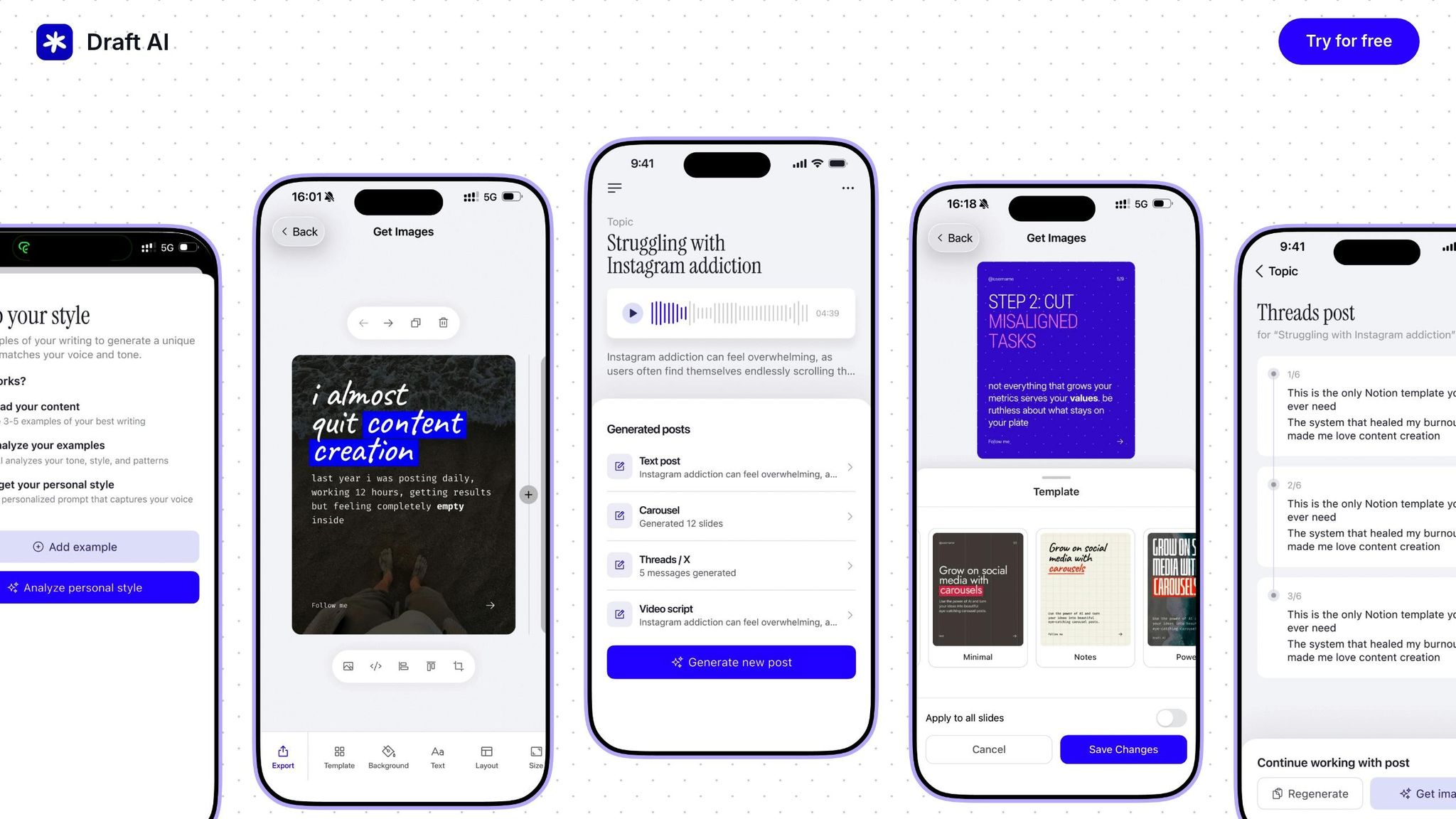
Draft AI is a tool designed to simplify content creation and scheduling for LinkedIn. It transforms raw data or even voice messages into polished posts in no time.
One standout feature is its ability to adapt to your writing style, making it ideal for busy professionals who want to maintain a consistent personal brand. It also provides ready-made templates for common LinkedIn content types, such as industry insights or personal reflections.
For LinkedIn users, Draft AI includes an export feature that ensures your posts are properly formatted and visually optimized for the platform. Its smart layout system automatically adjusts your content for the best possible presentation.
Comparison Table: LinkedIn AI Scheduling Tools
| Tool | Starting Price | Key Strengths | Best For | Notable Limitations |
|---|---|---|---|---|
| Draft AI | Free plan available | AI content creation, voice-to-text, multilingual support | Content creators, executives | - |
| Buffer | $6/channel/month | Reliable scheduling, generous free plan | Small businesses, solopreneurs | Basic AI features |
| Supergrow | $19/month | LinkedIn-specific features, engagement feeds | LinkedIn power users | Single-platform focus |
| Hootsuite | $99/month | Enterprise features, team collaboration | Large organizations | High cost for small users |
| Sprout Social | $199/seat/month | Advanced analytics, comprehensive reporting | Enterprise teams | Extremely expensive |
| Sendible | $29/month | Agency-friendly, scalable pricing | Marketing agencies | Learning curve |
| Taplio | $39/month | LinkedIn growth tools, analytics | Personal branding | LinkedIn-only |
Pricing and Features Breakdown
- Buffer stands out as one of the most budget-friendly options, starting at $6 per channel per month. This makes it ideal for individuals or small businesses exploring automated scheduling.
- Supergrow caters to active LinkedIn creators, starting at $19 per month for individuals. For agencies managing up to 10 clients, plans go up to $159 per month with a 20% annual billing discount and a 7-day free trial.
- Sprout Social, at $199 per seat monthly, is a premium choice for enterprise users. It offers advanced analytics and robust reporting features but comes with a steep price tag.
- Sendible, priced at $29 per month, provides a scalable solution for marketing agencies. It also offers a 15% discount for annual plans and a 14-day free trial.
- Taplio, at $39 per month, focuses exclusively on LinkedIn growth and engagement tools, making it an excellent choice for personal branding.
Testing free trials is a smart way to see which tool aligns best with your LinkedIn strategy. Whether you’re drawn to the AI-powered content creation of Draft AI or the in-depth analytics of Sprout Social, there’s a solution to match your goals. These tools reflect the growing range of options available to LinkedIn users today.
Conclusion
LinkedIn AI scheduling tools have reshaped how professionals and businesses handle content creation and management. By automating repetitive tasks like planning, scheduling, and repurposing, these tools free up your time to focus on strategy instead of getting bogged down in the details.
Beyond saving time, these tools also enhance the quality of your content. They help generate ideas, draft posts, refine tone, and provide insights tailored to your audience. This shifts content creation from guesswork to a more strategic and targeted process.
Another key benefit is maintaining a consistent posting schedule. These tools analyze audience activity to recommend the best times to post, ensuring maximum engagement. Plus, their analytics dashboards offer a wealth of data on post performance and audience demographics, helping you fine-tune your approach and sustain a strong brand presence.
One standout in this space is Draft AI, which offers a voice-to-text feature that transforms spoken thoughts or raw data into polished LinkedIn posts. Its ability to align with your personal writing style makes it a great asset for busy professionals who want to stay authentic while scaling their LinkedIn activity.
Investing in LinkedIn AI scheduling tools can lead to better engagement, stronger branding, and significant time savings. Whether you're an individual building your personal brand or a business managing multiple accounts, these tools have become essential for a modern LinkedIn strategy. Starting with a free trial is a great way to see how AI can streamline your workflow, giving you more time to build connections and engage with your network - activities that truly make an impact on LinkedIn.
FAQs
How do LinkedIn AI scheduling tools choose the best times to post for higher engagement?
LinkedIn's AI scheduling tools dig into several factors to pinpoint the best times for posting and boosting engagement. They look at things like audience behavior, activity trends, and platform-specific patterns.
On top of that, these tools consider details such as geographic location, industry, and job roles. The result? A customized posting schedule tailored to match your audience's habits, helping your content land in front of the right people at just the right moment.
What are the advantages of using AI-powered content creation tools for scheduling LinkedIn posts?
AI-driven content creation tools make scheduling LinkedIn posts much easier by crafting well-suited content tailored to your industry, audience, and unique writing style. These tools help you stick to a consistent posting schedule while cutting down on the time and energy needed.
With advanced AI, you can quickly produce engaging posts that maintain a polished tone and reflect your brand’s voice. This allows you to stay active on LinkedIn without the hassle of spending hours writing posts from scratch.
What is predictive performance scoring, and how can it improve my LinkedIn content strategy?
Predictive performance scoring leverages AI to evaluate your LinkedIn content and predict its potential performance. It considers factors like engagement levels, posting times, and audience preferences to provide actionable insights.
With these predictions, you can fine-tune your approach - scheduling posts when your audience is most active, crafting content that aligns with their interests, and boosting your overall visibility and engagement. It's a smart, data-focused way to get the most out of your LinkedIn efforts.


