9 AI Tools for Small Business Social Media
Running social media for a small business can feel overwhelming. AI tools can save time, simplify tasks, and improve results. Here’s a quick overview of nine AI-powered tools that help with content creation, scheduling, analytics, and engagement:
- Draft AI: Turns ideas into polished posts with templates, multilingual support, and consistent brand voice. Free and paid plans available.
- Sprout Social: Advanced analytics, sentiment tracking, and scheduling with AI recommendations. Plans start at $199/month.
- Buffer: Affordable scheduling and AI-powered content creation tools. Free plan available; paid plans start at $6/month per channel.
- Hootsuite: Comprehensive scheduling, content creation, and analytics for growing businesses. Starts at $99/month.
- Flick: Specializes in Instagram hashtags and captions, plus scheduling. Plans start at $14/month.
- Canva: AI tools for quick, professional visuals and videos. Free plan available; Pro starts at $12.99/month.
- Feedhive: Automates workflows with AI writing, predictive analytics, and content recycling. Pricing begins at $15/month.
- StoryLab AI: Focused on AI-generated copy for posts, blogs, and ads. Affordable pricing tailored for small businesses.
- Feedly: Curates industry content for sharing and audience engagement. Affordable with trend-tracking features.
These tools save time, reduce manual effort, and improve social media performance. Choose one based on your needs, such as content creation, scheduling, or analytics. Many offer free trials, so you can test before committing.
Quick Comparison
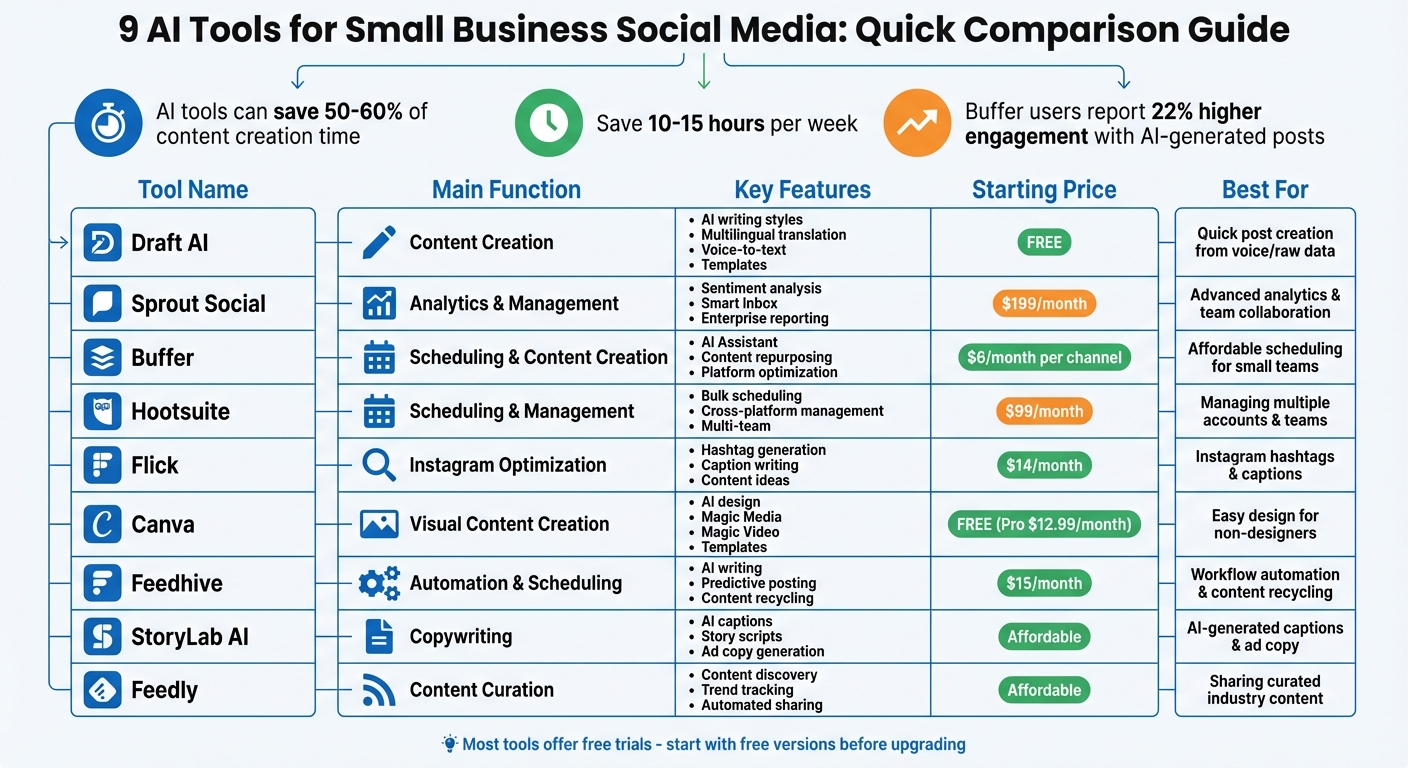
| Tool | Focus | Starting Price | Best For |
|---|---|---|---|
| Draft AI | Content creation | Free | Quick post creation with templates |
| Sprout Social | Analytics & scheduling | $199/month | Advanced analytics and team collaboration |
| Buffer | Scheduling & creation | $6/month per channel | Affordable scheduling for small teams |
| Hootsuite | Scheduling & analytics | $99/month | Managing multiple accounts and teams |
| Flick | Instagram optimization | $14/month | Instagram hashtags and captions |
| Canva | Visual content | Free | Easy design for non-designers |
| Feedhive | Automation & scheduling | $15/month | Workflow automation and content recycling |
| StoryLab AI | Copywriting | Affordable | AI-generated captions and ad copy |
| Feedly | Content curation | Affordable | Sharing curated industry content |
Save time and boost your social media presence with these AI tools. Start with free versions or trials to see what works best for your business.
AI Social Media Tools Comparison: Features, Pricing & Best Use Cases for Small Businesses
1. Draft AI
Content creation capabilities (e.g., captions, visuals, hashtags)
Draft AI makes turning raw data or even voice messages into polished, ready-to-post content a breeze - perfect for busy small business owners who need to capture ideas on the fly.
The platform offers pre-built templates to speed up the process, with options to tweak fonts and colors so your content aligns with your brand's identity. You can upload photos directly, adjust text settings, and select from multiple sizes to suit different social media platforms. The smart layout feature takes care of arranging your content for maximum visual appeal, while the multilingual translation tool helps you connect with audiences beyond English-speaking markets. A standout feature is its AI-driven writing styles, which ensure your brand voice stays consistent across all posts.
With its advanced tools and flexibility, Draft AI is designed to meet the evolving needs of small businesses.
Pricing suitability for small U.S. businesses
Draft AI offers a range of plans to fit different budgets. The Free plan provides basic templates and support for a single language - great for those just starting out. The Pro Plan (details available on the website) unlocks the full suite of features, while the Enterprise Plan offers custom pricing, team collaboration tools, and priority support for larger or more complex needs.
2. Sprout Social

Content creation capabilities (e.g., captions, visuals, hashtags)
Sprout Social's AI Assist helps craft caption variations that align with your brand's tone. It also features Suggested Hashtags, which analyzes your last 30 days of Instagram and TikTok activity to recommend the most commonly used tags.
The platform enhances accessibility by automatically generating image alt-text and video subtitles, which also improves search visibility. Its Find Content tool highlights trending articles and topics relevant to your business, making it easier to fill your content calendar during creative slumps. You can design graphics directly in Sprout or integrate with tools like Canva, Adobe Experience Manager, Dropbox, and Google Drive for seamless asset management.
"AI Assist in Sprout Social is so helpful, especially when it comes to generative text... having the AI Assist functionality to generate variations is a great tool for workflow efficiency and keeping our content feeling fresh across channels." - Bianca Shaw, Head of Social Media & Digital Reputation, Caesars Entertainment
Scheduling and publishing tools
With Sprout Social's centralized social calendar, you can plan and publish content across multiple platforms - all from one dashboard. Its ViralPost feature analyzes audience engagement patterns to recommend the best times to post, potentially increasing reach by up to 60%.
Scheduling is streamlined with automated approvals and an integrated Asset Library. For Instagram users, the SproutLink tool creates a clickable visual landing page, making it easy to drive traffic to specific products or website pages.
"The scheduling and publishing calendar has also made efficiency so easy to the point where I can work and schedule content a week or two ahead." - Assunta Catalano, Social Media Manager, KISS
On top of this, Sprout Social provides detailed analytics to guide your strategy and improve results.
Analytics and performance tracking
Sprout's Analyze by AI Assist simplifies complex data into actionable insights in just minutes. It monitors performance across channels, benchmarks against competitors, and automatically classifies sentiment.
The Trellis AI agent takes it a step further by answering specific questions about your data and offering next steps based on billions of data points. You can also enable Spike Alerts, which notify you of sudden changes in conversation volume or sentiment, helping you address potential issues early.
"Analyze by AI Assist has been a game changer for how I approach content and campaign analysis... What could previously take me hours of manual effort - such as identifying trends, measuring performance, and generating insights - can now be done in minutes." - Erica Bufford, Social Listening and Reporting at Tesco
These tools empower small businesses to refine their strategies and enhance engagement.
Pricing suitability for small U.S. businesses
Sprout Social's pricing starts at $199 per seat/month (billed annually) for the Standard plan, which is ideal for small teams managing fewer profiles. For businesses with higher engagement needs, the Professional plan is priced at $299 per seat/month, while the Advanced plan, designed for more complex workflows, costs $399 per seat/month. A 30-day free trial is available, and no credit card is required. According to a 2025 Forrester Consulting study, Sprout Social delivered a 268% return on investment over three years.
3. Buffer
Content creation capabilities (e.g., captions, visuals, hashtags)
Buffer's AI Assistant is a go-to tool for breaking through writer's block. It can generate post ideas and craft captions tailored to the tone and style of each platform. Interestingly, posts created with this AI Assistant see a 22% boost in engagement compared to those made without it.
You can easily import visuals from tools like Canva, Unsplash, Google Drive, and Dropbox for quick editing. Buffer also provides free AI-powered hashtag generators for Instagram, TikTok, and YouTube, making it simpler to increase your content's visibility. Plus, its browser extension is a handy way to capture content ideas while you browse, storing up to 100 ideas on the Free plan.
"I've become more focused, spending an hour maximum a week writing and scheduling my posts for the week ahead. If I'm out of ideas, asking the AI tool for ideas is a great place to start too." - Vicki Lovegrove, Design Consultant
With these tools, Buffer makes content creation feel less like a chore and more like a seamless part of your workflow.
Scheduling and publishing tools
Buffer's drag-and-drop calendar is a game-changer, letting you schedule posts across 11+ platforms from one dashboard. It even optimizes posts for each platform automatically, so you don’t have to rewrite content for different channels.
The "Create" scratchpad organizes your ideas using a Kanban-style board, helping you track content from brainstorming to publication. For those juggling multiple posts, the bulk scheduling feature allows you to plan content in advance, saving time for other priorities like strategy or audience engagement. Buffer also simplifies interactions with its unified inbox, which brings together direct messages and comments from all your connected profiles.
"As a full-time software engineer and part-time content creator, I'm short on time. Buffer helps me visualize and prioritize tasks. It's great for recording initial ideas and keeping everything organized by status in one place..." - Rita Iglesias, Software Engineer and Creator
Analytics and performance tracking
Buffer goes beyond just creating and scheduling posts - it also helps you understand how your content is performing. Its analytics dashboard consolidates key metrics from major platforms, giving you a clear view of what’s working. The "Best Time to Post" feature analyzes audience activity to suggest optimal posting times, while custom date filters let you dive into performance data for up to 30 days.
You can also gain insights into your audience, including demographics, engagement habits, and content preferences. The drag-and-drop report builder makes it easy to create customized, branded reports in PDF or image formats, updated daily. This setup allows you to identify top-performing posts and refresh them using the AI Assistant for new campaigns.
"The analytics in Buffer allows us to track client performance, analyze our posts, and report our results. The efficiency of analytics reporting means that we can take learnings and adapt our future content to reflect those learnings." - Beccy Gibson, Tempt
Pricing suitability for small U.S. businesses
Buffer's pay-per-channel pricing model is designed with small businesses in mind, offering flexibility and affordability. The Free plan includes up to 3 channels and 10 scheduled posts per channel, with access to the AI Assistant at no extra cost. For more features, the Essentials plan starts at $6 per channel per month (or $5/month when billed annually) and includes unlimited scheduling, advanced analytics, and a hashtag manager. The Team plan, priced at $12 per channel per month, supports unlimited users and adds approval workflows.
On average, users save 4-5 hours per week by managing their social media through Buffer. It’s a popular choice, with over 190,000 creators, small businesses, and marketers relying on it monthly. Plus, you can try any paid plan with a 14-day free trial - no credit card required for the Free tier.
"With Buffer I'm able to save approximately 4-5 hours every week, granting me the freedom to dedicate more of my valuable hours to other important tasks and projects." - CherRaye Glenn-Flowers, Brownce
4. Hootsuite
Content creation capabilities (e.g., captions, visuals, hashtags)
Hootsuite's OwlyGPT feature takes content creation to the next level by generating captions, hashtags, and images based on real-time trends. Each plan includes 300 AI credits per month, making it possible to repurpose your best-performing posts or create seasonal content effortlessly.
What’s more, Hootsuite integrates with Canva and Adobe Express, offering pre-designed templates and access to a library of free stock images and GIFs - all without leaving the platform. Angela Ferdinardo, Social Media and Brand Marketing Manager, highlights the ease of use: "Hootsuite's AI tools and hashtag generation capabilities make content creation and scheduling fast and seamless."
Alongside content creation, Hootsuite helps ensure your posts stay organized and consistently on schedule.
Scheduling and publishing tools
Hootsuite's scheduling tools are designed to simplify your workflow. Its Planner feature provides a centralized view of your content calendar, available in both calendar and list formats. For those who need to save time, the Bulk Composer lets you upload a .csv file and schedule up to 350 posts in one go. This is a game-changer for small businesses with limited time, allowing you to plan weeks of content in a single session.
The platform also includes a Best Time to Post feature, offering personalized recommendations and heatmaps to identify when your audience is most active. Plus, Hootsuite supports auto-publishing for Instagram Reels, Stories, Carousels (up to 20 images), TikToks, Facebook posts, and even Threads. Need to pause everything? The suspend button gives you the ability to instantly stop all scheduled posts across your accounts.
"My biggest problem as a one-man operation is the fact that I am a one-man operation. Hootsuite squashes that problem by amplifying my productivity." - Roy Beasley, Industry Analyst and Tech Writer, TECH-Levers
Analytics and performance tracking
Hootsuite’s analytics dashboard offers a comprehensive view of your performance across major platforms, tracking hundreds of metrics in one place. You can dive into post-level data like engagement rates, reach, impressions, and video views to see what’s resonating with your audience. The platform’s Blue Silk AI™ simplifies complex data into clear, digestible reports, making it easier to adjust strategies and improve engagement.
Take Stuckey’s, for example - a retail candy-maker that used Hootsuite Analytics over two years (ending in 2025) to achieve a 750% boost in online sales and a 108% annual growth in social media followers. Additionally, Hootsuite’s competitive benchmarking feature lets you compare your performance against up to 20 competitors, depending on your plan.
Pricing suitability for small U.S. businesses
Hootsuite’s pricing is tailored to deliver efficiency for small businesses. The Standard plan, priced at $99 per month (billed annually), includes 1 user, 10 social accounts, and unlimited post scheduling. This plan also covers AI-driven content creation, Best Time to Post recommendations, and performance benchmarking against 5 competitors. For $249 per month, the Advanced plan adds unlimited social accounts, bulk scheduling, and team approval workflows.
Small and medium businesses report saving more than 3 hours per week using Hootsuite. You can test the platform with a 30-day free trial or skip the trial to receive a 10% discount on annual billing. Nonprofits can also take advantage of discounted rates.
"Hootsuite cut our team's workload in half! We love Hootsuite for reporting, tracking ad performance, creating relationships with customers for our clients, and how easy it is to use." - Hannah Sanderson, Digital Communications Coordinator and Graphic Designer, VAZZO Creative
5. Flick

Content Creation Capabilities
Flick's AI Assistant, Iris, takes the hassle out of brainstorming and content creation. It can generate on-brand captions, suggest post ideas, and even outline weekly content strategies. The Brand Hub ensures every post fits your brand's voice and style by analyzing your existing content. Need hashtags? Flick’s search engine delivers 30 tailored suggestions per caption, and users have reported a 40% boost in reach when using AI-suggested hashtags compared to manual selection. Beyond text, Flick also offers tools for AI-generated images, carousel creation, and quick 30-second video scripts for platforms like TikTok and Instagram Reels.
"We're an e-commerce business so creating posts at scale has always been important to us. I have never produced so many posts in such a short time."
- Francesca, SMM, Voss Cosmetics
Once your content is ready, Flick’s scheduling tools make publishing a breeze.
Scheduling and Publishing Tools
Flick features a visual content calendar that integrates with Instagram, Facebook, TikTok, and LinkedIn. It includes a feed preview and optimizes posting times with its Best Time to Post feature. The scheduler uses analytics to identify when your audience is most active, helping you reach them at the right moment. Additionally, the Hashtag Manager lets you save and organize high-performing hashtags for different campaigns, streamlining your workflow.
These tools seamlessly connect with Flick’s analytics to ensure continuous improvement.
Analytics and Performance Tracking
Flick tracks over 20 metrics, including engagement rates, follower growth, and post performance. It goes a step further by identifying which hashtags actually drive engagement rather than just increasing reach. This data helps you fine-tune your strategy, while the AI assistant can repurpose your most successful posts into fresh content.
"I've managed to automate nearly 70% of my client work with Flick. I have clients with very different needs across a variety of niches and the suggestions for each is spot on."
- Julia Cohen, Freelance Social Marketer
Pricing Suitability for Small U.S. Businesses
Flick is built with small U.S. businesses in mind, offering a 7-day free trial for all plans. Pricing starts at around $14 per month (billed annually) for the Solo Plan, which includes 4 social profiles and 30 scheduled posts per month. The Pro Plan, designed for business owners, costs approximately $31 per month (billed annually), while the Agency Plan - ideal for managing multiple clients - comes in at about $71 per month (billed annually).
"As a small business, we couldn't afford a dedicated member of staff for social media. Flick has made it possible for us to maintain a strong social media presence with minimal effort."
- James Watson, Owner of Skipton Boat Trips
6. Canva
Content Creation Capabilities
Canva's AI-powered design tools make creating visuals for social media a breeze. With features like Magic Media, you can turn text prompts into images or quick 4-second video clips. For longer content, Magic Video helps craft 60-second vertical videos perfect for TikTok or Reels. In June 2025, Canva introduced Veo-3 integration, which generates 8-second cinematic clips complete with synchronized sound and lifelike character movements.
Testers at AIToolAnalysis experimented with Veo-3 AI to produce a 15-second testimonial clip. The result? Realistic lighting and synchronized lip movements that were polished into an Instagram Reel, complete with text overlays, in under five minutes. Other tools like Magic Edit allow you to fine-tune images using descriptive adjustments, while Magic Write helps craft captions and headlines with ease.
"The right AI tools transform how you generate captions, design graphics, schedule posts, and analyze performance across Instagram, Facebook, LinkedIn, and TikTok."
- Sonu Kalwar
Platforms like Canva can cut content creation time by 30–50%, saving social media teams between 10–15 hours a week. These time-saving tools integrate seamlessly with Canva's scheduling features, making it a one-stop solution for design and publishing.
Scheduling and Publishing Tools
Canva’s Content Scheduler lets you publish your designs directly to platforms like Instagram, TikTok, YouTube, and LinkedIn. By exporting content in platform-optimized formats, you can move from design to publishing without juggling multiple tools. This streamlined process ensures your workflow stays efficient and focused.
Pricing Suitability for Small U.S. Businesses
For small businesses, Canva offers a range of pricing options. The Free Tier provides access to basic design tools and limited AI features, making it a practical choice for those just starting out. For $12.99 per month, Canva Pro unlocks unlimited AI generations, premium stock media, and advanced brand kit functionalities. Teams can also benefit from pricing as low as $3.25 per user per month, depending on the configuration. This flexible pricing structure allows small businesses to explore Canva’s features before committing to premium plans. Notably, Veo-3’s video generation tools eliminate the need for separate $50–$100 monthly subscriptions to dedicated AI video platforms, offering cinematic-quality results as part of Canva’s broader suite.
sbb-itb-9f5fe42
7. Feedhive

Content Creation Capabilities
Feedhive’s AI Writing Assistant functions as a ChatGPT-powered tool, designed to help you craft on-brand captions and spark fresh content ideas - perfect for tackling writer’s block.
The Content Recycling feature allows you to breathe new life into older posts by reworking them with fresh perspectives tailored for different platforms. Another standout is Performance Prediction, which uses AI to predict how well a post might perform before it goes live. This gives you a chance to fine-tune your content for better engagement.
In addition to content creation, Feedhive simplifies the scheduling process, making it easier to manage your posting strategy.
Scheduling and Publishing Tools
With Post Categorization, you can organize your content into themes like "Inspirational" or "How-to" and schedule them across the week. This keeps your posting consistent and aligned with your brand’s voice. The Conditional Posting feature takes automation a step further by monitoring engagement metrics and triggering specific actions. For instance, if a post hits a certain engagement level, Feedhive can automatically post a follow-up comment with a promotional link - no manual work required.
"If you're juggling multiple social media accounts and craving efficiency, FeedHive is your hivemind partner."
- webdew
The platform also offers a Unified Social Inbox, consolidating messages from Facebook, Instagram, X (Twitter), and LinkedIn into one place, making communication more manageable.
These tools, combined with flexible pricing, make Feedhive a strong option for small businesses looking to streamline their social media efforts.
Pricing Suitability for Small U.S. Businesses
Feedhive’s pricing is designed with small businesses in mind. The Creator Plan starts at $15/month (annual billing) or $19/month (monthly billing) and supports up to 4 social accounts, along with access to the AI Writing Assistant. The Brand Plan is priced at $29/month and accommodates up to 10 accounts, while the Business Plan costs $99/month and includes advanced features like AI performance predictions and hashtag suggestions. Keep in mind that some AI tools, such as hashtag suggestions, are exclusive to higher-tier plans.
Feedhive has earned high praise, with a 4.6/5 rating on G2 and 4.9/5 on Capterra. Users often highlight its easy-to-learn interface and the time-saving benefits of its content recycling tools.
8. StoryLab AI
Content Creation Capabilities
StoryLab AI is a tool designed to simplify copywriting by using AI to craft engaging social media posts, blog content, and ad copy. It stands out by generating search-friendly copy for various formats, such as captions, blog titles, and outlines. Need multiple caption options to break through writer’s block? It’s got you covered. Just input your target keywords, and the platform delivers content that balances search visibility with a conversational, natural tone. Unlike platforms that bundle in scheduling or analytics, StoryLab AI focuses solely on content creation and optimization.
It’s a straightforward, no-frills solution for businesses looking to streamline their content production.
Pricing Suitability for Small U.S. Businesses
StoryLab AI’s pricing structure is tailored for small businesses, making it a practical alternative to hiring full-time copywriters. By quickly generating professional, search-optimized content, it saves both time and resources. This allows small business owners to shift their focus to other essential tasks without breaking the bank.
9. Feedly
Content Creation Capabilities
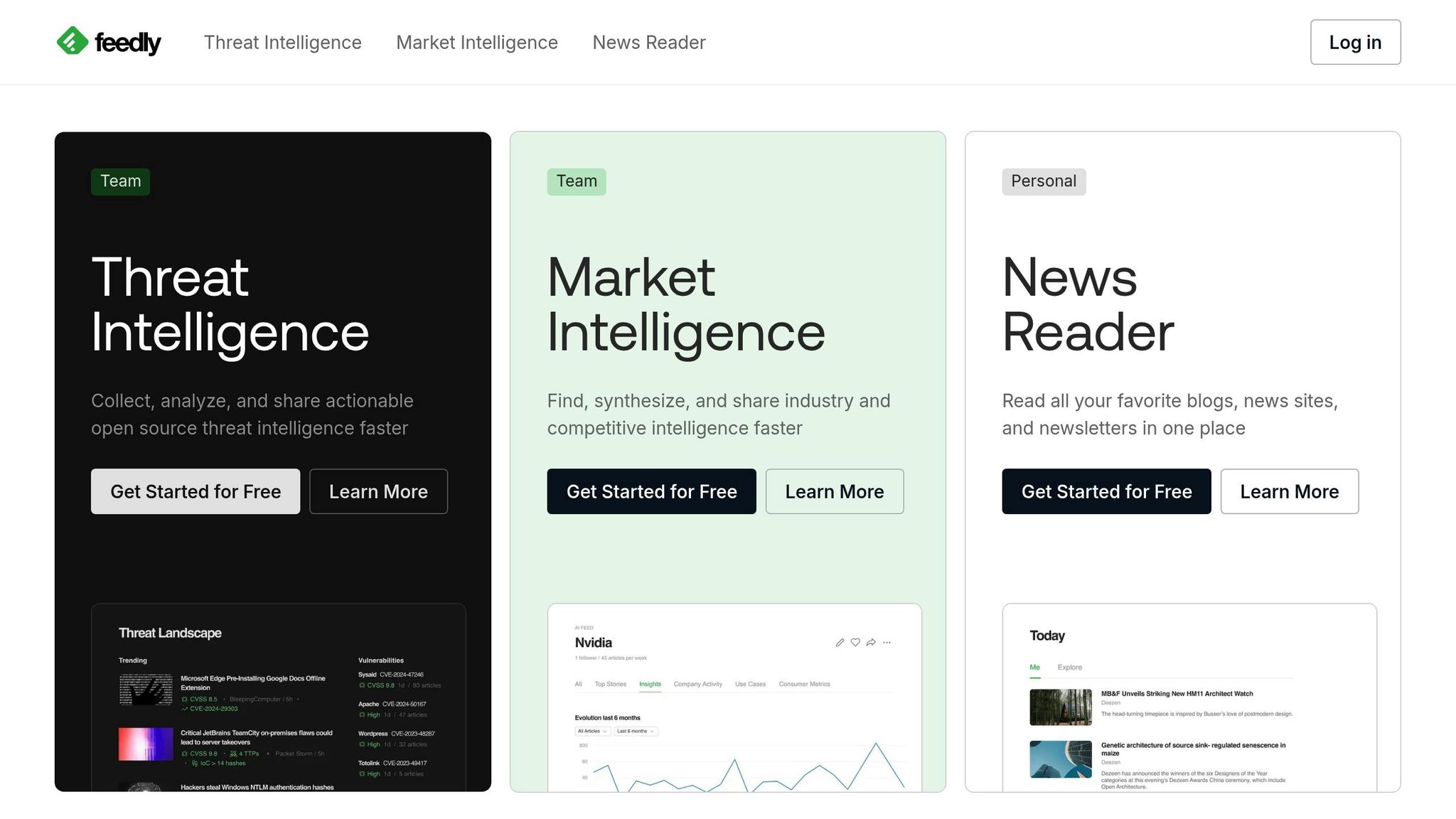
Feedly is all about discovering and curating content rather than generating original material. This AI-powered platform pulls together articles, news, blog posts, and newsletters, creating a one-stop hub for relevant industry updates. By sharing these curated stories, you can provide your audience with timely and insightful information, positioning your business as a trusted resource in your field. Feedly keeps an eye on the topics you care about, surfacing the most relevant content for your team to review and share. This approach complements your original posts, helping to establish and reinforce your expertise in the industry.
Scheduling and Publishing Tools
Feedly doesn’t just help you find great content - it also simplifies the process of sharing it. With built-in scheduling tools, you can plan posts ahead of time, ensuring your social media feeds stay active and engaging without constant manual effort. The platform optimizes posting times, helping your content reach your audience when they’re most likely to engage. Plus, it supports direct sharing across multiple networks, making it easy to maintain a consistent and professional online presence.
Pricing Suitability for Small U.S. Businesses
For small businesses in the U.S., Feedly is a practical solution for staying on top of industry trends without breaking the bank. By automating the search for trending topics and providing curated insights, it saves valuable time and resources. Whether you’re aiming to supplement your original content or simply keep your audience informed, Feedly helps you maintain an active social presence. It’s especially useful for businesses looking to build thought leadership by sharing high-quality, relevant information - even when creating everything in-house isn’t feasible.
The Only 7 AI Marketing Tools You Actually Need!
Tool Comparison Table
Here’s a handy comparison of nine tools, showcasing their main functions, standout AI features, pricing, and the type of small businesses they’re best suited for. This breakdown should help you find the right fit for your goals.
| Tool | Main Function | Key AI Features | Starting Price (USD) | Best For |
|---|---|---|---|---|
| Draft AI | Content Creation | Personal writing styles powered by AI, multilingual translation, voice-to-text content conversion, pre-built templates | Free (Pro plans available) | Small businesses needing quick content creation from raw data or voice inputs |
| Sprout Social | Analytics & Management | Sentiment analysis, Smart Inbox for organizing messages, enterprise-level reporting | Premium pricing | Companies requiring in-depth analytics and collaboration across teams |
| Buffer | Scheduling & Content Creation | AI Assistant for post ideas, content repurposing, and platform-specific optimization | Low-cost entry point | Small teams seeking affordable scheduling tools with basic AI features |
| Hootsuite | Scheduling & Management | Bulk scheduling, cross-platform management, multi-team command center | Mid-range pricing | Larger small businesses juggling multiple social accounts and team members |
| Flick | Content Creation & Hashtags | AI tools for hashtag generation, caption writing, and content ideas | Mid-range pricing | Businesses prioritizing Instagram strategies and hashtag optimization |
| Canva | Visual Content Creation | AI design suggestions, customizable templates, brand kit integration | Free (Pro starts at $12.99/month) | Non-designers needing professional-quality graphics |
| Feedhive | Scheduling & Automation | AI writing assistant, predictive posting, and content recycling | Mid-range pricing | Businesses aiming to streamline content workflows through automation |
| StoryLab AI | Content Creation | AI-driven copywriting for captions, story scripts, and ad copy | Affordable pricing | Businesses producing video content and platform-specific stories |
| Feedly | Content Discovery | AI-powered tools for finding content, tracking trends, and automating sharing | Affordable pricing | Companies building industry authority through curated content sharing |
This table simplifies the decision-making process, highlighting each tool’s strengths and ideal use cases for small businesses.
Conclusion
AI tools can slash content creation time by 50–60%, saving small business owners 10–15 hours each week. For businesses with tight resources, this kind of efficiency is a game-changer.
To make the most of these time savings, focus on tools that address your specific challenges. For instance, if manual posting eats up your day, prioritize scheduling and automation tools. On the other hand, if crafting captions or designing graphics feels overwhelming, start with content creation platforms. Once you’ve nailed the basics, tools for analytics and sentiment analysis can help you fine-tune your strategy by showing what resonates with your audience.
Keep in mind that most businesses only use a small portion of the features these tools offer. Start simple - try free versions of platforms like Draft AI, Buffer, or Canva to cover your essential needs. Once you see results, you can consider upgrading to paid plans for added functionality.
Using a combination of tools often delivers better results than sticking to one platform. For example, pairing Draft AI for quick content creation with Buffer for scheduling and Canva for design gives you an efficient, end-to-end workflow without overspending. You can even automate processes with platforms like Zapier to connect these tools seamlessly. Just remember, even the best automation requires your oversight to ensure everything aligns with your brand.
AI works best as a helper, not a replacement. Always review AI-generated content to ensure it matches your brand voice and engages your audience. As AIToolAnalysis aptly put it, “AI tools for social media are genuine productivity multipliers for repetitive tasks... They’re terrible at creative breakthroughs”. Let AI handle the repetitive work while you focus on adding the creative flair. By blending the right tools with human creativity, you can maximize engagement and achieve better results.
FAQs
How can AI tools help small businesses with social media content creation?
AI tools have transformed how small businesses approach social media content creation, making the process faster and more manageable. With just a simple prompt or even a voice message, these tools can churn out post ideas, craft captions, recommend hashtags, and even design carousels or full scripts. By automating tasks like brainstorming and editing, they free up time for businesses to focus on their broader strategies.
What’s more, AI can fine-tune content to align with audience interests by analyzing trends and user sentiment. This ensures that posts resonate with followers while maintaining a consistent tone and message across platforms, giving brands a polished and professional image. Tools like Draft AI take it a step further, offering customizable templates, photo uploads, and multilingual translation options. This makes it easier than ever to produce high-quality, engaging content without breaking the bank.
What should I look for in an AI tool to manage social media for my small business?
When selecting an AI tool for managing your social media, it’s important to zero in on features that match your business goals. Tools with content creation capabilities - like AI-generated captions, scripts, or carousel designs - can save you time while keeping your posts polished. A scheduling feature that works across platforms like Facebook, Instagram, LinkedIn, and TikTok is a must for staying consistent. On top of that, analytics tools can give you insight into how your content is performing, help you understand audience engagement, and fine-tune your strategy.
Budget and scalability also matter. Look for a tool that fits your current financial situation but can grow alongside your business. Take Draft AI, for example - it can turn raw data or even voice memos into ready-to-post content in just minutes. With features like customizable templates, multilingual translation, and AI-driven personal writing styles, it’s a great option for small businesses that want professional, on-brand content without the extra hassle. By focusing on these key features, you can streamline your workflow and boost your engagement.
How can AI tools help small businesses analyze social media performance?
AI tools are changing the game for small businesses by making social media analytics more accessible and actionable. With these tools, businesses can instantly access essential metrics like likes, comments, shares, and click-through rates. By leveraging advanced algorithms, they can spot trends, monitor engagement, and even determine the best times to post. This means businesses can make smarter, data-driven decisions without hiring a dedicated analyst.
What’s more, many AI platforms go beyond just analytics. They combine features like scheduling and performance predictions, offering insights into how content might perform and suggesting the ideal times to share it. With automated reports and user-friendly dashboards, small businesses can easily track their social media ROI and fine-tune their strategies to drive better engagement.


