How AI Adapts to Your Writing Style

AI tools can now analyze your writing style to help you create content faster while maintaining your unique voice. By studying your word choices, sentence structure, and tone, these tools generate drafts that reflect how you naturally communicate. This process not only saves time but also ensures consistency across all your content, whether it's for personal use or business branding.
Key takeaways:
- AI uses Natural Language Processing (NLP) to learn your style through techniques like tokenization, syntactical analysis, and semantic analysis.
- You can train AI with 15–20 writing samples or even voice inputs to match your tone and preferences.
- Features like Style Definition Documents and Custom Instructions allow further refinement for tone, vocabulary, and structure.
- Tools like Draft AI offer pre-designed templates, multilingual support, and visual customization to streamline content creation.
- Feedback loops improve AI-generated drafts over time, reducing editing needs by 50% and boosting productivity by 30%.
AI isn't replacing your voice - it's enhancing your ability to write efficiently while staying consistent across platforms. Whether you're crafting social media posts, emails, or blog articles, these tools make the process faster and more effective.
Clone ANY Writing Style Using AI In Seconds (Tutorial)
How AI Analyzes Your Writing Style
AI dives into your writing style using Natural Language Processing (NLP) to examine everything from your word choices and sentence structure to punctuation and tone. It starts by breaking down your text through a process called text preprocessing. This involves tokenizing your words, removing fillers, and reducing words to their root forms. The result? A clear picture of your vocabulary and word preferences. Then comes syntactical analysis, which looks at whether you lean toward short, snappy sentences or longer, more complex ones, and whether you favor active or passive voice. All of this forms the foundation for how AI tailors itself to match your unique style, as we’ll explore further.
Using Natural Language Processing (NLP)
NLP goes beyond just skimming the surface of your text - it digs deeper to uncover patterns and meaning. Semantic analysis helps the AI interpret your sentences and assign importance to specific words. To understand context, modern AI uses word embeddings, which capture how you pair certain words together. Advanced content creation tools like Transformer models take this further by using self-attention mechanisms. These models process your entire text at once, recognizing long-range connections and subtle stylistic nuances, such as how you structure arguments or transition between ideas.
Recognizing Patterns in Writing
AI doesn’t just analyze what you say - it also picks up on how you say it. It studies your stylistic rhythms and emotional cues, tracking elements like punctuation, sentence flow, and sentiment. This creates a kind of linguistic fingerprint - a consistent pattern that reflects your personal style across various topics. For example, AI can detect how you handle disagreements, convey enthusiasm, or simplify complex ideas. By analyzing 15–20 samples of your writing (like emails, blog posts, or social media updates), AI identifies whether you prefer technical jargon or plain language, formal or casual phrasing, and whether you lean on metaphors or stick to straightforward descriptions.
| NLP Technique | Role in Style Analysis |
|---|---|
| Tokenization | Breaks text into smaller units to reveal word-level habits. |
| Lemmatization | Groups word variations to map your vocabulary range. |
| Dependency Parsing | Examines word relationships to assess sentence complexity. |
| Coreference Resolution | Tracks how you use pronouns and metaphors for clarity. |
One of the most important aspects of this process is the feedback loop. When you accept or reject AI-generated suggestions, the system learns from your choices. Over time, it refines its understanding of your voice, distinguishing between subtle differences in word usage. This iterative learning makes the AI better at predicting not just what you might say, but what you would say. The result? A tool that mirrors your authentic voice in every draft.
Steps to Train Draft AI on Your Writing Style
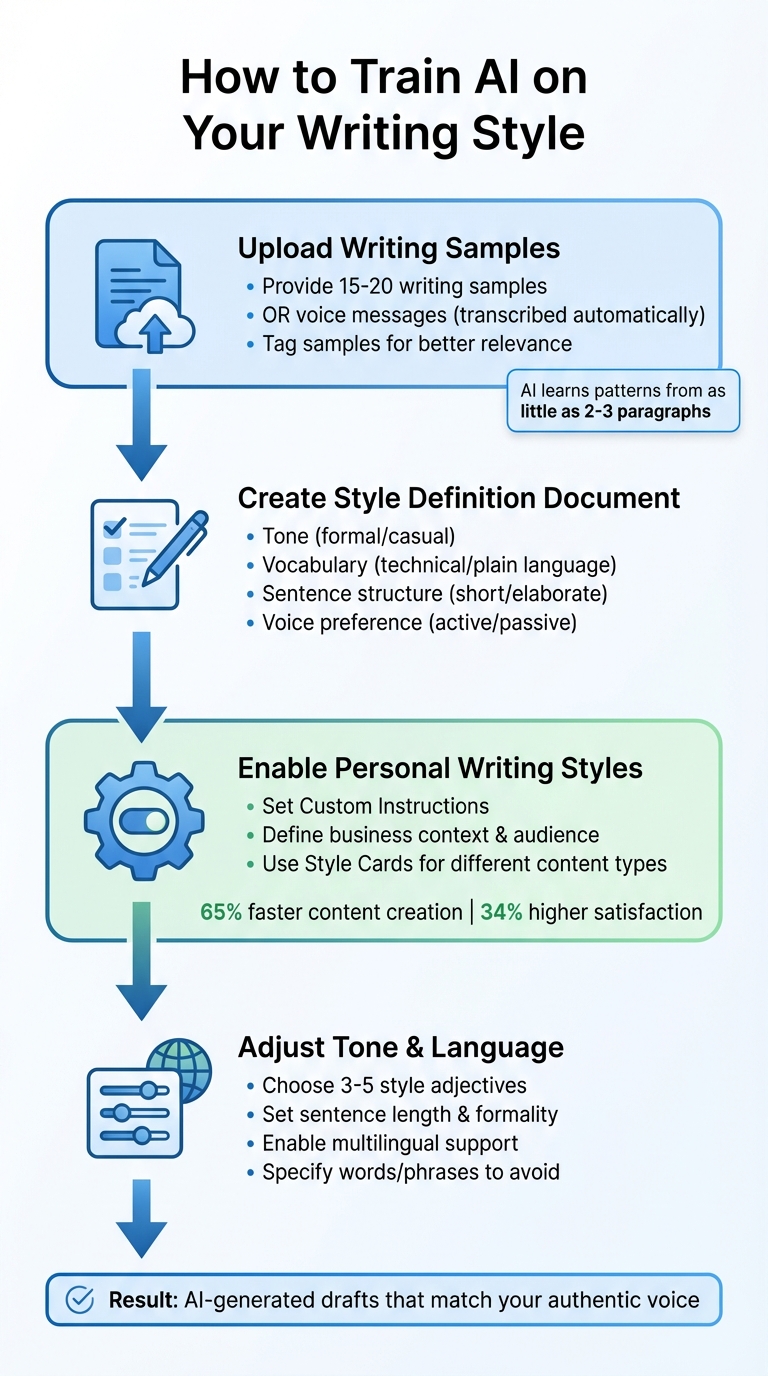
How AI Learns Your Writing Style: 4-Step Training Process
Teaching Draft AI to replicate your unique writing style is straightforward and involves a few key steps. By providing the platform with examples of your work, whether written or spoken, you help it learn your stylistic nuances. Think of it like sharing your writing "fingerprint", enabling the AI to adapt your voice to different types of content.
Uploading Writing Samples or Voice Inputs
Start by compiling 15–20 examples of your writing that best showcase your natural communication style. These could include blog posts, emails, social media updates, or any other content that reflects how you express yourself. Draft AI uses few-shot learning, meaning it can detect patterns in your style with as little as 2–3 paragraphs of text. If you're focusing on LinkedIn posts, for example, upload your most engaging and successful LinkedIn updates to train the system.
Prefer speaking over writing? No problem. You can send voice messages directly to Draft AI, which will transcribe them into text while keeping your natural rhythm and word choices intact. This is especially handy for those who find it easier to dictate their thoughts. For better results, tag your samples so the AI can pull the most relevant examples when generating new content.
"The most successful AI writing customization happens through iteration. Don't expect perfect results from your first prompt." - Daniel Felix, Author
To further refine the AI's understanding of your style, create a Style Definition Document. This document should outline your preferences for tone, vocabulary, sentence structure, and other stylistic elements. Include details like whether you prefer concise or elaborate sentences, if you lean toward technical jargon or plain language, and whether you favor active voice over passive. This serves as a go-to reference for the AI across all projects.
These initial steps are the foundation for creating AI outputs that align closely with your personal style.
Enabling AI-Driven Personal Writing Styles
Once your samples are uploaded, activate Draft AI's personal writing styles feature. This tool applies your voice to all content generation by allowing you to set Custom Instructions. In this section, you can define your business context, target audience, and tone preferences. For example, you might specify: "Write in a conversational tone that's authoritative yet approachable. Avoid corporate jargon. Use short paragraphs and active voice."
This approach has been shown to reduce content creation time by 65% and improve client satisfaction scores by 34%. The process includes setting stylistic parameters, structural guidelines, and specific "do not use" elements, ensuring the AI delivers refined outputs.
Draft AI also offers Style Cards, which act as templates for different writing needs, such as technical documentation, creative pieces, or formal communication. Each card includes essential prompts and vocabulary examples, making it easy to switch between styles depending on the task at hand.
Adjusting Tone and Multilingual Settings
After setting up your core style, you can fine-tune the tone and language to better connect with your audience. Use a simple template to define your preferences: describe your style with three to five adjectives and explicitly outline the tone, including what to include or avoid. For example: "Create LinkedIn posts in a professional style that is insightful, conversational, and action-oriented. The tone should be confident but not arrogant, and avoid overused buzzwords."
You can also adjust sentence length, vocabulary, and formality to align with your brand voice and audience expectations. If you're working in multiple languages, Draft AI's multilingual translation feature ensures your tone remains consistent. Simply specify the target language and the audience's expertise level to maintain both cultural and technical accuracy.
"Training your AI tool to 'sound like you' ensures your content stays authentic, recognizable, and trustworthy, especially as you scale." - Dream Local Digital
Customizing Outputs in Draft AI
Once you've trained your style in Draft AI, the next step is making sure your outputs align perfectly with your brand identity. With Draft AI, you can tweak both the visual design and the structural components of your posts, scripts, and carousels to reflect your unique style.
Using Ready-to-Use Templates
Draft AI provides a selection of pre-designed templates tailored for social media posts, video scripts, and carousels. These templates offer a solid framework, leaving room for you to infuse your distinctive tone and voice. For instance, if you're crafting LinkedIn posts, you can choose the LinkedIn-specific template, and the AI will automatically format your content with the ideal tone and length. From there, you can refine details by setting preferences like:
- Sentence length: Short, varied, or long.
- Vocabulary level: Simple or advanced.
- Point of view: First, second, or third person.
This streamlined process has been shown to boost employee productivity by 66% when using AI writing tools.
Font and Color Customization
Draft AI goes beyond words, letting you adjust the visual style of your content. Through the "Syntaxes & Themes" settings, you can control how your text looks and how the interface displays your work. Options include choosing fonts, customizing color schemes, and applying themes that align with your brand. For example, if your company uses a bold blue and white color palette, you can configure the editor to match those exact shades. This ensures your content maintains a consistent visual identity across all platforms.
Photo Uploads and Text Controls
To enhance the visual side of your content, Draft AI features an Images Dashboard where you can upload and manage photos alongside your text. This integration strengthens the visual impact of your message. Additionally, you can fine-tune specific parts of your text - adjusting tone, grammar, or structure - without needing to regenerate the entire draft. This level of control allows you to make precise edits efficiently, saving time while keeping your content polished.
"Think of AI content creation like flying an airplane - autopilot does a lot of the work, but there's always a human in the cockpit making flight adjustments." - John Thomas, Draft
Breaking your content into sections can help maintain clarity and structure throughout the creation process.
sbb-itb-9f5fe42
Reviewing and Refining AI Adaptations
Fine-tuning AI-generated content is an ongoing process. It's not just about getting the AI to produce text; it's about shaping that text so it mirrors your voice and style. This cycle of reviewing, correcting, and refining is what transforms generic AI output into something that feels genuinely personal.
Providing Feedback to the AI
The first step is to evaluate the AI's work against your specific style and tone. Does it reflect the right perspective (first or third person)? Is it formal or informal enough for your audience? Does it balance technical depth with accessibility? AI content can sometimes feel too uniform, which may dilute its tone or impact. That’s where detailed feedback comes in. Avoid vague instructions like "make it better." Instead, offer clear, actionable suggestions: "Use shorter sentences for readability" or "Include more industry-specific terms for a professional audience." Also, keep in mind that AI models rely on historical data, so it's crucial to fact-check any statistics or claims, especially for recent events. This level of precision helps guide the AI toward better results in future revisions.
Iterating Edits for Consistency
Once you've provided feedback, request a revised version and watch for any shifts in tone or style as the content evolves. Breaking the text into smaller sections can help maintain consistency throughout. With each iteration, you can also layer in personal touches - like anecdotes or specific viewpoints - that the AI might not naturally include. This attention to detail ensures the final piece aligns with your voice while keeping the content cohesive.
Exporting Content to Platforms
When you're satisfied with the content, it's time to prepare it for publishing. Export it to platforms like LinkedIn or others, but don’t skip a final review. Double-check the style, tone, and overall flow to ensure it represents you accurately. These last-minute adjustments can make all the difference in delivering content that feels authentic and polished.
Benefits of Style-Adapted AI Content Creation
When AI learns your writing style, it doesn't just save time - it transforms how you create content. Tools like Draft AI can boost productivity by 30%, reduce editing time by half, and help professionals generate 59% more documents per hour. Instead of starting from scratch, you get a first draft that already mirrors your voice, cutting down the heavy lifting.
Consistency across your brand becomes much easier to achieve, especially for businesses juggling multiple platforms. Whether it's LinkedIn posts, email campaigns, or Instagram captions, an AI that understands your tone ensures your communication feels unified. This kind of consistency builds trust and strengthens recognition among your audience.
Over time, quality improves as well. The more feedback you provide, the better the AI gets at matching your preferences. This feedback loop means each draft requires less manual tweaking, bringing you closer to your ideal output with every iteration.
The multilingual capability is another major perk. Style-adapted AI can maintain your unique tone and persona while translating content into different languages. This eliminates the delays and inconsistencies that often come with manual translation.
Comparing Features Across Draft AI Plans
These benefits are available across all Draft AI plans, but the features vary depending on the plan you choose.
| Plan Name | Price | Description | Features |
|---|---|---|---|
| Free Plan | $0 | Basic access to Draft AI | Limited templates, basic text controls, single language support |
| Pro Plan | $XX/month | Advanced content creation tools | All templates, full text controls, multilingual support, personal styles |
| Enterprise Plan | Custom Pricing | Tailored for businesses | Custom templates, team collaboration, and priority support |
The Free Plan is a great way to test the waters with basic functionality. The Pro Plan unlocks the full potential of style adaptation, including multilingual support and access to all templates. For larger organizations, the Enterprise Plan offers tailored solutions like custom templates and team collaboration tools, making it easier to maintain a consistent brand voice across multiple teams and platforms.
Conclusion
AI that aligns with your writing style isn't here to take over your voice - it’s here to amplify it. As John Thomas from Draft AI explains, "Think of AI content creation like flying an airplane - autopilot does a lot of the work, but there's always a human in the cockpit making flight adjustments". This analogy highlights the balance: you stay in control while the AI takes care of the heavy lifting, like drafting and organizing content.
Draft AI simplifies the writing process by breaking it into clear, manageable steps. Start with your raw ideas - whether they’re notes, voice recordings, or quick thoughts - and let the AI turn them into structured outlines. From there, you refine the draft, ensuring it matches your tone and intention. Over time, as you provide feedback, the AI learns to adapt even more closely to your style, creating a seamless collaboration.
This partnership works best when you actively engage with the AI. By uploading strong writing samples, giving specific feedback, and tweaking tone and language, you create a continuous improvement loop. Each interaction helps the AI better reflect your authentic voice, making it a valuable partner rather than just a tool.
Draft AI also offers flexibility with its tiered plans, designed to grow with your needs. The Free Plan is perfect for testing the basics, while the Pro and Enterprise Plans unlock advanced features like multilingual support and tools for team collaboration. Whether you're a solo creator or part of a larger team, these options ensure you can scale your content without losing your unique voice.
FAQs
How does AI maintain my unique writing style and ensure consistency?
AI helps keep your writing style distinct and consistent by analyzing key elements like your choice of words, tone, sentence flow, and rhythm. By reviewing samples of your work - whether blog posts, captions, or even voice recordings - it picks up on patterns such as your go-to vocabulary, favorite transition phrases, and level of formality. This creates a tailored “style profile” unique to you.
As you continue using the tool, the AI fine-tunes this profile based on your input, learning from the edits you accept or reject. This approach reduces the generic feel often associated with AI-generated content, making it better at mirroring your voice. Tools like Draft AI take it a step further by allowing you to upload raw data or voice notes, then crafting content that reflects your style. You can even tweak templates, adjust fonts and colors, or translate into different languages to ensure your tone stays consistent across all platforms.
How can I train AI to match my personal or brand writing style?
To teach AI to match your writing style, start by gathering 10–20 examples of your best work - this could include blog posts, social media captions, or emails. Pay attention to the details that make your style unique, such as your tone, sentence structure, or go-to phrases. Once you've identified these elements, upload the samples to an AI tool like Draft AI. Create a short style guide that captures the essence of your voice (e.g., "friendly, conversational, with a touch of humor and concise sentences"). This guide will help the AI understand how you write.
Next, test the AI's output by comparing it to your original work. If it doesn’t quite hit the mark, tweak the guide or provide additional examples. Keep refining until the results feel right. Once you're happy with how the AI mirrors your style, save the settings. This ensures the AI consistently produces content that aligns with your voice, no extra tweaking required.
Can AI match my writing style across different languages and platforms?
Modern AI tools are now capable of analyzing your personal or brand voice and replicating it seamlessly across various languages and platforms. By examining your choice of words, sentence structure, and overall tone, AI creates a writing style model specifically tailored to you. This model ensures that any new content stays true to your unique voice.
What’s more, with advanced multilingual features, AI can maintain your tone and phrasing even when translating content into different languages. Tools like Draft AI make this process incredibly straightforward. You can upload raw data or even voice memos, and within minutes, receive polished outputs like social media posts, scripts, or carousel content. These outputs not only reflect your personalized style but also come with customization options for templates, fonts, colors, and multilingual support.


