Ultimate Guide to LinkedIn Hashtags

Want your LinkedIn posts to reach the right audience? Hashtags are still your go-to tool in 2026. Here's what you need to know:
- What they are: LinkedIn hashtags categorize your content, making it discoverable by people following or searching for specific topics.
- Why they matter now: While not the main driver of viral posts anymore, they still boost visibility when used strategically.
- How to use them: Stick to 3–5 hashtags per post. Use a mix of broad, niche, and branded tags for maximum impact. For example:
- Broad: #Leadership (35.4M followers)
- Niche: #SaaSMarketing (smaller but targeted)
- Branded: #LifeAt[YourCompany]
- Placement: Add hashtags at the end of your post for better visibility.
- Pro tip: Use LinkedIn’s search bar or tools like Draft AI to find trending and relevant hashtags.
Hashtags aren’t about going viral - they’re about connecting with the right people. Use them wisely, track performance, and adjust based on results to grow your professional reach.
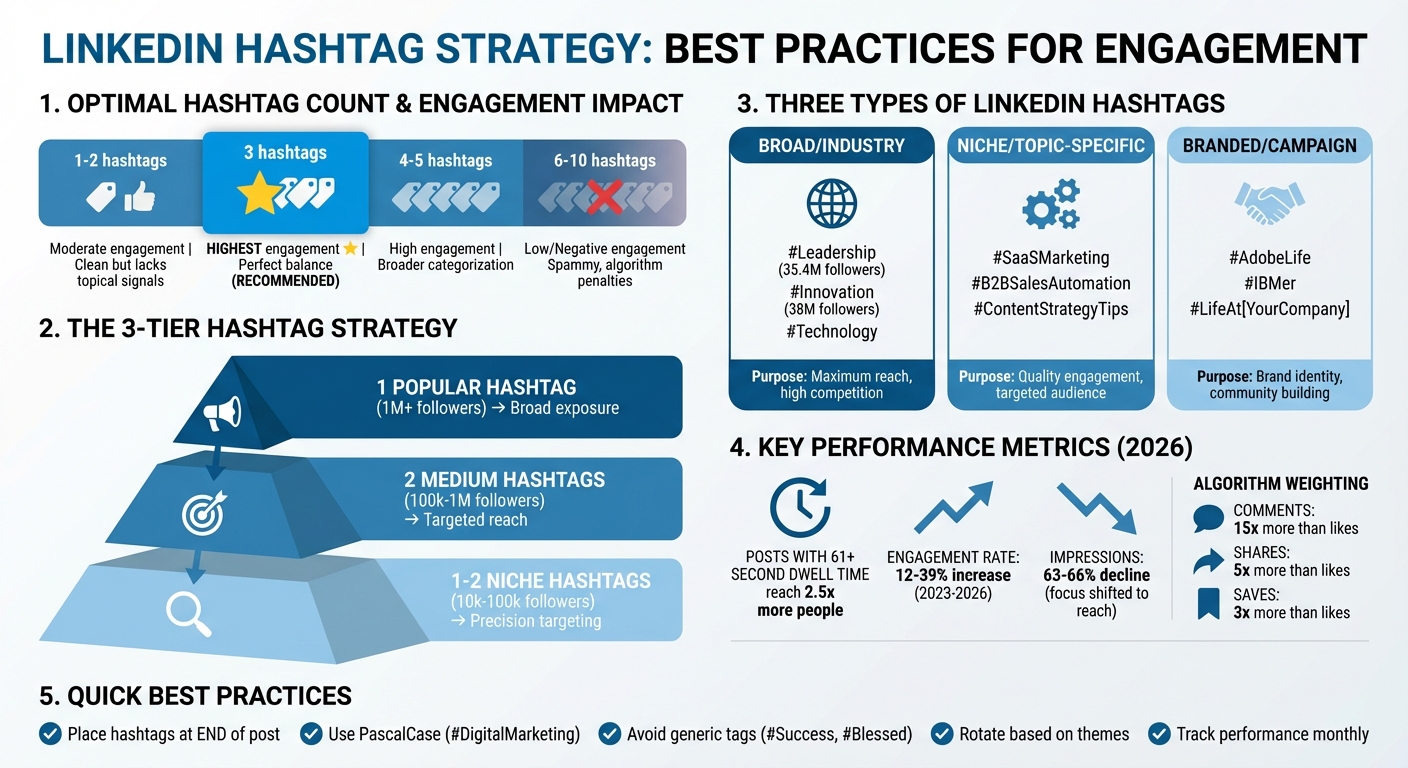
LinkedIn Hashtag Strategy Guide: Types, Numbers, and Performance Impact
EVERYTHING You Need To Know About LinkedIn Hashtags (COMPLETE GUIDE!)
Once you've mastered your hashtag strategy, you can use LinkedIn AI scheduling tools to automate your posting schedule.
sbb-itb-9f5fe42
Types of LinkedIn Hashtags
Not all hashtags are created equal. Knowing the different categories can help you craft a strategy that balances reach, engagement, and brand recognition. Here’s a breakdown of the three main types.
Industry and Broad Audience Hashtags
These hashtags connect you to expansive professional communities. Examples include #Technology, #Leadership, or #Management - the latter boasting around 35.4 million followers. Using these tags can expose your content to large, diverse audiences interested in industry-wide topics.
However, broad hashtags come with heavy competition. For instance, #Innovation (with over 38 million followers) is incredibly popular, meaning your content must stand out in a crowded feed. To strike the right balance, combine broad tags with more specific ones to boost both visibility and relevance.
"A well-chosen hashtag can put your post in front of thousands of professionals you're not connected to." – eclincher
Now, let’s focus on hashtags that cater to more specialized audiences.
Niche and Topic-Specific Hashtags
Niche hashtags are designed for smaller, more targeted groups. Tags like #B2BSalesAutomation, #ContentStrategyTips, or #LegalTech connect you with professionals who are deeply invested in specific subjects. While these hashtags may have fewer followers than broad ones, they often lead to higher-quality interactions because they attract people who are genuinely interested in your expertise.
For example, if you’re sharing insights on SaaS marketing, using #SaaSMarketing can help you reach decision-makers actively seeking content on that topic. If you are targeting a global audience, you might also consider using AI tools for multilingual LinkedIn posts to adapt your niche hashtags for different regions. This targeted approach can establish you as a thought leader in your field, offering more meaningful engagement than casting a wide net with generic tags.
Branded and Campaign Hashtags
Branded hashtags are unique to your company or personal brand. For instance, Adobe uses #AdobeLife to highlight its company culture, while IBM promotes employee stories with #IBMer. These hashtags help reinforce your identity and centralize conversations around your brand.
Campaign hashtags, on the other hand, are temporary and tied to specific initiatives like product launches, events, or promotions. Hootsuite, for example, uses #HootsuiteLife to foster a sense of community and #BeyondTheNest for particular programs. When creating branded hashtags, keep them short (1–3 words), ensure they’re unique, and promote them consistently.
"Think of a branded hashtag as your content's signature." – Ross Simmonds, Founder, Distribution.ai
The trick is to use these hashtags strategically. Aim for 1–2 broad tags to maximize reach, 2–3 niche tags for focused engagement, and 1 branded tag to strengthen your community. Stick to the recommended 3–5 hashtags per post for optimal results.
Best Practices for LinkedIn Hashtag Usage
Now that we've covered the different types of hashtags, let’s focus on how to create social media posts and use hashtags effectively. The way you select, place, and manage hashtags plays a big role in how well your posts perform.
Choosing the Right Number of Hashtags
Finding the right balance is key. Posts with exactly three hashtags tend to drive the most engagement. Go beyond five, and you might come across as spammy - and even risk penalties from LinkedIn’s algorithm.
Martina Bretous, a writer at HubSpot, highlights this perfectly:
"LinkedIn's former senior director of product management, Pete Davies, recommends sticking to three hashtags. That should be enough to target the main keywords without looking spammy."
A great approach is the 3-tier strategy:
- One popular hashtag (1M+ followers) for broad exposure
- Two medium hashtags (100k–1M followers) for a more targeted reach
- One or two niche hashtags (10k–100k followers) for precision targeting
Here’s how different hashtag counts can affect engagement and perception:
| Hashtag Count | Engagement Impact | Perception |
|---|---|---|
| 1–2 | Moderate | Clean, but might lack enough topical signals |
| 3 | Highest | Strikes the perfect balance for algorithms and readers |
| 4–5 | High | Helps with broader categorization |
| 6–10 | Low/Negative | Feels spammy; likely to trigger algorithm penalties |
This breakdown highlights why sticking to three hashtags can be a smart move.
Where to Place Hashtags
For the best results, add hashtags at the end of your post. Hashtags in comments don’t get the same visibility since LinkedIn’s algorithm prioritizes those placed directly in the post. While it’s possible to weave hashtags naturally into your sentences, doing so can make your content harder to read.
If you’re writing a LinkedIn article, remember that hashtags only work as clickable links when added to the article’s description box - not within the body text.
Another tip: use Pascal Case (capitalize the first letter of each word, like #ContentMarketing). It not only improves readability but also ensures screen readers can process the hashtags correctly. Pairing smart placement with the right format gives your hashtags the best chance to shine.
Avoiding Overused or Irrelevant Hashtags
Relevance matters just as much as placement. Before using a hashtag, search for it on LinkedIn to check its follower count and the quality of conversations it’s tied to. Steer clear of generic tags like #Success or #Business, and avoid casual ones like #Blessed or #PicOfTheDay. These don’t add much value and can hurt your professional image.
Instead, pick hashtags that reflect your expertise and resonate with your audience. Rotating your hashtags based on themes is another great way to engage different groups and keep your content fresh.
With LinkedIn’s 2024 algorithm updates, hashtags are now more tightly integrated with SEO strategies. This means thoughtful, keyword-aligned hashtags are rewarded far more than simply using high-volume ones.
How to Research and Select Hashtags
Boosting your content's visibility on LinkedIn doesn't have to be overwhelming. By combining LinkedIn's built-in tools with insights from competitors, you can identify hashtags that resonate with your audience.
Using LinkedIn Search and Analytics
Start with LinkedIn's search bar. Enter a keyword, filter results by "Posts", and review high-performing content to get a sense of trending hashtags in real time.
For more detailed information, use this direct URL formula: https://www.linkedin.com/feed/hashtag/keyword/ (replace "keyword" with your desired hashtag). This will take you to the hashtag's dedicated page, where you can check its follower count and explore recent posts.
When evaluating hashtags, focus on the quality of engagement rather than just the follower count. Look at the Posts tab to see if the conversations are meaningful or just surface-level interactions. Thoughtful discussions often indicate a more engaged audience. If you manage a LinkedIn Business Page, take advantage of the "Specialisms" section, where you can include up to 20 relevant keywords to improve discoverability.
Tracking Competitor and Influencer Hashtags
Competitors and industry influencers can provide a shortcut to effective hashtag strategies. Identify 3–5 successful accounts in your niche and analyze the hashtags they use on their most engaging posts . Following hashtags is another smart move. This allows relevant content to appear in your feed, helping you identify which tags your audience interacts with most. LinkedIn has reported a 15% increase in visibility for posts from non-connections on mobile and a 25% increase on desktop for followed hashtags. This makes it easier to stay updated on trending topics and audience preferences.
These methods give you a solid foundation to refine your hashtag strategy further with specialized tools.
Tools to Simplify Hashtag Research
While manual research is helpful, certain tools can make the process faster and more efficient. For example, the LinkedIn Hashtag Analytics Chrome extension provides real-time follower counts and reach estimates directly within LinkedIn.
Draft AI is another handy tool. It can generate hashtag-optimized posts and suggest relevant tags during the content creation process, saving you time while keeping your strategy on point. To stay organized, maintain a spreadsheet of your chosen hashtags along with their follower counts. Update this list monthly to track trends and adjust to any algorithm changes.
Aligning Hashtags with Content Goals
To get the most out of your hashtags, align them with your specific content goals. Whether you're aiming to establish thought leadership, attract talent, or drive marketing efforts using the best content creation tools, tailoring your hashtag strategy is key. Avoid defaulting to generic tags - focus on those that directly support your objectives.
Hashtags for Thought Leadership
When building thought leadership, aim for a mix of hashtags to maximize your reach and relevance. Use one broad industry tag (e.g., #Leadership), two specialized tags (e.g., #StrategicThinking, #ExecutiveCoaching), and one niche tag that emphasizes your expertise in a specific area. Additionally, branded content series hashtags like #MondayInsights or #TechTuesday can help you maintain a consistent presence and make it easier for followers to engage with your recurring updates over time.
"Think of hashtags on LinkedIn as filing your content in the right cabinet, not putting it on a billboard. It's about making sure the right people can find you - not trying to broadcast to everyone." - Neal Schaffer, Digital Marketing Expert
Steer clear of generic hashtags like #Success or #Motivation, as they often attract a broad, unfocused audience. Instead, focus on industry-specific terms that appeal to professionals who are genuinely interested in your insights. A balanced mix of broad and niche tags ensures your content reaches the right people.
Hashtags for Recruitment and Employer Branding
For recruitment efforts, combine one broad industry tag (e.g., #TechIndustry) with one or two recruitment-specific tags (e.g., #Hiring, #CompanyCulture) and a branded tag that reflects your organization's identity (e.g., #LifeAtSalesforce). This approach strengthens your employer brand while connecting with professionals actively seeking job opportunities.
Branded hashtags are particularly effective for fostering a sense of community around your company culture. They also allow you to track the performance of recruitment campaigns. Always format branded hashtags using CamelCase (e.g., #WorkingAtGoogle) to ensure accessibility for screen readers. Since late 2024, LinkedIn has replaced clickable hashtags on business pages with "Specialisms" in the About section, enabling admins to add up to 20 industry-relevant keywords to boost searchability. For personal profiles, keyword discovery now occurs in the Skills section.
| Goal | Recommended Hashtag Types | Examples |
|---|---|---|
| Recruitment | Role-specific + Intent tags | #Hiring, #JobOpening, #TalentAcquisition |
| Employer Branding | Culture + Branded tags | #CompanyCulture, #LifeAt[Company], #EmployeeSpotlight |
| Job Seeking | Status + Skill tags | #OpenToWork, #JobSearch, #ProjectManagement |
Hashtags for Marketing and Sales
For marketing and sales, hashtags can help you refine your targeting and reach the right professional audience. Use one broad industry tag (e.g., #B2BMarketing), two solution-specific tags (e.g., #LeadGeneration, #SalesEnablement), and one or two audience-focused tags (e.g., #CMO, #MarketingLeaders). Popular sales-related hashtags include #B2BSales, #SalesStrategy, #SocialSelling, and #AccountBasedMarketing.
While broad hashtags can provide extensive reach, niche hashtags often generate higher-quality engagement. For instance, using a tag like #SaaSGrowth can connect you with a specific professional community, whereas a general tag like #Marketing might get lost in the noise. Combining broad and niche tags ensures your content reaches both a wide audience and the right professionals.
To maintain a clean and professional appearance, place hashtags at the end of your post. Stick to 3–5 hashtags per post - overloading your content with too many hashtags can appear spammy and may even trigger penalties from the algorithm, reducing your visibility.
Using Draft AI for Hashtag-Optimized Content
Crafting LinkedIn posts that reflect your personal style while incorporating effective hashtags can be a time sink. Draft AI simplifies this process by generating hashtag-optimized content in just minutes. Here’s how it helps you strike that perfect balance between authenticity and engagement.
Generating Hashtag-Enhanced Posts with Draft AI
Draft AI scans your post's text and media to suggest hashtags tailored to your content . It smartly combines popular hashtags with niche ones to maximize your reach. For instance, if you're discussing technology innovation, the tool might recommend a mix like #Innovation (38.2M followers), #AI, and #FutureTech .
"Tools like Draft AI can save time by suggesting hashtags tailored to your posts. These tools analyze your content and recommend hashtags that are likely to boost visibility and engagement." - Riya Thambiraj, Senior Content Writer at Draftly
Draft AI also keeps an eye on trending topics, suggesting hashtags that align with current professional discussions. Plus, you can tweak the tone of your post - whether you want it to sound professional, motivational, or even bold - ensuring your content stays uniquely yours and avoids sounding overly automated.
Customizing Content for Maximum Reach
Beyond just suggesting hashtags, Draft AI fine-tunes your content to connect with various audiences. Its multilingual translation feature allows you to adapt posts for different regions while keeping hashtags relevant across languages. Additionally, the platform analyzes your previous posts to learn your writing style and applies that tone to new content, seamlessly integrating optimized hashtags . This blend of human creativity and AI precision ensures your voice remains at the forefront of every post.
To help you refine your strategy, Draft AI includes an analytics dashboard that tracks hashtag performance in real time. With only 1% of LinkedIn users posting regularly, using Draft AI to maintain a consistent schedule with optimized hashtags can give you a noticeable edge. And don’t forget - format your hashtags in PascalCase (e.g., #DigitalMarketing) to make them accessible for screen readers .
Measuring Hashtag Performance
To fine-tune your LinkedIn hashtag strategy, you need to rely on data-driven measurement. Once you've crafted a solid approach, tracking performance becomes essential for making adjustments that drive results. LinkedIn's analytics dashboard provides insights into impressions and engagement - which includes reactions, comments, saves, shares, and reposts - over timeframes ranging from 7 to 365 days. However, it's worth noting that since 2023, impressions have declined by 63-66%, while engagement per post has risen by 12-39%. In 2026, the focus has shifted from raw impressions to reach, which measures unique viewers. These metrics are critical for building on the strategies and methods discussed earlier.
Key Metrics to Track
One of the most powerful indicators of success is dwell time. This metric highlights how long users spend engaging with your post, emphasizing meaningful interaction over mere exposure. Posts with dwell times exceeding 61 seconds reach 2.5 times more people and achieve a 15.6% engagement rate, compared to posts with dwell times of 11-30 seconds. Engagement signals carry varying levels of importance: comments weigh 15 times more in the algorithm than likes, shares are weighted 5 times more, and saves are weighted 3 times more. Beyond these, you should also track conversion metrics, such as how many users clicked your link, signed up, or downloaded content after discovering your post via a hashtag.
"Dwell time - the duration users spend reading or interacting with your post - is the primary measure of content quality on LinkedIn in 2025." - Paul Irolla, CEO, Meet Lea
For additional insights, manual checks can complement analytics tools. Free tools like the Engage AI Chrome extension provide real-time updates on hashtag follower growth and potential reach scores directly in your feed. If you're looking for more in-depth analysis, platforms like Sprout Social (starting at $249/month) and Iconosquare (starting at $49/month) offer features like sentiment tracking and Tag Performance Reports, which allow you to compare the effectiveness of different hashtag combinations.
Adjusting Your Strategy Based on Data
To refine your hashtag strategy, consider using a tiered rotation system. This approach categorizes hashtags into three groups:
- Proven Winners: These are the hashtags that consistently perform well. Use them about 70% of the time.
- Testing Ground: Dedicate 20% of your efforts to experimenting with new or trending hashtags.
- Retired: Remove underperforming hashtags that no longer deliver results.
Run A/B tests with different hashtag sets - such as niche versus broad tags - to see which combinations drive more profile visits and conversions. Focus your efforts on the 20% of hashtags that generate 80% of your results, while continuing to experiment with the remaining 20%. This iterative process ensures your hashtag choices align better with your content goals.
Keep an eye on your competitors' hashtag strategies. By identifying high-performing hashtags in your industry, you can uncover opportunities to boost engagement and expand your audience. On LinkedIn, an engagement rate of 3-6% is considered average, while rates above 10% are exceptional. Regularly adjust your hashtag mix every few weeks based on performance data to stay aligned with your audience's evolving preferences.
Conclusion
LinkedIn hashtags have evolved. They’re no longer about chasing viral reach but act more like labels that help the algorithm categorize your content and connect it with the right audience. The platform now prioritizes high-quality, conversation-driven posts over those packed with hashtags, so focusing on quality is more important than ever.
The ideal range is still 3–5 hashtags per post. Aim for a mix: one broad industry hashtag, two medium-level specialty tags, and a niche or branded tag for precision. Place them at the end of your post, and use PascalCase (e.g., #DigitalMarketing) to ensure accessibility.
Keep an eye on your performance by tracking key engagement metrics. With engagement rates up 44% year-over-year, there’s plenty of organic potential for creators who post thoughtfully and strategically.
Tools like Draft AI can simplify this process, helping you create polished, hashtag-optimized content in minutes. By combining these strategies with data-backed insights, you can consistently drive meaningful engagement on LinkedIn.
FAQs
How do I pick hashtags for my exact audience?
When selecting hashtags for your LinkedIn posts, aim for ones that resonate with your industry and niche. Stick to 3–5 hashtags per post, focusing on quality rather than cramming in too many. Begin with broader terms like #Marketing or #Technology, then narrow it down to more specific options, such as #DigitalMarketing. While hashtag generator tools can offer suggestions, always double-check that the hashtags you choose align with what your audience cares about. This approach helps your content reach the professionals you want to engage with.
How can I tell if a hashtag is helping my posts?
Tracking hashtag performance with LinkedIn analytics gives you valuable insights into your content's reach, impressions, likes, comments, and overall engagement. This data helps pinpoint which hashtags are driving visibility and sparking interaction with your audience. By keeping an eye on trends and exploring related hashtags, you can uncover what truly connects with your followers. This approach allows you to fine-tune your strategy, ensuring your content performs even better over time.
Can Draft AI suggest hashtags that match my writing style?
Draft AI leverages advanced AI tools to create personalized hashtags that match your writing style. These suggestions are designed to be relevant and tailored, helping boost engagement with your content.


