5 AI Tips for Better Social Media Captions
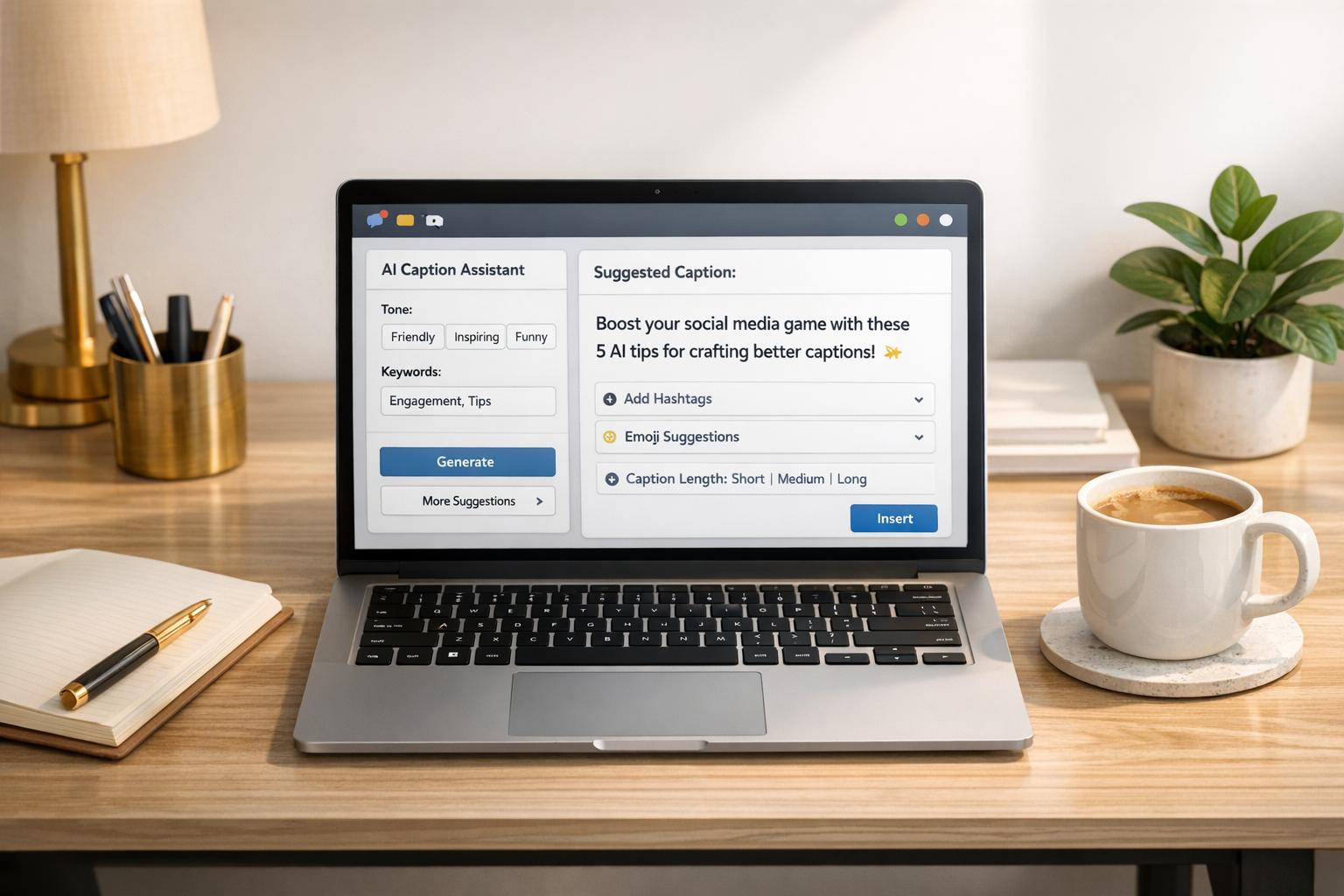
Crafting social media captions can be time-consuming, but AI tools simplify the process, helping you create social media posts in minutes by generating tailored, engaging text. Here are five actionable tips to improve your captions while maintaining your brand's voice:
- Define Your Brand Voice: Identify 3–5 adjectives that describe your tone (e.g., witty, professional). Share examples of past captions with AI to guide its output.
- Write Detailed Prompts: Provide AI with specifics like audience, platform, tone, and goals. Clear instructions lead to better results.
- Customize for Each Platform: Match tone and length to the platform. For example, Instagram captions thrive at 138–150 characters, while X (formerly Twitter) posts perform best at 71–100 characters.
- Generate and Edit Options: Use AI to create multiple caption drafts, then refine them to add personality and accuracy.
- Track Performance: Analyze engagement metrics to refine future captions. Shorter captions often perform better, depending on the platform.
AI tools are powerful for brainstorming and saving time, but your input and editing ensure captions resonate with your audience. Use these strategies to craft posts that stand out.
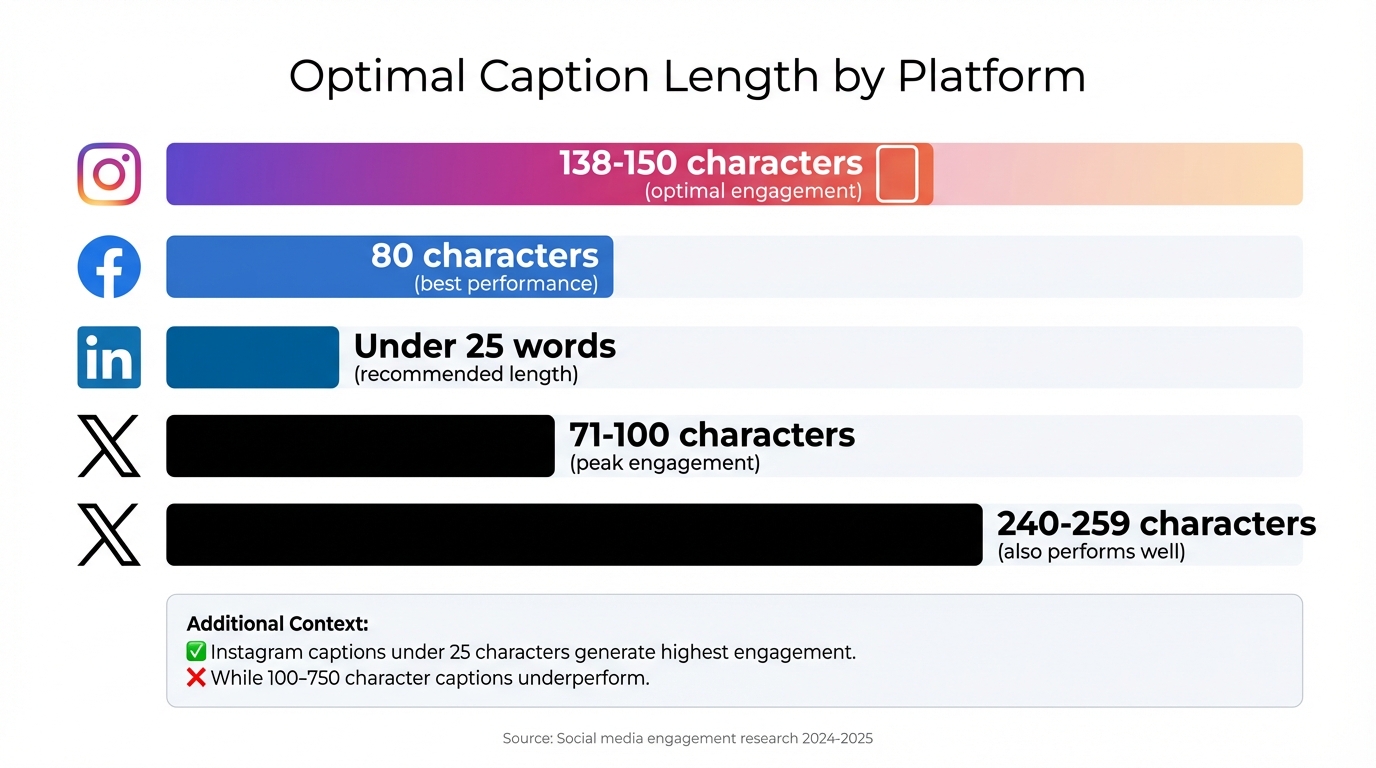
Optimal Caption Length and Character Counts by Social Media Platform
I Know AI Wrote Your Instagram Caption (Here’s How to Fix It)
sbb-itb-9f5fe42
1. Define Your Brand Voice First
Before diving into automated content creation tools, take a moment to clearly define how you want your audience to feel when they interact with your brand. Is your brand witty and irreverent? Professional and authoritative? Inspirational and relatable? Without a clear direction, AI-generated content can feel flat and generic.
Start by picking 3–5 adjectives that capture your brand's personality - think words like witty, authoritative, empathetic, or playful. Use these adjectives consistently in your AI prompts to guide the tone. Dana from Imjustapublicist offers this advice:
"If your business or brand's personality is fun and peppy, keep that energy in your captions... but if your brand is more laid back, don't overdo the exclamation marks".
Another way to refine your brand voice is by providing examples. Share 3–5 of your best-performing captions with the AI and ask it to stick to conversational, jargon-free language. Jasper Marketing emphasizes the importance of this approach:
"Writing like you would speak adds personality to your posts and makes your brand come across as warm and human".
It’s also essential to tailor your tone to different platforms. For instance, LinkedIn calls for polished, educational content, while TikTok thrives on a playful, emoji-friendly style. Eileen Kwok, Social & Influencer Marketing Strategist at Hootsuite, explains:
"Every channel serves a different purpose and different demographics, so the copy needs to vary".
Set clear platform-specific rules in your AI prompts. For TikTok, encourage informal language and emojis, while for LinkedIn, stick to proper grammar and a professional tone. To maintain consistency, document key style rules - like emoji use, hashtag guidelines, and calls-to-action - in a style guide. This ensures your AI-generated content stays on-brand.
Why does this matter? Captions with a strong, engaging voice can boost engagement by as much as 15%. Defining your brand voice upfront makes a real difference. Once you’ve nailed your tone, you’re ready to move on to creating detailed prompts.
2. Write Detailed Prompts
Once you've nailed down your brand voice, the next step is to create detailed prompts that guide the AI effectively. Think of AI as a barista: the better you describe your order, the closer the result will match your expectations. Clear, specific instructions lead to precise AI-generated captions, and this is where structured prompts become invaluable.
A good starting point is to focus on the "Big Five": goal, audience, platform, tone, and constraints. Here's an example of a well-crafted prompt:
"Write an Instagram caption for eco-conscious millennials aged 25-35 announcing our organic dog treat line. Tone should be playful and witty. Keep it under 150 characters with 2 emojis and include a CTA to click the link in bio."
This level of detail ensures the AI produces content that aligns with your needs. As Phill Agnew, Senior Product Marketer at Buffer, wisely says:
"AI rule of thumb: Nail the input and you're way closer to the perfect output."
Adding visual context can also help match the tone. For instance, if your post features a golden retriever playing in a park, include that detail in your prompt. This helps the AI craft text that complements the image. Additionally, setting boundaries with "do and don't" lists can refine the output even further. For example: "Do: use humor sparingly" and "Don't: use industry jargon or all caps."
Detailed prompts consistently outperform vague ones. For example, a generic prompt like "Write a tweet about Black Friday" (or use multilingual LinkedIn tools for global reach) might result in bland copy such as "Gear up for the shopping spree!" But a more specific prompt - tailored for a sustainable coffee shop with a "50% off deal targeting eco-conscious consumers" - could yield something like: "Fuel your day with purpose! Enjoy 50% off our distinct organic roast…" This approach can make a real difference. In July 2025, a fashion brand partnered with SuperAGI to create AI-driven captions tailored to their audience. The results? A 30% boost in engagement - jumping from an average of 100 likes and 10 comments per post to 130 likes and 15 comments.
Fine-tuning is also key. Follow-up prompts like "make it more casual" or "shorten to under 200 characters" can further refine results. Paige Schmidt, Social Engagement Coordinator at Hootsuite, emphasizes this point:
"It's all about being direct with what you want, and the system will adjust accordingly."
3. Customize Captions for Each Platform
What works on LinkedIn might completely miss the mark on TikTok - and the reverse is just as true. Every social platform has its own vibe, and using AI can help you fine-tune your message to fit each one perfectly. Let’s talk numbers: Instagram captions do best at 138–150 characters, Facebook posts shine around 80 characters, LinkedIn updates work well under 25 words, and X (formerly Twitter) posts hit their stride at 71–100 characters. The beauty of AI tools is that they can automatically adjust your captions to meet these character limits when you specify the platform. But it’s not just about length - tone matters just as much.
Take LinkedIn and TikTok, for example. On LinkedIn, educational and thought leadership content reigns supreme, while TikTok thrives on casual, playful vibes. Eileen Kwok, Social & Influencer Marketing Strategist at Hootsuite, puts it this way:
"LinkedIn, for example, is a space for working professionals, so we prioritize educational and thought leadership content on the platform. Our audience on TikTok is more casual, so those videos speak to the fun and authentic side of our brand."
AI tools make it simple to match the tone to the platform. Want something professional for LinkedIn? No problem. Need a playful, emoji-filled caption for TikTok? AI’s got you covered. Kwok highlights how TikTok’s unique style can even include quirks like:
"having words in all caps for dramatic effect, using emojis instead of words, and even the misspelling of words all serves the playful nature of the app."
With the right inputs, AI can handle these nuances effortlessly.
Another great strategy is repurposing one core idea across multiple platforms. AI can take a single concept and turn it into a polished LinkedIn carousel using AI tools, an engaging X thread, or a laid-back TikTok script - each crafted to resonate with the specific audience.
Don’t forget about platform-specific calls-to-action. For instance, Instagram captions often use “Link in bio” since direct links aren’t clickable, while Facebook and LinkedIn allow clickable links in the post itself. Also, for accessibility, use CamelCase in hashtags (e.g., #SocialMedia) to make them easier for screen readers to interpret.
For a seamless way to customize captions, tools like Draft AI (https://getdraft.io) can help you adapt your core message to align with the unique demands of each platform.
4. Generate Multiple Options and Edit
AI can be a game-changer when it comes to brainstorming captions. Instead of starting from scratch, let your content creation tools generate 3–5 variations of a post in seconds. You can even request specific styles - like one that's humorous, one that's professional, and another that's short and snappy. This method helps you break through writer's block while offering a variety of creative directions.
Once you've got these options, it's time to make them your own. Add your brand’s unique voice and personality to the mix. As Ana Mendes from MeetEdgar explains, "AI-generated captions are excellent starting points, but they might still need a human touch to make them truly shine." For example, you can take a generic phrase like "Start your Monday right!" and swap it for something more relatable, like "Who else hit snooze five times this morning?" This editing process is what transforms AI's drafts into authentic, engaging content. Paige Schmidt, Social Engagement Coordinator at Hootsuite, also highlights this, saying, "As people become more familiar with AI-generated text, it's important to maintain a human touch to make the content feel more authentic."
Don’t forget to double-check the facts and sources in AI-generated content - AI can sometimes produce inaccurate information or make mistakes. Also, structure your captions carefully: start with a hook (since platforms often cut off text after a few lines), follow up with a quick story or insight, and wrap it up with a clear call-to-action.
Using AI this way can save up to 80% of the time you’d typically spend crafting a post. But remember, the magic happens during the editing phase. That’s when good captions become great ones, infused with the personality and authenticity that grab your audience’s attention. Treat AI like a brainstorming buddy - it gets the ideas flowing, and you bring the creativity that makes people stop scrolling.
For even quicker results, tools like Draft AI (https://getdraft.io) can generate multiple options instantly, giving you more time to focus on perfecting the human touches that make your content stand out.
5. Track Performance and Adjust
Creating great captions is just the start - tracking how they perform is where the real magic happens. By analyzing what works and what doesn’t, you can refine your strategy and keep your audience hooked. Take the Atlanta Hawks, for example. During the 2024–2025 period, they used AI-powered insights to fine-tune their content, leading to a staggering 170.1% growth in Facebook audience and a 127.1% jump in video views.
Here’s how to get started: feed 3–6 months of your social media data into an AI tool and ask it a simple question: “What types of content drove the highest engagement last quarter?” The AI will group your captions into categories - like product launches, industry updates, or testimonials - and pinpoint which ones get the most likes, comments, and shares. According to Gemma Persello, Senior Social Media Strategist at Magnetic Creative:
"For me, it's really about finding the outliers, what's performing above average and what's below average, and then spotting patterns to understand why."
Want to know what works best? Research shows that Instagram captions under 25 characters generate the highest engagement, while longer ones (100–750 characters) tend to fall flat. Over on Twitter (X), posts between 240 and 259 characters perform best, and for Facebook, 50-character captions hit the sweet spot. Use these insights to tweak your AI prompts - if shorter captions resonate with your audience, instruct your AI to craft concise, punchy text around 25 characters.
But don’t stop at engagement metrics - dive into comment sentiment to gauge whether your tone is hitting the mark. AI tools can scan audience reactions and flag whether your captions are being received positively or negatively. Malena Roche, Senior Strategy and Insights Consultant at Battenhall, highlights how AI simplifies this process:
"I've found AI really useful within social listening, particularly for sentiment analysis... I can tell ChatGPT to focus on the aspect: negative for athleisure, positive for Farm Rio. That's something I always had to do manually for more complex sentences, and now AI saves me tons of time."
If your analysis uncovers negative feedback, don’t panic - use it as an opportunity to adjust your tone and test new approaches.
Performance tracking isn’t a one-and-done task; it’s an ongoing feedback loop. Use the insights you gather to refine your AI prompts, experiment with variations, and double down on strategies that resonate. By staying flexible and data-driven, you’ll keep your content fresh and consistently engaging across platforms.
Conclusion
AI has reshaped the way we craft social media captions, offering multiple tailored options in just seconds while staying true to your brand's voice. As Ana Mendes, an AI Marketing Specialist, explains:
"AI is revolutionizing how we create content, making it faster and easier to produce engaging, on-brand social media captions."
With AI tools, businesses have reported saving up to 80% of the time it traditionally takes to create a single post. But this isn't just about speed - it’s about freeing up valuable time to focus on connecting with your audience, reviewing performance metrics, and refining your strategy based on real-world results. Using a social media content creation checklist can help ensure your strategy remains consistent.
Take Draft AI, for example. It simplifies the process by transforming raw ideas into polished, platform-specific content. Whether you’re crafting catchy Instagram captions, professional LinkedIn updates, or snappy TikTok texts, Draft AI adapts seamlessly to each platform’s unique style while keeping your voice intact.
The real magic happens when you use AI as a creative partner rather than a substitute for your imagination. Let it help you tackle writer’s block, spark new ideas, and experiment with different approaches. Then, add your personal flair to ensure each caption feels authentic and uniquely yours. By blending AI’s efficiency with your creativity, you can deliver engaging, on-brand content that truly resonates with your audience and drives meaningful results.
FAQs
How can AI tools help keep my brand's voice consistent in social media captions?
AI tools are capable of capturing your brand's tone, style, and vocabulary, ensuring every caption feels natural and aligns perfectly with your identity. By reviewing past captions, brand guidelines, or even a simple description of your voice, these tools can craft content that reflects your preferred phrasing, humor, and keyword choices.
Many advanced platforms also let you set specific rules - like including certain phrases or avoiding particular words - and can alert you to inconsistencies before anything goes live. Over time, these tools get smarter by analyzing engagement data, fine-tuning your voice while keeping it fresh and relevant. This makes it easier to produce consistent, high-quality captions that truly connect with your audience, even in the fast-moving world of social media.
How can I create effective prompts for AI to generate better social media captions?
To craft effective prompts for AI-generated captions, start by pinpointing the purpose of the caption - whether it’s to boost engagement, promote a product, or something else entirely. Next, consider the platform where the caption will appear, like Instagram, TikTok, or LinkedIn, as this influences both the tone and length. Define your target audience in detail, including factors like age, interests, location, and any relevant brand characteristics. This helps the AI tailor the tone and style to fit your audience. Be clear about key elements you want included, such as tone (e.g., playful or professional), specific keywords or hashtags, and any calls-to-action. If you have a preferred format, like "under 150 characters with emojis", make sure to specify that. Providing a bit of context - such as the product, event, or story behind the post - can also make the captions feel more aligned with your brand.
Here’s an example of a well-structured prompt: “Create a playful Instagram caption for a US-based audience aged 18–24, promoting a new sustainable sneaker. Use the hashtag #EcoStep and include a call-to-action to swipe up.” After reviewing the AI’s first attempt, you can refine the prompt by tweaking the tone or adding more brand-specific details, then run it again until the output matches your expectations.
If you’re using tools like Draft AI, simply paste your detailed prompt into the platform, choose a caption template, and let it generate polished, platform-ready captions in no time.
How can I track and improve the performance of AI-generated social media captions?
To measure how well your AI-generated captions are performing, start by defining clear goals. Focus on metrics like likes, comments, shares, click-through rates (CTR), and reach. Most social media platforms come with built-in analytics tools that provide real-time data, making it straightforward to track engagement and compare how different posts are doing.
Try using A/B testing to see what works best. Create two versions of a caption, post them to similar audiences, and analyze which one gets better results. This approach can help you fine-tune your prompts, tone, or style for future captions. Keeping a simple log of these tests will make it easier to spot patterns over time.
Make it a habit to review your performance regularly - whether weekly or monthly. Look for trends in the data to guide your decisions. For example, you might discover that tweaking your posting schedule or adjusting your content strategy can significantly boost engagement. Visualizing these trends can make it easier to plan your next steps and keep improving the effectiveness of your captions.


