5 Steps to Train AI for Your Brand Style
Want your AI to reflect your brand's style perfectly? Here's the process in 5 clear steps:
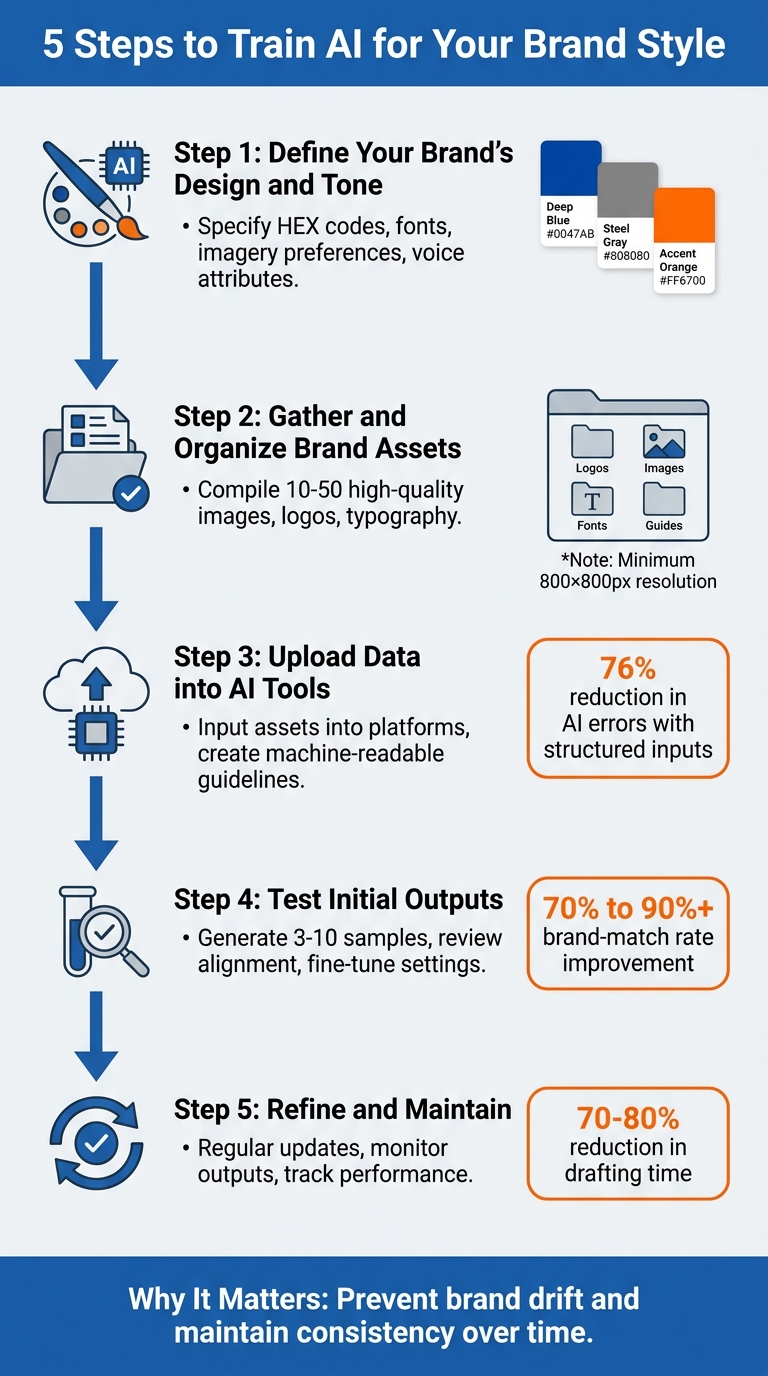
- Define your brand's design and tone: Specify exact colors (e.g., HEX codes), fonts, imagery preferences, and voice attributes.
- Gather and organize brand assets: Compile high-quality images, logos, typography, and other visuals into structured folders.
- Upload data into AI tools: Use platforms like Draft AI to input these assets and create machine-readable brand guidelines.
- Test initial outputs: Generate sample content, review results for alignment, and fine-tune settings like tone, length, and style.
- Refine and maintain: Regularly update assets, monitor outputs, and track performance to ensure consistency over time.
Why it matters: Poorly aligned AI content can erode trust and hurt your brand. Following these steps ensures your AI produces outputs that match your brand's identity, saving time and improving quality. Tools like Draft AI can simplify this process, helping you maintain control over tone and visuals.
Pro Tip: Regularly review and update your guidelines to avoid "brand drift" as your style evolves.
5-Step Process to Train AI for Your Brand Style
Step 1: Define Your Brand's Design Elements
To ensure AI-generated content aligns perfectly with your brand, start by translating your visual identity into detailed, specific guidelines. AI tools interpret instructions literally, so vague terms like "clean" or "premium" might lead to results far from what you had in mind. The solution? Remove any ambiguity by documenting measurable, precise details.
Identify Core Visual Elements
Begin with your color palette. Use exact HEX or RGB codes rather than broad descriptors like "blue" or "red." Include color swatches or sample images to avoid confusion, especially since HEX strings can sometimes cause tokenization issues. For added personality, consider renaming colors to reflect your industry. For example, a luxury brand might call a shade "Champagne" rather than "beige" to reinforce its identity.
Next, outline your typography hierarchy. Specify fonts for headings and body text, along with their sizes and weights. Create a catalog of your logo versions, including primary logos, icons, and any rules for usage, such as minimum size or required clear space around the logo. Finally, define your imagery style - whether you prefer photography or illustrations, the type of lighting (natural, studio, etc.), and the overall composition style (e.g., minimalist, bold, or futuristic). These guidelines ensure the AI produces visuals that feel distinctly "on-brand."
To make your instructions actionable, convert abstract ideas into measurable parameters. For instance, instead of saying "youthful energy", you might specify "models aged 22–28, active poses, natural outdoor lighting". This level of clarity eliminates guesswork and ensures the AI generates outputs that align with your vision.
Set Your Brand's Tone and Voice
Your brand’s communication personality is just as important as its visuals. Define 3–5 key voice attributes using paired traits for nuance, such as "confident yet approachable" or "technical but easy to understand". This helps the AI avoid sounding generic or robotic.
Create a brand-specific lexicon that lists both preferred terms and words to avoid. For example, you might prefer "team" over "staff" or steer clear of overused corporate jargon like "synergy." Be clear about technical preferences too - decide if you’ll use the Oxford comma, whether contractions are allowed, and whether your sentences should be short and punchy or more flowing. Tools like Draft AI allow you to lock in these preferences, ensuring every piece of content reflects your unique voice. In fact, a 2025 study showed that personalized AI outputs were rated significantly higher in quality and creativity compared to generic ones.
To further refine the AI's understanding of your brand, gather 5–10 examples of your best past writing. Create an "on-brand vs. off-brand" grid to show the differences between correct and incorrect phrasing in common scenarios. This gives the AI a clear framework for producing content that feels authentically yours.
With these detailed visual and tonal guidelines in place, you'll be ready to move on to the next step: gathering and organizing your brand assets. These foundational steps make the AI training process smoother and more effective.
sbb-itb-9f5fe42
Step 2: Gather and Organize Brand Assets
Now that you’ve established your visual and tonal guidelines in Step 1, it’s time to create a high-quality reference library of brand assets. Why does this matter? Because the quality of your dataset directly impacts the accuracy of AI outputs. Taking the time to compile and organize these assets properly will pay off in consistent, on-brand results.
Collect High-Quality Examples
Start by gathering 10–50 high-quality images that best represent your brand. These should include a variety of visuals - social media posts, carousel graphics, product photos, and other designs that reflect your brand’s aesthetic. Consistency is key here. Your examples should have similar lighting, color tones, backgrounds, and camera angles. Mismatched imagery can confuse AI models and lead to inconsistent results.
Pay special attention to image resolution. Ideally, images should be at least 800×800 pixels, but 2,000 pixels or higher is better, especially for e-commerce or platforms with zoom features. For product-based brands, include multiple perspectives: shots from different angles, close-ups of textures (like fabric or material details), and clean packshot photos. If your brand incorporates human models, include images that align with your preferred demographics, body types, and facial expressions to maintain consistency in AI-generated characters.
Organize Assets for AI Input
Once your assets are collected, organize them into folders based on their purpose. For example:
- Style models: Textures, lighting, and color examples.
- Object models: Products, packaging, or other brand-specific items.
- Character models: Mascots, personas, or any human elements.
Use descriptive filenames like "hero_frame_primary_dark.png" or "badge_launch_small_coral.svg" to make files easy to identify. This level of organization helps the AI understand the role of each asset and simplifies future updates.
Create a component library of modular elements - frames, badges, icons, or texture overlays - that can be reused in various designs. This ensures your brand identity remains intact across different layouts. If you’re using tools like Draft AI, upload these assets to your centralized brand kit, where fonts, colors, and templates are stored. This way, the AI can automatically apply your brand rules to all generated content, whether it’s social posts, carousels, or scripts.
Finally, clean up your library by removing outdated or off-brand visuals. This step is crucial to avoid "brand drift", where outdated elements influence your AI’s outputs.
Step 3: Upload Data into AI Training Tools
Now that your brand assets are neatly organized, it's time to load them into your AI training tool. Why? Because structured inputs can reduce AI errors by a whopping 76%. The main objective here is to turn your brand guidelines into clear, machine-readable instructions that the AI can follow with precision.
Upload Design and Style Guidelines
Start by uploading your visual reference dataset, ensuring you use high-quality images. Tools like Draft AI allow you to centralize your brand assets in a single location, including fonts, color palettes, templates, and visual references. This setup keeps your brand identity consistent as you move from asset organization to AI generation.
Here’s a tip: avoid relying only on text descriptions. For example, instead of typing out a HEX code like "#E5E5E5", upload a color swatch sheet. Visual references are far more effective for accurate palette matching. The same goes for fonts and other design elements - upload examples rather than trying to describe them in words.
When writing instructions, be specific and measurable. Instead of vague phrases like "premium aesthetic", spell out the details: "soft directional lighting at a 45-degree angle, minimal shadows, neutral gray background (#E5E5E5)". This approach works - just ask Zalando. In Q4 2024, the fashion retailer used AI to create 70% of its editorial content. By being precise, they slashed their production timelines from 6–8 weeks to just 3–4 days.
Adjust AI Settings
Once your data is uploaded, fine-tune the AI to reflect your brand's unique characteristics. For instance, the temperature setting can help you strike the right balance between creativity and consistency. A lower temperature ensures more predictable, stable outputs - great for formal brands. On the other hand, a higher temperature allows for more creative freedom, which might suit brands with a playful tone. Similarly, adjusting the Max Tokens setting helps control the length of the AI's outputs, ensuring they align with your typical messaging style.
Consider creating a brand prefix block - a reusable snippet that includes your brand constants, like specific color codes, lighting styles, and model demographics. This snippet can be added to every generation request, making sure the AI stays on-brand from the start. Once everything is set up, training usually takes 1–3 hours. Fine-tuning with LoRA is not only quick (about 11 minutes) but also budget-friendly, costing less than $1.
Step 4: Generate and Test Initial Outputs
Once your guidelines are uploaded, it’s time to assess the AI’s initial outputs. Start by generating a small batch of content in different formats, like social media posts, carousels, or scripts. Tools like Draft AI simplify this process, allowing you to create multiple content types from a single input - be it raw data or even a voice recording. This step transitions your AI from the training phase into refining your brand’s content.
Create Sample Content
Kick things off by crafting 3–10 high-quality brand content samples. These could range from emails and Instagram captions to product descriptions. By using specific examples, the AI can identify clear patterns, which is much more effective than relying on vague instructions. Research backs this up, showing that this method can boost brand-match rates from 70% to over 90%. For visual content, consider using LoRA-based training with at least 10 consistent images to maintain a cohesive look.
Next, develop a Voice Profile for your brand. This should include your tone, sentence rhythm, and signature phrases. Test the AI across various platforms to confirm it adapts appropriately - for instance, keeping things punchy for Twitter, story-driven for LinkedIn, and visually engaging for Instagram. A 2025 survey revealed that 92% of U.S. knowledge workers expect AI to tailor its writing to their brand’s specific style.
Once you’ve generated these samples, the focus shifts to reviewing and fine-tuning the results.
Review and Refine Outputs
Evaluate the outputs to ensure they align with your brand’s identity. For visual content, confirm that colors match your exact HEX or RGB codes, fonts are accurate, and lighting appears natural. For written content, assess whether the tone, vocabulary, and sentence rhythm reflect your brand’s personality, steering clear of anything that feels generic or overly robotic.
Don’t stop at the first draft. As Ryan Acton puts it:
"Training AI is like mentoring a junior writer. The more detailed you are, the faster it adapts".
Use contrastive prompting to compare a generic version of a post with your on-brand version, and have the AI analyze the differences. If something feels off, refine your prompts with constraints like “avoid jargon” or “no salesy tone.” You can also adjust your brand prefix block to better reinforce your unique style.
Finally, run A/B tests to compare AI-generated content with human-written benchmarks. Track metrics like engagement, click-through rates, and conversions. These tests will help you pinpoint where the AI excels and where additional adjustments are needed.
Step 5: Refine, Iterate, and Deploy
Once you've completed initial tests, the real work kicks off. Training AI isn't a one-and-done task - it requires consistent monitoring and updates. This is especially important to avoid your AI producing bland, generic content. Why? Because in 2026, 61% of consumers said brand communications "all sound the same lately" due to overusing generic AI. Despite this, only 23% of marketing teams have updated their brand guidelines to address AI. To stand out, focus on refining, iterating, and deploying AI that strengthens your brand identity.
Track Performance Metrics
After reviewing initial outputs, it's time to measure how well your AI performs and make adjustments. Start by setting up blind review panels where team members score AI-generated content on a scale of 1–10 for brand alignment - without knowing if it's AI- or human-created. Track "edit distance", which measures how much editing the AI's drafts need before publishing. A smaller edit distance means your AI is getting closer to your brand voice.
For monthly voice audits, review 10–20 recent pieces of content and evaluate them against your brand guidelines. Look at key elements like sentence length, vocabulary (preferred vs. avoided terms), and tone consistency across platforms. Research shows that content with a consistent brand voice can boost engagement by up to 40%. Sentiment analysis tools can help you ensure the emotional tone stays consistent, whether you're posting on Instagram, LinkedIn, or your blog.
Update and Customize Over Time
As your brand grows, your AI needs to evolve with it. Conduct quarterly reviews to spot "voice drift", where AI outputs start sounding less aligned with your brand. Create an "anti-pattern" list of phrases, structures, or visuals your AI should avoid, and update it regularly. Tyler Clayton, Platform Steward at SUCCESS, emphasizes the importance of this:
"Your voice is your edge. By building a style profile, providing examples, creating reusable templates and checking frequently, you can harness AI's power without losing your authenticity".
For visual content, keep your AI updated with fresh assets every few months. This ensures things like color accuracy (e.g., navy stays navy) and consistent backgrounds. Tools like Draft AI make this easy - you can tweak font and color settings or upload new photo examples to keep visuals aligned with your brand. Test these updates on a small scale before rolling them out widely. Regular updates can also cut drafting time by 70% to 80%.
Conclusion
A structured training process is the backbone of ensuring your AI aligns seamlessly with your brand. This final stage emphasizes that training AI is not a one-time task - it’s a dynamic journey. By defining your brand’s design elements, organizing high-quality assets, uploading structured data, testing outputs, and fine-tuning over time, you create what experts refer to as your "Visual DNA". This framework ensures your AI doesn’t default to generic visuals but instead produces content that strengthens your brand identity and reinforces recognition.
The advantages are undeniable. Custom AI models not only streamline automated content creation timelines, but they also maintain the visual consistency that fosters brand recognition. As MetaModels.ai aptly puts it:
"A generic tool produces a convincing image. A custom model produces an accurate one".
Tools like Draft AI simplify this process by allowing you to upload brand assets, customize fonts and colors, and create content that reflects your unique style. Whether it’s social media posts, carousels, or scripts, Draft AI adapts to your writing voice and visual preferences, ensuring a unified presence across platforms. Features like custom style analysis, available in the Pro plan, make it easier to deliver professional, consistent content without starting from scratch every time.
The secret to success lies in treating AI training as an ongoing system. Regular updates, human oversight, and performance tracking are essential to keeping your AI aligned with your brand. In a competitive market, a well-trained AI becomes a powerful asset - offering speed and scalability while preserving the authenticity that sets your brand apart. Keep refining your AI to ensure every piece of content reflects your brand’s unique identity and keeps you ahead of the curve.
FAQs
What’s the minimum I need to define for my brand style?
To shape your brand style, begin by focusing on your core brand assets. This includes images and visual elements that truly represent your identity. Make sure to upload high-quality images with a minimum resolution of 600 x 600 pixels in formats like JPEG, PNG, or WEBP. These assets are essential for helping AI tools accurately interpret and replicate the distinct visual style of your brand.
How many brand examples should I upload for reliable results?
When uploading examples of your brand style, aim for variety and quality. While there's no strict rule on the number of samples, the more diverse and representative your examples are, the better. Include materials that showcase the core elements of your brand's visual or verbal identity. Providing a broader range of examples typically leads to more accurate and consistent results. Focus on items that truly reflect what makes your brand stand out.
How can I keep AI content aligned with my brand over time?
To ensure AI-generated content stays true to your brand, it's essential to take a proactive approach. Start by regularly updating your training datasets with high-quality, brand-specific examples. These samples help the AI understand the tone, style, and messaging unique to your brand.
Clearly documenting your brand voice is another critical step. A well-defined guide ensures that both your team and the AI have a consistent reference point. Once the AI generates content, validate it against this guide to ensure it aligns with your expectations.
It's also important to establish testing protocols. These protocols will help you check for consistency and identify areas where the AI might need improvement. Over time, retrain the AI with fresh data to reflect any changes in your brand’s style or messaging. This ongoing process ensures that your content evolves alongside your brand.
By focusing on continuous training and validation, you can prevent your AI-generated content from straying away from your brand's identity.


