AI Content Creation: Templates, Styles, and More
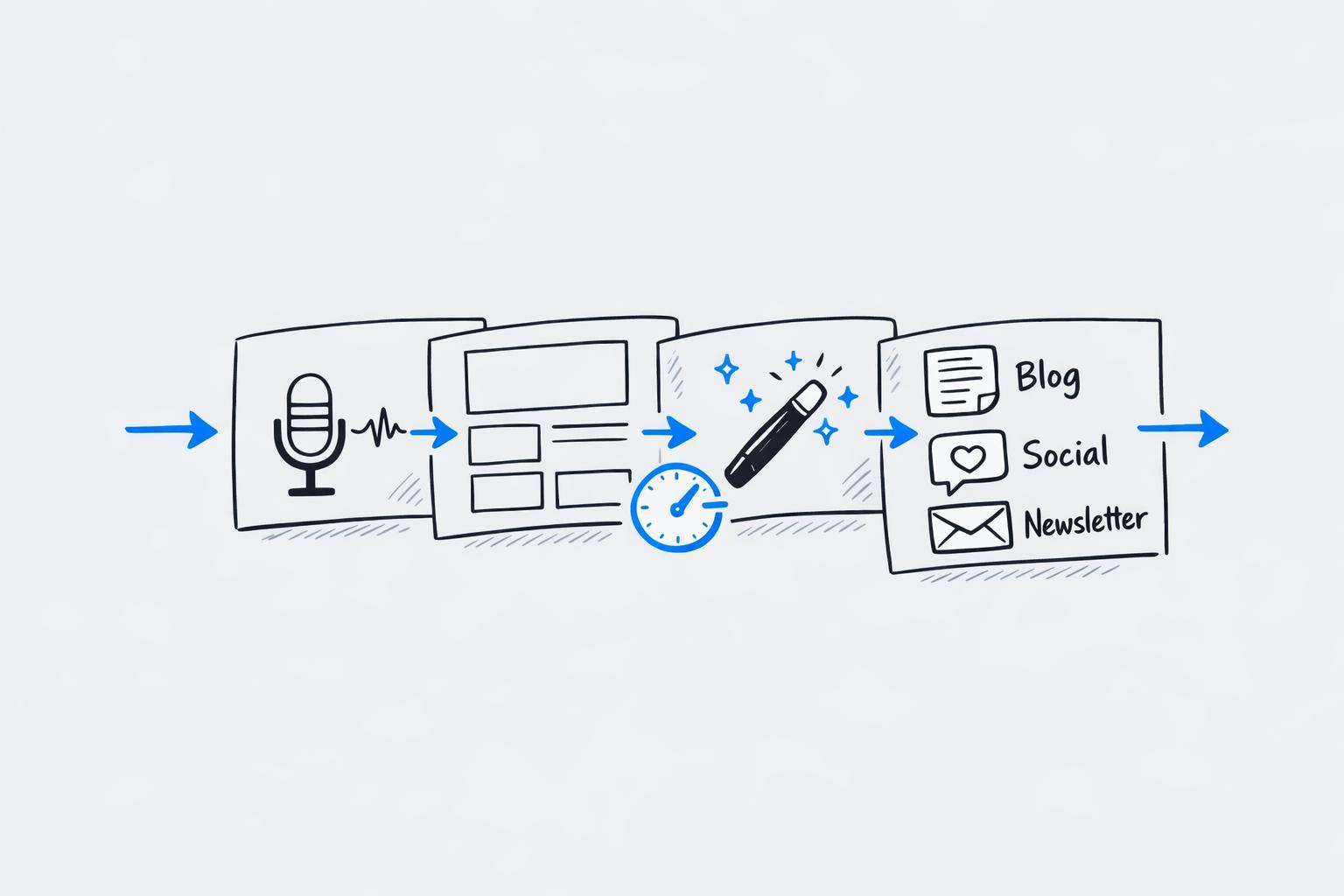
AI content creation tools are transforming how professionals create social media posts in minutes, videos, and more. These tools streamline the process by combining pre-built templates, personalized writing styles, and customization features, helping users save time and maintain consistency.
Key Highlights:
- Templates for Different Formats: Pre-designed for text posts, Instagram carousels, and video scripts.
- Writing Style Mimicry: AI learns your tone using samples, ensuring content aligns with your voice.
- Customization Options: Adjust fonts, colors, layouts, and even translate content into multiple languages.
- Quick Content Creation: Turn raw data or voice memos into polished, platform-ready posts in minutes.
- Content Ideas on Demand: Swipeable idea cards and AI-generated hooks keep your content pipeline active.
These features make AI tools like Draft AI a game-changer for professionals looking to create polished, branded, and platform-ready content quickly and efficiently.
AI Content Creation Tools: Key Features and Performance Statistics
The Ultimate AI LinkedIn Content Creation Tool Stack for 2026 (My entire content workflow)
sbb-itb-9f5fe42
Pre-Built Templates for Different Content Types
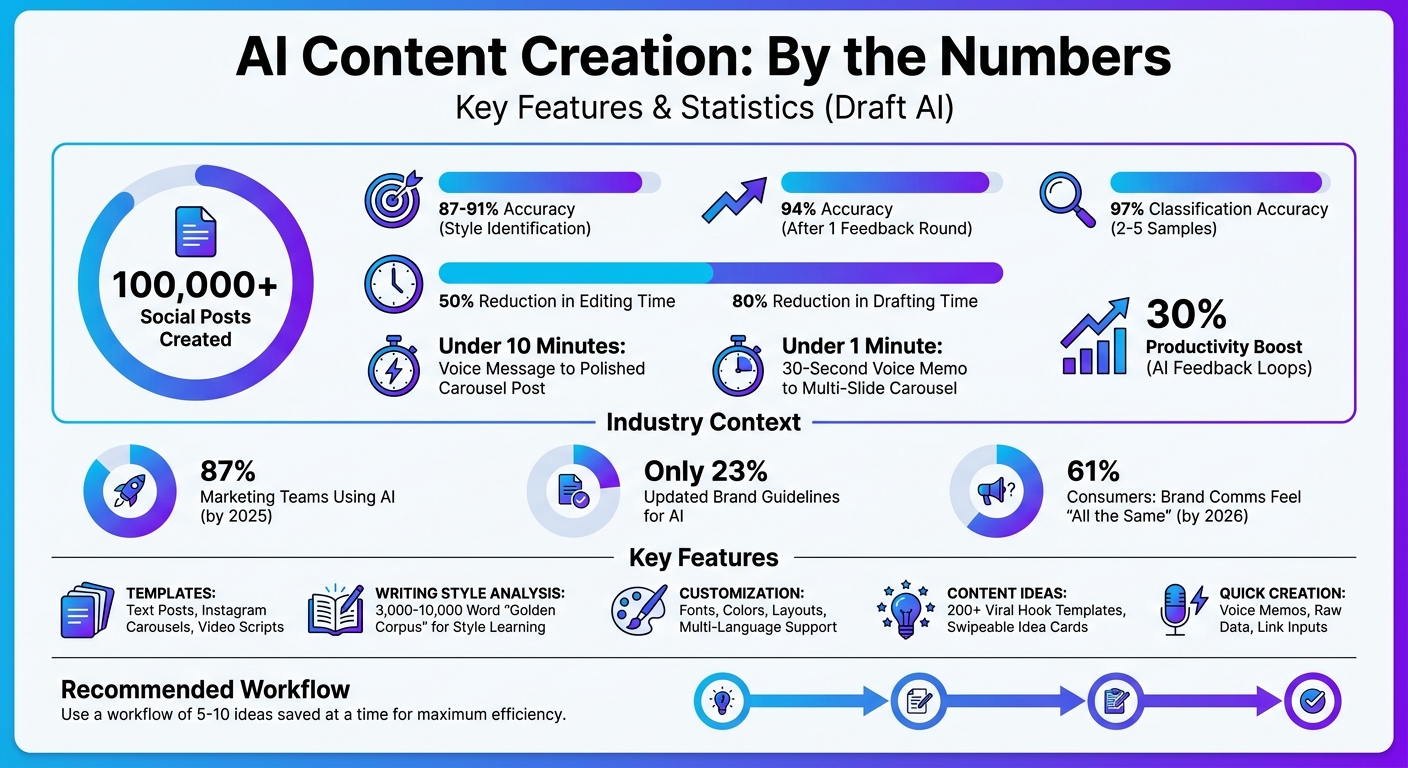
AI tools speed up content creation by using pre-built templates to cut out repetitive setup tasks. Instead of starting from zero every time, you can use templates that already include your brand details, tone preferences, and formatting tailored to specific platforms. Draft AI takes this a step further by storing your content briefs as reusable templates, complete with your brand overview and formatting needs. Over 100,000 social posts have been created using the platform. These templates are specifically designed for formats like text posts, carousels, and video scripts, ensuring they're ready for the platforms where they'll be published.
Text Post Templates
Text post templates are designed to meet the unique requirements of different platforms. For instance, one idea can be transformed into a polished LinkedIn update, a casual Facebook post, and a short, direct Telegram message - all without manual rewriting. These templates automatically adjust tone, length, and style to fit each platform. They even let you preview how your content will look across channels, so you can make tweaks as needed before publishing.
Carousel Templates for Instagram and LinkedIn
Carousel templates simplify visual storytelling for platforms like Instagram and LinkedIn. They structure your content into slides with consistent formatting, making it easy to present step-by-step guides, showcase product features, or share data insights without needing design tools. Plus, the system can generate custom AI-created images for your posts and supports Instagram's carousel format. For added brand consistency, you can include links to visual resources or style guidelines in your saved template briefs. These templates also help with creating structured formats for scripted videos.
Instagram Reels Script Templates
Draft AI offers three types of Instagram Reels script templates: expert, story, and dialogue formats. Expert scripts are great for sharing tips or insights, positioning you as a knowledgeable source. Story scripts follow a clear narrative structure, with a beginning, middle, and end. Dialogue scripts are perfect for conversational videos, like Q&A sessions or debates. Each template is crafted to capture attention quickly and works well for short-form video content. You can access these templates either through the content request flow or directly from your saved templates folder at https://app.draft.co/saved/templates.
AI-Powered Personal Writing Styles
When it comes to automated content creation, maintaining your unique writing style is just as important as picking the right tools for the job. AI has the ability to learn and mimic your personal style by analyzing elements like sentence structure, punctuation, vocabulary, and rhythm. This process, often called linguistic fingerprinting, helps the system understand what makes your writing distinct. Studies reveal that AI models can identify individual authors with an accuracy of 87% to 91% by examining these psychological and syntactic markers.
Copy Your Style Feature
Draft AI’s "Copy Your Style" feature takes this concept further by analyzing your existing work to grasp your communication style. Using a "Golden Corpus" of 3,000 to 10,000 words, it identifies patterns unique to your writing. For instance, it might detect that you use em-dashes for parenthetical thoughts once or twice every 200 words. The analysis covers areas like tone, sentence flow, punctuation preferences, and vocabulary use.
To get the most accurate results, it’s best to provide a mix of writing samples - such as emails, social media posts, and long-form articles (including multilingual LinkedIn posts) - so the AI can understand how your tone shifts depending on the audience. Initial accuracy rates hover around 87%, but after one round of feedback, they can climb to about 94%. Thanks to advanced few-shot learning methods, the AI can adapt to your style using as few as 2 to 5 samples, achieving classification accuracy of up to 97%. Plus, the tool evolves alongside your writing, offering options to reset and refine its understanding as your style changes.
Style Reset and Adjustment Options
Capturing your voice is only part of the equation - being able to adjust it over time is just as critical. If your tone or brand guidelines shift, you can update the AI by uploading new samples in formats like PDF, DOC, or TXT, or by pasting text directly into the platform. The system also offers manual style editing, allowing you to set specific rules for tone, vocabulary, and sentence structure instead of relying entirely on automation.
Every time you tweak drafts, the feedback loop sharpens the AI’s understanding, which can boost productivity by around 30% and cut editing time in half. If the AI starts leaning too heavily on certain stylistic features, you can manually adjust these tendencies to keep your voice balanced and authentic.
Maintaining Brand Voice
For businesses, keeping a consistent brand voice is non-negotiable. Without AI-specific guidelines, content created by different team members can start to feel generic, which risks diluting your brand’s identity. By 2025, 87% of marketing teams were using AI for content creation, but only 23% had updated brand guidelines to address it. As a result, by 2026, 61% of consumers reported that brand communications felt "all the same".
"The brands that win the next five years won't produce the most content. They'll produce content that's recognizably, authentically theirs at scale." – MyVoiceTwin
Draft AI helps preserve your brand’s identity by letting you set conditional rules. For example, you can allow the tone to shift - casual for social media, formal for white papers - while ensuring the core voice remains consistent. Treat your brand voice as a living, evolving element, and update your AI style profiles quarterly to keep pace with your latest communication strategies.
Customization Features for Better Content
Once you've established your writing style, the next step is to make sure your content aligns with your brand's visual identity. With Draft AI, you can customize visual elements directly within the platform, eliminating the need for separate design tools.
Font and Color Controls
Draft AI allows you to tweak fonts and colors effortlessly. By tapping the Aa button (located in the lower right on iOS or below the editor on Mac), you can access these settings. From there, you can select themes for both light and dark modes, which is perfect for adapting your content to different viewing preferences or working environments.
For those who want even more precision, you can create custom themes using JSON files. This lets you define exact brand colors by using hex codes, such as #000000 for black or #FF5733 for a vibrant orange. This level of control ensures your content maintains a consistent look, even if you're managing multiple brands.
These tools provide a strong foundation for creating visually aligned content.
Photo Uploads and Smart Layouts
Adding visuals to your content is just as straightforward. Draft AI's smart layout feature automatically arranges text and images, giving your posts a polished and professional finish. You can upload photos directly, and the system adjusts the layout based on the format you're working on - whether it's a carousel, a text post, or a script for a Reel.
The platform’s theme settings also ensure that your uploaded visuals complement your chosen fonts and colors, keeping your design cohesive and on-brand.
Multi-Language Translation and Size Adjustments
Draft AI doesn't stop at visual design - it also helps your content adapt to different languages and platforms. Multilingual content creation is available to all users, including those on the free plan. The platform uses a template engine powered by Apple's DateFormatter class to handle localized date and time formats. You can even set a preferred locale, such as it_IT for Italian or es_MX for Spanish, to align with regional formatting standards.
On top of that, Draft AI simplifies resizing content for various social media formats. It dynamically adjusts text, file names, metadata, and formatting to fit the requirements of channels like Instagram, LinkedIn, and Facebook. This eliminates the hassle of manual reformatting, saving you time while ensuring your content looks great everywhere.
Creating Viral Content Ideas
Coming up with new content ideas all the time can feel like a struggle. That’s where Draft AI steps in, making the process quick and interactive. With its unique features, paired with customizable templates, it fits seamlessly into your content strategy.
Swipeable Idea Cards
Draft AI uses a fun, swipe-based interface to help you discover content ideas. Just provide some details about your business or blog, and it generates a stack of idea cards. Swipe right to save the ideas you love, and swipe left to skip the ones that don’t fit. Over time, the system adapts to your preferences, offering suggestions that are more aligned with your style and needs.
To keep your content pipeline flowing, it’s recommended to save 5–10 ideas at a time. These saved ideas are stored in your Idea Lists, easily accessible on your dashboard whenever inspiration strikes.
Attention-Grabbing Hooks and Content Organization
Draft AI is a pro at creating hooks that grab attention in just 1–2 seconds - those critical moments that can make or break your content’s performance. As Captain Hook AI puts it:
"Your hook has 1-2 seconds to stop the scroll, and if you miss that window, it doesn't matter how good your content is".
Using a library of over 200 tested viral templates, Draft AI generates hooks tailored for platforms like Instagram Reels, TikTok, LinkedIn slides, and X threads. These hooks are neatly organized into categorized Idea Lists on your dashboard, making it easier to keep your content pipeline active and avoid running out of creative steam.
Voice Messages and Raw Data Input
Got a quick idea but no time to write it down? Record a short voice memo - anywhere from 30 seconds to 2 minutes - or drop a link from your favorite platform, and Draft AI will do the rest. It transcribes and transforms your input into polished, on-brand content in no time. For instance, a 30-second voice memo can turn into a fully designed multi-slide carousel in less than a minute. Plus, with support for multiple languages, it’s a handy tool for creating content ideas for a global audience.
How to Create Content with Draft AI
Draft AI makes turning your ideas into polished, shareable content straightforward, as explored in Valery's Toolkit Blog. From brainstorming to platform-ready designs, the process is designed to be efficient and user-friendly.
Set Your Input and Pick a Template
Begin by deciding what kind of content you need. You can record a voice message, paste a link, or simply type out your idea. If you’ve already saved ideas in your Idea Lists, you can pull from those for a quicker start.
Next, choose a template that matches your goal - whether it’s a LinkedIn text post, an Instagram carousel, or a script for Reels. Draft AI provides pre-made templates for various formats, so you’re not starting from scratch. If you frequently create similar content, save and reuse templates to make your workflow even smoother.
Generate and Customize Your Content
Once you’ve set your input and picked a template, Draft AI generates the content for you. From there, you can personalize it to fit your brand using the platform’s editing tools. Adjust the writing style to align with your voice, modify fonts and colors, or upload images to enhance the final design. Features like Copy Your Style make it easy to maintain brand consistency.
Need to switch things up? You can change the language, resize content for different platforms, or tweak the layout - all within the same interface. Once you’re satisfied with the edits, your content is ready for export.
Export and Prep for Publishing
When your content is finalized, export it in the format that works for your target platform. Draft AI takes care of technical details, ensuring your carousel, text post, or Reel script is ready to go. Before publishing, you can make last-minute adjustments like resizing for aspect ratios or trimming text. The platform’s smart layout ensures your content looks polished and professional, no matter where it’s shared.
Conclusion
Draft AI takes the hassle out of content creation by eliminating tedious steps. With pre-built templates, it tackles the dreaded blank-page problem, while its AI-powered writing styles ensure your brand voice remains consistent. Plus, its range of customization options lets you fine-tune content to match your exact needs.
One standout feature is the swipeable idea cards. Just input your business or blog details, and you can swipe through viral hook suggestions with ease. Save the ones that click, and you'll never have to spend hours brainstorming again. It’s a simple yet effective way to keep your content fresh and engaging - perfect for today’s fast-paced social media demands.
Draft AI also saves you serious time, cutting drafting efforts by up to 80%. Imagine going from a voice message to a polished carousel post in under 10 minutes. It’s designed to deliver platform-ready posts in no time.
Whether you're juggling multiple social accounts, aiming for consistent branding, or trying to post more often, Draft AI simplifies your workflow from start to finish. Check out getdraft.io to try a template with your own content. Once you export your first post, you’ll see just how much faster and easier content creation can be. Let Draft AI bring speed and precision to your process.
FAQs
How many writing samples are needed to copy my style?
To help the AI align with your writing style, you'll need to share 15–20 samples of your work. This gives the AI enough material to understand your tone, word choice, and overall preferences.
Can I reuse templates across different platforms?
Many AI content tools provide customizable templates that can be reused across different platforms. These templates are designed to be flexible, allowing you to adjust them for various needs and purposes with ease.
Does Draft AI ensure my brand fonts and colors stay consistent?
Yes, Draft AI lets you set your brand's fonts and colors using its templates and customization options. This helps keep your content visually consistent and perfectly aligned with your branding.


