AI vs. Manual Content Creation: Time Comparison
Creating content manually takes a lot of time - 15 to 25 hours weekly for small business owners. AI tools like Draft AI reduce this to just 2–3 hours while increasing output significantly. Here's how:
- Manual Content Creation: Involves tasks like ideation, writing, designing, and scheduling (see our content creation checklist), consuming up to 1,300 hours annually. This translates to $39,000–$65,000 in time costs (valued at $50/hour).
- AI Content Creation: Draft AI automates 60–70% of the process, generating posts in minutes. Tasks like ideation are instant, and graphic design is fully automated.
- Time Savings: Manual workflows produce 5–10 posts weekly, while AI enables 30–70+ posts in the same time frame.
Quick Comparison
| Task | Manual Time (Weekly) | AI Time (Weekly) |
|---|---|---|
| Content Ideation | 3–5 hours | 0 hours (instant) |
| Writing/Editing | 5–8 hours | 30 minutes (review) |
| Graphic Design | 3–5 hours | 0 hours (AI automated) |
| Scheduling/Publishing | 2–3 hours | 5 minutes (bulk) |
| Total Time | 15–25 hours | 2–3 hours |
| Posts Produced | 5–10 posts | 30–70+ posts |
AI tools like Draft AI free up time for strategy and growth while maintaining quality. Use AI for repetitive tasks and reserve manual input for high-priority content to maximize efficiency.
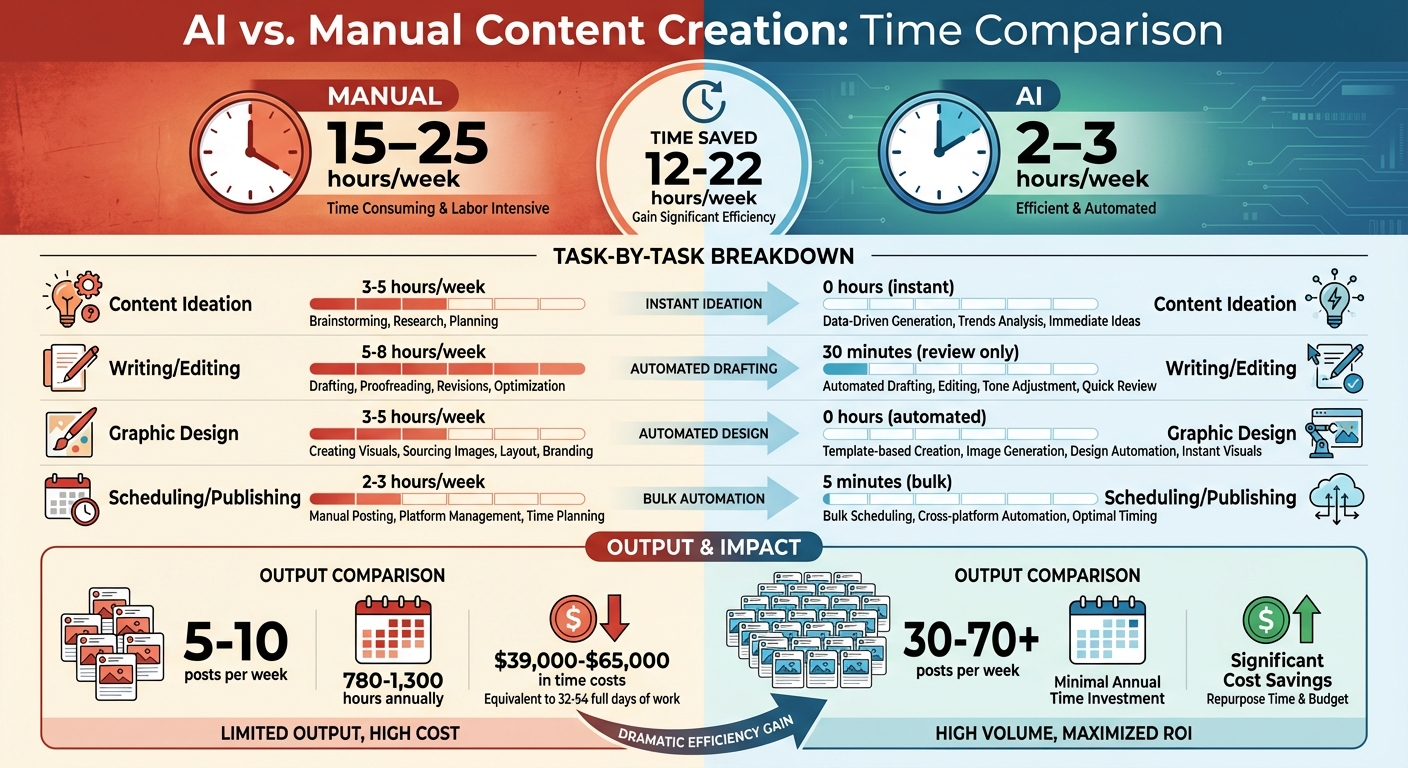
AI vs Manual Content Creation Time Comparison Infographic
The Latest AI-Powered Content Creation Workflow for Business (Speed Challenge!)
sbb-itb-9f5fe42
How Much Time Manual Content Creation Takes
Creating content manually takes a considerable amount of time. For small business owners, this often means dedicating 15–25 hours per week to the task. Over the course of a year, that’s 780–1,300 hours, or roughly 32–54 full days of work. If you’re a solo founder, this translates to a time cost of $39,000–$65,000 when valued at $50/hour.
And here’s the kicker: writing itself only accounts for 30–40% of the total time spent on content. The rest is consumed by tasks like research, formatting, and administrative work - steps that are often underestimated. For example, writing an 800–1,500-word blog post can take 5.5–10 hours, while crafting a long-form guide of 2,500–4,000 words demands 12–22 hours.
"The real bottlenecks: It's not writing. Topic ideation and brief creation (15–20% of time)... Approval and review cycles (20–30% of elapsed time)... Publishing and formatting (often underestimated)." - Averi
Here’s a closer look at how the time breaks down across different stages:
Content Ideation and Planning
Coming up with content ideas is a surprisingly time-intensive process. It can take 3–5 hours per week, involving tasks like topic research, competitor analysis, and drafting content briefs. For solo marketers, this phase makes up 15–20% of the total production time. Many creators also lose time battling "blank screen syndrome" - staring at an empty document or endlessly scrolling through competitor feeds for inspiration.
Writing and Editing
The actual writing and editing process takes 5–8 hours weekly, adding up to 260–416 hours annually. Depending on experience, writers spend 4–10 hours crafting a 1,500-word blog post. On top of that, the average B2B blog post goes through 2.3 review cycles, with each cycle adding 1–3 business days to the timeline.
Designing and Formatting
Design and formatting are often overlooked but can be major time sinks. Creators spend 3–5 hours per week (or 156–260 hours annually) on tasks like creating graphics, resizing images for various platforms, and designing carousels with AI tools. For instance, producing a single Canva image can take 45 minutes or more. Then there’s CMS formatting - adding links, optimizing images, and configuring meta tags - which takes an additional 45–90 minutes per post.
Scheduling and Optimization
Even scheduling content isn’t as quick as it sounds. Between hashtag research and timing posts, creators spend 2–3 hours weekly, which amounts to 104–156 hours annually. In regulated industries like FinTech or HealthTech, legal and compliance reviews can further extend the timeline by 3–7 days, regardless of how quickly the content was written. These hours add up, eating into time that could otherwise be spent on strategic business priorities.
AI Content Creation with Draft AI: A Faster Method
Compared to traditional manual approaches, Draft AI dramatically speeds up content creation. Tasks that once took hours can now be completed in just minutes. For instance, you can generate full content assets in as little as two minutes. Powered by GPT-3 natural language processing, this platform analyzes patterns and produces human-like text quickly, turning raw ideas into polished posts, carousels, and scripts.
How Draft AI Works
The process is simple: start by recording a 30-second to 2-minute voice memo, and Draft AI will transcribe, structure, and design your content. Alternatively, you can input text directly. Next, choose your desired format - whether it’s a LinkedIn carousel, Instagram Reel script, or an X thread - and the AI generates the content in your personal writing style. The tool adapts to your unique voice, terminology, and brand personality, ensuring the output feels like it was written by you, not a machine.
Draft AI also addresses the challenge of getting started with its viral hook generator. By sharing details about your business or blog, the platform creates a stack of content ideas displayed as swipeable cards (imagine Tinder, but for content). Save the ideas you like and use them later to craft new posts. This feature alone can help you generate three times more ideas in the same amount of time compared to manual brainstorming.
Beyond these features, Draft AI offers tools designed to save even more time and effort.
Features That Save Time
Draft AI simplifies content creation with several time-saving tools. Ready-to-use templates come with pre-designed layouts for carousels and posts, allowing you to customize fonts, brand colors, and sizing with ease. The multilingual translation feature enables instant adaptation of content for global audiences, eliminating the need for translators or hours of language research. Additionally, the personal writing styles feature analyzes your existing content to replicate your unique tone, significantly reducing the time spent on editing.
Repurposing content is another standout feature. A single voice memo can be transformed into multiple formats - Instagram carousels, LinkedIn slides, Reel scripts, X threads, and story scripts. Research tasks, which typically take up 32% of a marketer’s week, can be cut down by 60% with Draft AI.
These tools collectively lead to impressive time savings each week.
Weekly Time Savings with Draft AI
Manually creating content for a single channel can take 5–10 hours per week, resulting in around 5–10 posts. With Draft AI, that workload drops to just 2–3 hours weekly, while output increases to 30–70+ posts. Tasks that would normally require 30–45 minutes can be completed in about 10 minutes using AI. Visual design time is reduced by 70% thanks to automated formatting and layouts. On average, marketers using AI tools save 2.5 hours per day, while teams work 40% faster and produce content that’s 20% higher in quality. Generative AI can automate or speed up 60–70% of the work involved in content creation, leaving more time for strategic planning, audience engagement, and other activities that help grow your business.
Manual vs. AI Content Creation: Time Comparison
Creating content manually demands a significant time investment - 15 to 25 hours each week. This translates to an annual cost of $39,000 to $65,000. With Draft AI taking over the bulk of the work, that weekly commitment shrinks dramatically to just 2–3 hours, requiring only a quick review.
AI simplifies the process by automating repetitive tasks to accelerate production. Take content ideation, for instance: manually, it might take 3–5 hours a week, but Draft AI generates ideas instantly. Writing and editing, which could consume 5–8 hours manually, are reduced to just 30 minutes of review time. Graphic design? What used to take 3–5 hours is fully automated. Even scheduling and publishing, which typically require 2–3 hours, take only about 5 minutes when done in bulk.
The efficiency gains don’t stop there. While manual workflows yield around 5–10 posts per week, Draft AI empowers teams to produce 30–70+ posts in the same period. The contrast in time and output highlights the transformative impact of AI on content creation.
Time Comparison Table
Here’s a side-by-side breakdown of the time saved with AI-driven content creation:
| Task | Manual Time (Weekly) | AI Time with Draft AI (Weekly) |
|---|---|---|
| Content Ideation | 3–5 hours | 0 hours (instant AI generation) |
| Writing/Editing | 5–8 hours | 30 minutes (review only) |
| Graphic Design | 3–5 hours | 0 hours (AI generated) |
| Scheduling/Publishing | 2–3 hours | 5 minutes (bulk approval) |
| Total Weekly Time | 15–25 hours | 2–3 hours |
| Posts Produced | 5–10 posts | 30–70+ posts |
| Time Saved | - | 12–22 hours |
Source:
Using Both AI and Manual Methods Together
You can streamline content creation by blending AI for repetitive tasks with human oversight for critical content. AI tools like Draft AI handle routine elements, while manual review ensures the final product aligns with your brand and maintains quality.
"Think of AI content creation like flying an airplane - autopilot does a lot of the work, but there's always a human in the cockpit making flight adjustments." - John Thomas, Draft
A tiered approach works best: 60% AI-driven content, 30% hybrid (AI plus human editing), and 10% fully manual content. Studies show that hybrid content - AI drafts refined by humans - earns a 39.1% page 1 ranking rate, outperforming pure AI (36.2%) and fully human-created content (31.4%).
Here’s how to strike the right balance between AI efficiency and human input.
Using AI for Routine Tasks
AI tools like Draft AI excel at handling repetitive tasks. They can instantly generate ideas, create outlines, and produce first drafts, saving hours of work. For regular posts, quick updates, or daily engagement, AI is a time-saver.
One standout feature is the voice-first capability, which turns voice memos into polished carousels, scripts, or text posts. This eliminates the dreaded blank-page syndrome and ensures your natural phrasing comes through while speeding up the process.
Manual Review for Important Content
While AI can handle the heavy lifting, human oversight is essential for high-stakes content. Precision tasks like maintaining your brand's tone, ensuring factual accuracy, and crafting strategic messaging require a human touch. AI might generate content quickly, but it lacks the context of your market, audience preferences, and the subtleties that make your content resonate.
To balance speed and quality, set strict time limits for reviews: 15 minutes for routine posts and 30 minutes for cornerstone content. During this review, focus on fact-checking, adding insights unique to your brand, and refining any awkward phrasing. Remove or rewrite AI-generated sections that don’t fit your voice. Aim to adjust 10–20% of the AI draft - just enough to add value without negating the time saved.
Conclusion
The time comparisons above highlight a clear advantage: AI dramatically reduces the hours spent on content creation. While manual efforts can take 4–6 hours per post, AI slashes that down to just 30–45 minutes. What used to consume an entire afternoon can now be wrapped up in a single morning.
Draft AI handles the most tedious parts of content creation - cutting research time by 60%, trimming design work by 70%, and speeding up drafting by 40%. This means you can redirect your focus to strategy and growth, where your expertise truly shines.
For marketers, this shift is transformative. On average, AI tools save 2.5 hours per day, with 85% of creators reporting faster workflows thanks to AI. A real-world example? Giesswein, after adopting an automated content creation system in early 2026, went from publishing less than two posts a month to daily publishing. The result? Over €2 million in additional organic revenue.
With Draft AI, you don’t have to sacrifice quality for speed. Let the tool handle the groundwork, then spend just 15–30 minutes on a final review to ensure your personal touch shines through.
The takeaway is simple: use AI for routine tasks, and reserve your time for content that demands your expertise. Ready to see the difference? Try Draft AI for free and discover how much time you can save on your next post. It’s not about automating everything - it’s about reclaiming your hours for what matters most.
FAQs
How do I keep my brand voice when using Draft AI?
To keep your brand voice consistent while using Draft AI, start by clearly documenting your tone, style, and messaging guidelines. Tools like Style Definition Documents and Custom Instructions can help ensure the AI's output matches your brand's personality. You can also train the AI using examples of your best-performing content, giving it a solid foundation to work from. Regularly reviewing the AI's work is key to maintaining alignment with your brand. For sensitive or nuanced content, human editing is still crucial to ensure the messaging feels genuine and stays true to your brand’s identity.
What should I review manually before publishing AI content?
Before putting AI-generated content out into the world, it's essential to give it a thorough manual review. Focus on factual accuracy, clarity, tone, and overall coherence. While AI can catch basic issues like spelling mistakes, a human touch ensures the content aligns with your brand's voice and truly connects with your audience.
Pay attention to grammatical errors, inconsistencies, and formatting problems to maintain a professional appearance. This review process is vital for capturing subtle context and ensuring the messaging stays on point.
How can I turn one voice memo into multiple posts with Draft AI?
Draft AI makes content creation effortless with its voice-to-content feature. Here's how it works: you record or upload a voice memo, and the app does the rest. It transforms your memo into multiple types of content, like Instagram carousels, LinkedIn threads, or video scripts.
What sets it apart? It doesn't just convert your words - it crafts eye-catching layouts and attention-grabbing hooks designed to resonate with audiences. You can review the generated options, pick your favorites, and save them, all without lifting a finger to type. It's a simple way to speed up your workflow and focus on your ideas instead of the manual work.


