How AI Improves Carousel Engagement
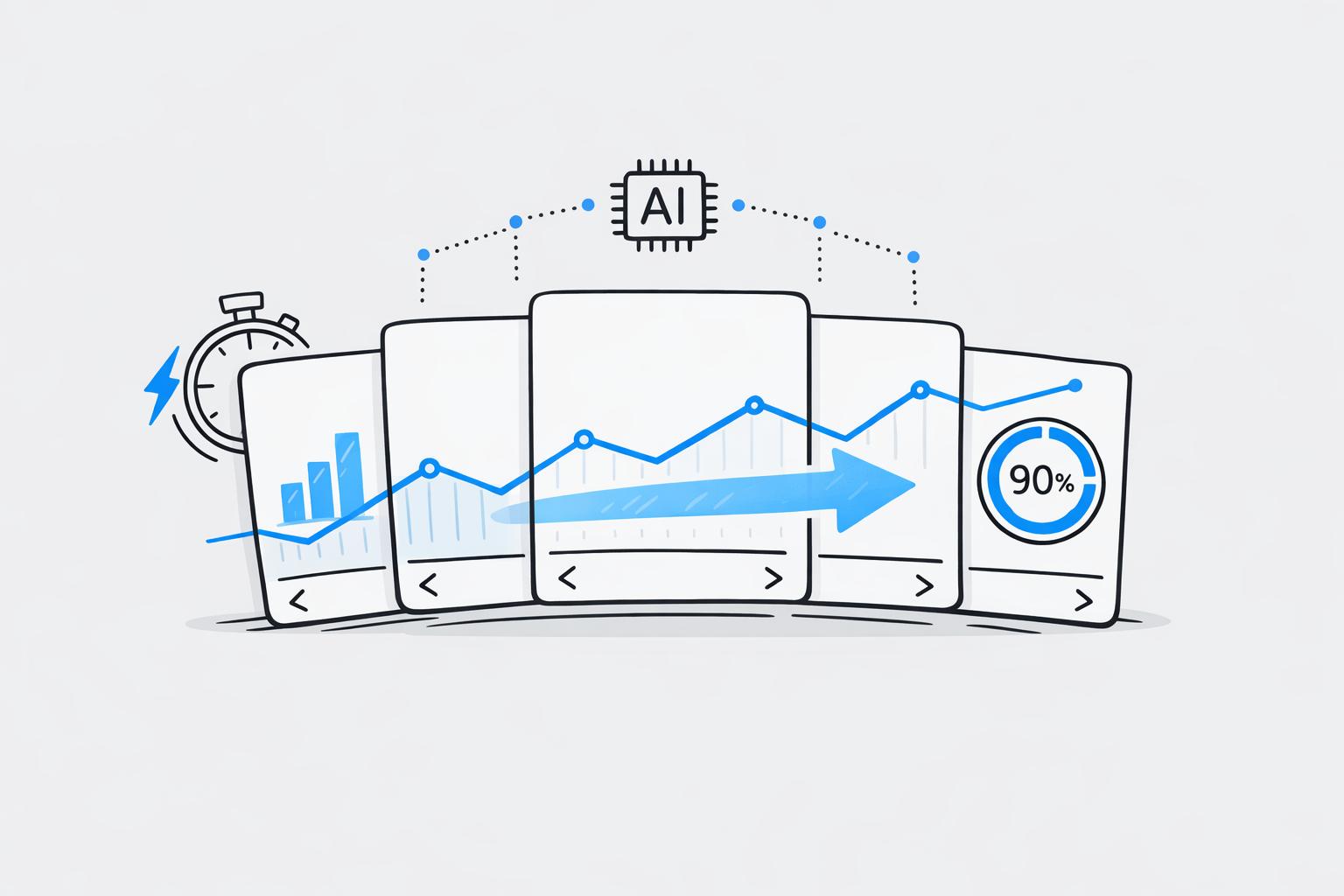
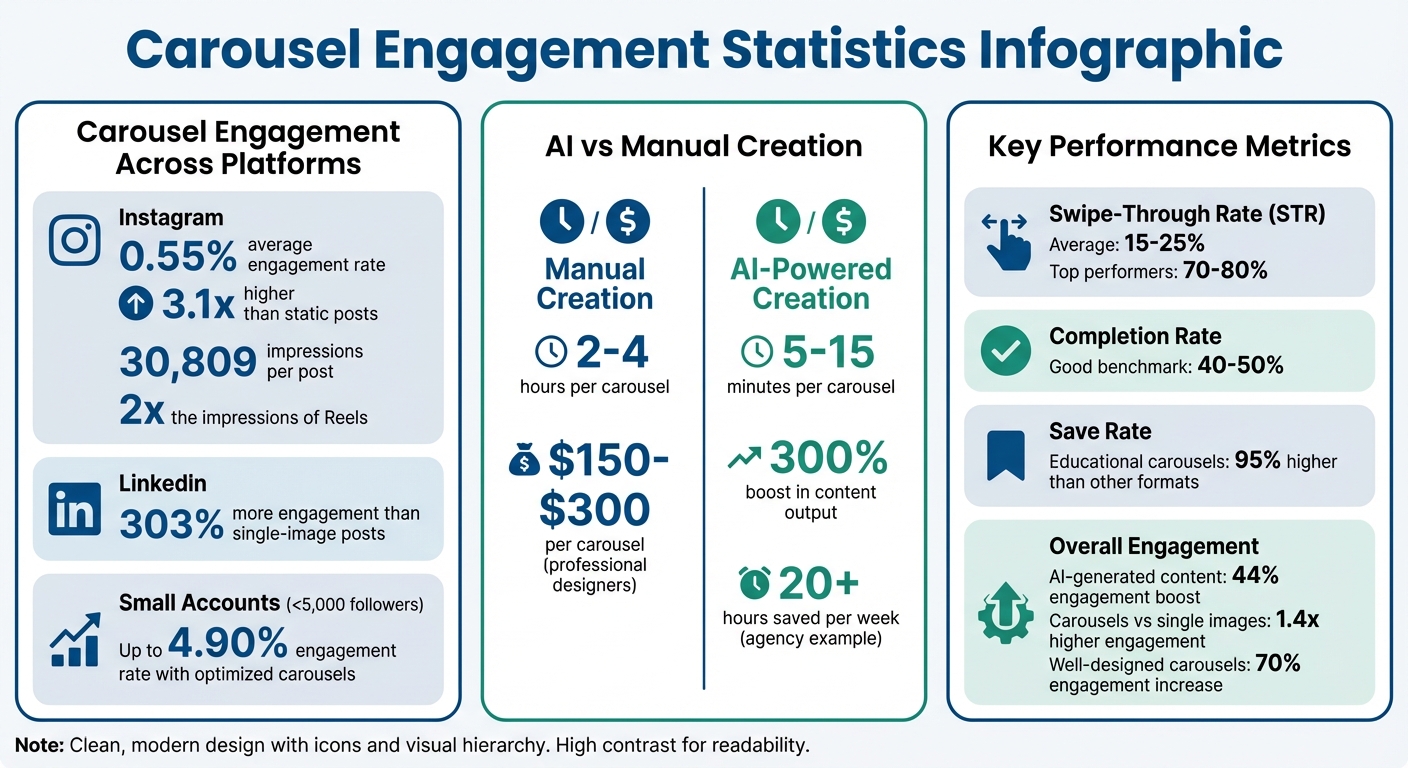
Carousels are dominating social media in 2026, driving higher engagement rates compared to static images or Reels. On Instagram, carousels average 0.55% engagement (3.1x higher than static posts) and 30,809 impressions per post - double that of Reels. LinkedIn carousels see 303% more engagement than single-image posts. However, creating these can take 2–4 hours manually, making it challenging for consistent posting.
AI tools like Draft AI solve this by reducing carousel creation time to 5–15 minutes. They handle everything from writing hooks and captions to designing layouts, enabling you to focus on strategy. AI also tracks metrics like swipe-through rate (STR) and completion rate, helping refine content based on real-time data. For instance, high-performing carousels achieve STRs of 70–80% and completion rates of 40–50%.
AI-powered platforms not only streamline design but also personalize content for different platforms and languages, ensuring relevance across diverse audiences. With built-in analytics, they identify what works - like engaging hooks or optimal layouts - and predict performance before posting. This makes creating carousels faster, data-driven, and more effective, allowing you to create social media posts in minutes.
Carousel Engagement Statistics: AI vs Manual Creation Performance Metrics
Key Carousel Engagement Metrics
Metrics That Define Carousel Success
Understanding the right metrics can shape your strategy for carousel posts. One of the most telling indicators is the swipe-through rate (STR), which measures the percentage of viewers who move from the first slide to the last. It’s calculated using this formula: (Number of users who viewed the last slide / Number of users who viewed the first slide) x 100. On average, a solid STR falls between 15% and 25%, but top-performing carousels can hit an impressive 70–80%.
Another critical metric is the completion rate, which tracks how many viewers swipe through every slide in your carousel. A good benchmark for this is 40% to 50%. This metric helps you understand if your content maintains interest from start to finish. Additionally, dwell time, or the total time users spend engaging with your post, is becoming increasingly important. Social media algorithms now prioritize content that keeps users engaged longer.
Saves hold a special place in engagement metrics. When users bookmark your carousel, it signals long-term value. Educational carousels, for instance, often see a 95% higher save rate compared to other formats. Meanwhile, shares reveal the viral potential of your content, and slide-specific engagement pinpoints which slides resonate most and where viewers lose interest. Together, these insights help refine your approach to carousel design. You can further streamline this process by using AI tools for carousel design to implement these data-driven changes quickly.
Why These Metrics Matter
By tracking these metrics, you can shift from random posting to a more strategic, data-driven approach. For example, if your completion rate drops significantly after a specific slide, it’s a clear sign that your narrative may lose momentum at that point. This insight allows you to adjust by removing weak slides, sharpening your hooks, or improving the overall flow of your carousel.
"The algorithm is designed to show people content that will keep them engaged. When users spend more time with your content through carousel interactions, it signals quality to the platform." - Mari Smith, Facebook Marketing Expert
Strong engagement and longer dwell times send positive signals to social media algorithms, which can boost your organic reach. Even smaller accounts - those with under 5,000 followers - can achieve engagement rates as high as 4.90% by using carousel templates for small businesses to optimize their posts.
sbb-itb-9f5fe42
How AI Improves Carousel Content
AI Content Generation
AI has reshaped the way carousels are created by taking your input - whether it's a topic, a URL, or raw text - and turning it into a structured, multi-slide narrative. This process often follows the tried-and-true "Hook-Middle-CTA" formula, keeping viewers engaged from the first slide to the last. By simply providing details about your business or blog, AI can instantly produce a ready-to-use carousel script.
Advanced models like GPT-4 and Claude play a big role here. These tools analyze high-performing carousels to identify what grabs attention and then apply those insights to your content. The result? Attention-grabbing hooks right on the first slide, whether it's a bold claim, a surprising stat, or a question that sparks curiosity - all designed to catch a viewer's eye in under three seconds.
Platforms like Draft AI take it a step further by helping you brainstorm viral ideas. You can share details about your business or topics, and the AI generates a stack of content cards (think of it like swiping through Tinder). Save the ideas you like, and use them later to build engaging carousels. This process not only speeds up brainstorming but also helps you overcome creative blocks. Once the content is ready, advanced design tools ensure the visuals are just as compelling as the copy.
Design Tools and Templates
AI-powered design tools make it easy to create professional-looking carousels, even if you're not a graphic designer. These tools analyze elements like color psychology and font combinations to maximize readability and engagement. Well-designed carousels can boost engagement by as much as 70% compared to single-image posts.
Features like automatic brand kits ensure your carousels maintain consistent colors, fonts, and logos across all slides, creating a cohesive look that builds trust and strengthens brand recognition. AI even adjusts layouts to display optimally on different social platforms.
Draft AI also provides customizable templates that let you tweak fonts, colors, and layouts. You can upload photos, adjust text, and choose from multiple size options to make your carousel fit perfectly on your target platform. Visual cues, like arrows or images that "bleed" off the edge, encourage viewers to swipe through the slides. With polished visuals in place, AI also ensures your content connects with a variety of audiences.
Personalization and Language Options
One of AI's standout features is its ability to tailor content for specific audience segments. By aligning the copy with user interests, it boosts relevance and engagement. You can even adapt the same carousel for different platforms - for example, using a professional tone on LinkedIn and a more casual style on Instagram - without starting from scratch.
Draft AI also includes multilingual translation, letting you seamlessly switch languages to reach global audiences without needing manual translation. It adapts to your brand voice by following personalized guidelines, ensuring the output aligns with your marketing goals while still feeling natural. By customizing language and tone, you can meet audience expectations and see measurable improvements in engagement.
Tracking and Improving Performance with AI
Using AI to Track Engagement
AI tools are great for tracking key engagement metrics like Swipe-Through Rate (STR) and slide-specific interactions. To put it into perspective, high-performing carousels often hit STR levels of 70–80%, ensuring your message gets across effectively.
These tools go beyond just numbers. They identify where viewers drop off, measure dwell time (how long users linger on multi-slide posts), and even analyze the sentiment behind comments to understand emotional responses. Take this example: in September 2024, a fashion brand used AI analytics to tweak its product carousel. By leading with lifestyle images instead of product shots and adding user-generated content in the middle slides, they saw a 40% jump in swipe-through rates, a 25% boost in overall engagement, and a 50% spike in website click-throughs.
Tools like Draft AI allow you to save multiple versions of your content and directly compare which headlines, visuals, or calls-to-action resonate most. This eliminates the guesswork and provides data-driven insights for consistent improvement.
Testing and Refining Carousels
AI doesn’t just track performance - it helps you refine it. For instance, Draft AI’s Pro plan, priced at $15/month, offers unlimited content iterations. This means you can experiment as much as you need to find the winning combination. A digital marketing agency managing five clients shared that implementing AI tools saved them over 20 hours a week while boosting their content output by 300%.
When testing, focus on one variable at a time, like the opening hook or call-to-action, to pinpoint what drives results. AI can also predict how a carousel might perform before it even goes live by analyzing historical data. This predictive edge helps fine-tune your content ahead of time, setting it up for success.
How to Create Carousels with Draft AI
Step 1: Upload Your Content
Start by either recording your voice - speak for 30 seconds to 2 minutes to capture industry-specific terms and your tone - or directly input raw text or business details. The platform then generates multiple post variations designed to cover an entire week. Keep in mind, Draft AI works on iOS 18.0 or later and supports English, Russian, and Spanish.
Step 2: Choose Your Content Ideas
Once your content is uploaded, Draft AI's Ideas Generator steps in with a stack of viral content ideas, each featuring attention-grabbing hooks. These ideas are displayed as cards you can swipe through - right to save an idea, left to skip it. The more you swipe, the smarter the AI becomes, tailoring suggestions to fit your preferences. When you've selected an idea you like, you're ready to move on to the customization phase and start designing your carousel.
Step 3: Customize and Export
After picking your favorite idea, head into the onboard editor to make it your own. You can choose from over 10 professionally designed templates, upload your own images, tweak fonts, and adjust layouts while the AI ensures optimal text placement. Once your carousel design is complete, export it as a PNG for Instagram, a PDF for LinkedIn, or share it directly to your social media accounts. Draft AI also formats your content for platforms like Instagram, LinkedIn, TikTok, X (Twitter), and YouTube Shorts, saving you even more time.
Create Viral Instagram Carousels in 40 Seconds
Conclusion
AI has turned carousel creation into a task that takes just 15 minutes, instead of hours. Forget the hassle of struggling with complicated design tools or spending $150–$300 per carousel on professional designers. Tools like Draft AI let you simply speak your ideas or paste raw text to create polished, ready-to-post content.
Research shows that AI-generated content can boost engagement by 44%, and carousel posts outperform single-image posts by 1.4× in engagement. By combining speed with smart design principles - like optimized color schemes, easy-to-read fonts, and well-placed text - AI helps you work faster and more effectively. It’s not just about saving time; it’s about ensuring your content resonates with your audience.
What sets AI apart is its ability to eliminate guesswork. Instead of wondering what hook will grab attention or which layout will encourage swiping, AI uses data to figure out what works. With Draft AI's Ideas Generator, you get swipeable cards filled with viral content ideas, tailored to your preferences. The more you use it, the smarter it gets, ensuring each carousel hits closer to the mark with your unique audience.
FAQs
What makes a carousel “high-performing”?
A well-crafted carousel grabs attention, keeps viewers engaged longer, and effectively communicates a story through eye-catching and thoughtfully designed slides. Achieving this often involves using design choices informed by data and fine-tuning content to connect with the audience.
Which metrics should I track first for carousels?
To get the most out of your carousel content, keep an eye on three key metrics: swipe-through rate (STR), engagement rate, and dwell time. These numbers offer a clear picture of how users are interacting with your posts. By analyzing them, you can gauge performance and fine-tune your approach to make your content more impactful.
How can Draft AI help improve my carousel results over time?
Draft AI improves carousel performance by leveraging data insights and automation to produce visually engaging content at speed. It allows for frequent testing of different designs, messaging, and hooks, helping you pinpoint what connects best with your audience. By analyzing performance metrics, it offers actionable suggestions to fine-tune your content, ensuring your carousels are consistently tailored to boost engagement effectively.


