AI Retargeting Campaigns: Best Practices
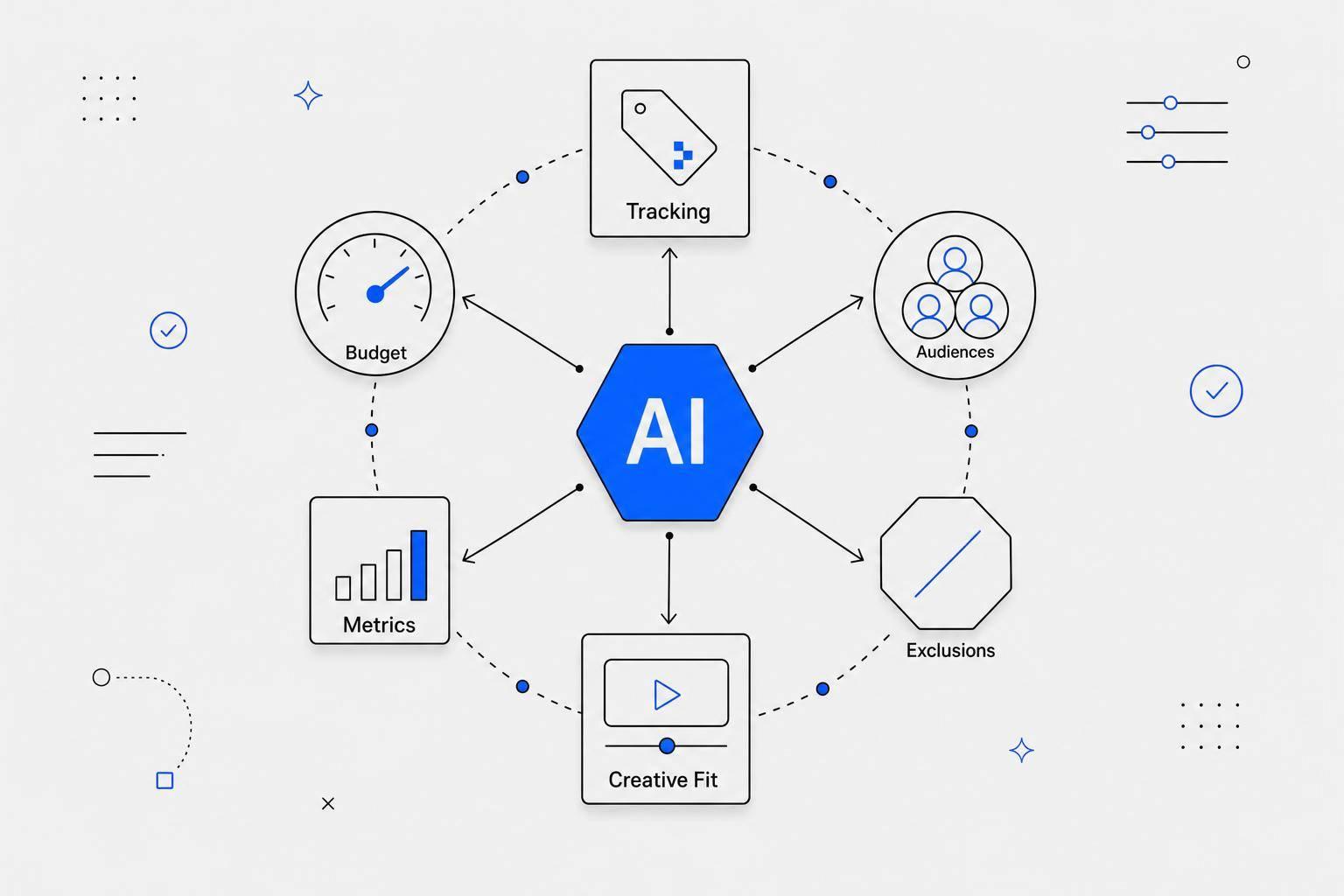
Most retargeting wins or loses on 5 things: tracking, audience size, exclusions, ad-message fit, and budget control. If I get those right, AI can help me cut CPA, push more spend to high-intent users, and improve ROAS. If I get them wrong, the system learns from bad data and wastes money.
Here’s the short version:
- I set one goal per campaign: purchases, cart recovery, or lead conversion.
- I make sure my pixel + CAPI are both working, because pixel-only setups can miss 20% to 40% of conversions.
- I group people by intent and recency: viewers, cart abandoners, checkout abandoners, and past buyers.
- I keep audiences large enough to deliver, usually aiming for 1,000+ users per ad set when possible.
- I exclude recent buyers and lower-funnel overlap, since poor exclusions can waste 5% to 12% of spend.
- I match the ad to the action: viewed product, abandoned cart, or post-purchase upsell.
- I watch CPA, ROAS, CTR, conversion rate, frequency, and EMQ in a separate retargeting view.
- I start budgets small - often $10 to $50/day per ad set - then scale by 10% to 20% every 3 to 5 days.
A few benchmarks help me stay grounded: retargeting often drives 3x to 5x higher ROAS than cold traffic, and many small businesses keep it at 15% to 30% of total ad spend. Warm traffic can perform far better than prospecting - but only when the setup is clean.
| Area | What I focus on | Simple target |
|---|---|---|
| Tracking | Pixel, CAPI, event deduplication | Clean event flow |
| Audiences | Intent + recency buckets | 2–4 audience groups |
| Size | Enough data for delivery | 1,000+ users when possible |
| Exclusions | Recent buyers, funnel overlap | Fewer wasted impressions |
| Budget | Slow scaling | +10% to 20% every 3–5 days |
If I treat AI retargeting like a data and delivery system - not just an ad toggle - I give it a much better shot at producing profit.
How to Run Retargeting Ads in 2026 (Drive More Sales)
sbb-itb-9f5fe42
Build the Right Data and Audience Foundation Before Turning On AI
AI retargeting lives or dies on event data. If tracking is off, the system learns from bad inputs and your budget leaks fast. So before you launch anything, make sure event capture is clean and reliable.
Install Pixels, Conversion APIs, and Key Events Correctly
A browser pixel by itself isn't enough anymore. If you don't run a server-side Conversions API (CAPI) alongside your pixel, you're probably missing 20% to 40% of your conversion data because of iOS limits and ad blockers. Adding CAPI can bring that data back and grow your audience pool by 40% to 55% compared with pixel-only setups.
After both are in place, check that standard events are firing at each stage of the funnel:
ViewContentAddToCartInitiateCheckoutPurchaseLead
If you're using Aggregated Event Measurement (AEM), rank your top eight events by business value. That tells the platform which signals to use first when data gets thin. Use the Meta Pixel Helper Chrome extension and the Events Manager test tool to verify that each event fires the way it should. To avoid double-counting, pass a unique event_id that matches across both your pixel and CAPI calls.
You should also review your Event Match Quality (EMQ) score in Meta Events Manager. Aim for 7.0 or higher. If you're below 6.5, that's usually a sign that something in the data setup is off, and AI performance will suffer.
Get tracking live before launch so audience data has time to build. Once the setup is clean, the next move is to sort visitors by intent and timing.
Group Retargeting Audiences by Intent and Recency
Not every visitor has the same buying intent. A person who glanced at your homepage 90 days ago is nothing like someone who hit the checkout page yesterday and bailed. Treating them the same burns money on weak traffic and leaves your hottest prospects under-served.
A simple way to set this up is to group people by what they did and how recently they did it.
| Segment | Intent Level | Recommended Window |
|---|---|---|
| All Visitors | Low | 30 Days |
| Product/Service Viewers | Medium | 14 Days |
| Cart Abandoners | High | 7 Days |
| Checkout Abandoners | Very High | 3 Days |
| Past Purchasers | Retention | 90–180 Days |
For high-intent groups like cart and checkout abandoners, shorter windows help keep the audience current and the message timely. If your sales cycle is longer, 90- to 180-day windows can work for past purchasers and other retention groups.
One mistake to avoid: slicing audiences into tiny segments. Give AI enough volume to learn. In most cases, 2–3 broad intent buckets work better than a pile of small lists. Meta needs at least 100 users for a custom audience, but in practice, 1,000+ is a better floor for steady delivery.
Those buckets then feed the next layer of control, like exclusions, frequency limits, and burn windows.
Handle Privacy, Consent, and Suppression Lists
Privacy rules shape both match rates and reach. Use a clear privacy policy, and keep your suppression lists up to date so retargeting only hits people you're allowed to reach.
There's also a direct budget angle here. Build a "Purchasers" custom audience covering the last 30 to 90 days and exclude it from acquisition campaigns. If someone just bought, showing them conversion-heavy ads again is an easy way to waste spend. And if your CRM is connected, upload hashed email lists each week to keep exclusions current and first-party data in good shape.
With that audience base in place, the next step is getting tighter control over delivery efficiency.
Structure Audiences and Ad Delivery Rules So AI Can Spend Efficiently
Once tracking is clean and your intent buckets are set, the next move is simple: give the AI clear rules for where money should go. That starts with organizing audiences by funnel stage, pulling out high-value users, and setting delivery rules that cut wasted impressions. From there, exclusions, caps, and burn windows help keep spend under control.
Segment by Funnel Stage, Value, and Buying Signals
Split audiences by intent and customer value, but keep each group big enough for the system to learn. In most cases, 3–4 tiers work better than a pile of tiny segments.
Funnel stage is one layer. Customer value is another. Your top 20% LTV customers and high-value cart abandoners should sit in their own segment so you can give them stronger offers and higher bid caps. Meta's delivery system needs enough volume to get out of the learning phase, so aim for at least 1,000 users per ad set when possible.
Use this table as a guide for how delivery should shift by tier:
Delivery Priority Table
| Funnel Stage | User Behavior | Audience Window | Example Objective |
|---|---|---|---|
| Upper Funnel | Video viewers (50%+), social engagers | 7–30 Days | Brand Awareness / Engagement |
| Mid Funnel | Product page viewers, category browsers | 1–14 Days | View Content / Traffic |
| Bottom Funnel | Add-to-cart, checkout initiators | 1–7 Days | Sales (Catalog/DPA) |
| Post-Purchase | Past buyers, repeat customers | 30–180 Days | Retention / Upsell |
Set Exclusions, Frequency Caps, and Burn Windows
Exclude higher-intent audiences and purchasers from lower-intent ad sets. If you don't, you can end up paying to show ads to people who already moved further down the funnel. Even skipping exclusions for recent purchasers can waste 5–12% of ad spend.
Frequency should change based on intent. People closer to buying can handle more repetition. Broader audiences usually can't.
- High-intent audiences like checkout abandoners can handle 5–7 impressions per week.
- Mid-funnel product viewers tend to do better at 3–5 impressions per week.
- Upper-funnel audiences should usually stay around 1–2 impressions per week to avoid ad fatigue.
Burn windows act like stop dates. Use 30 days for most products, 7 days or less for hot leads, and 90–180 days for retention. After that window closes, stop retargeting and shift non-converters into email or organic follow-up.
Once delivery is under control, match the creative and offer to the audience's intent. Using the best content creation tools can help you produce these variations at scale.
Match Creative, Offers, and AI Testing to What Each Audience Did
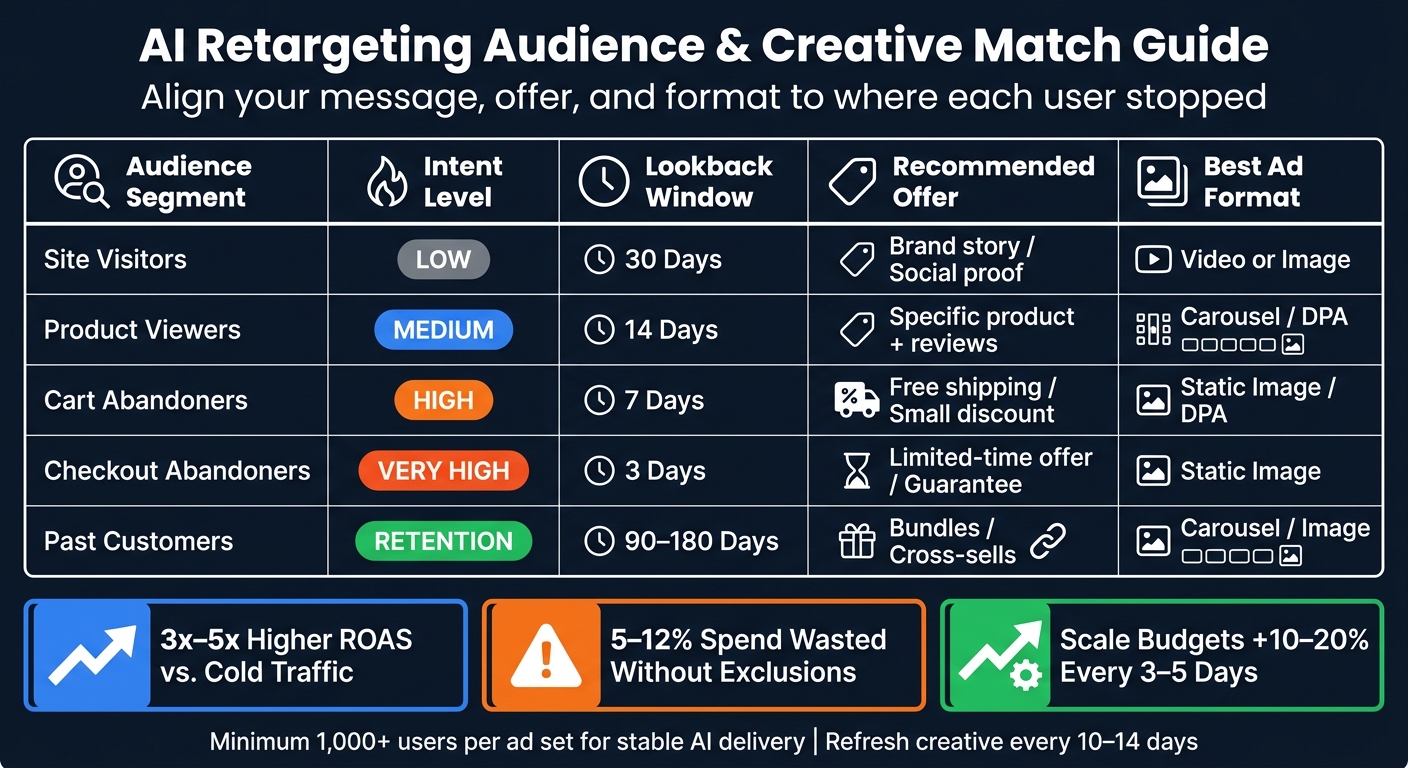
AI Retargeting Audiences: Intent Segments, Windows & Ad Strategy
Now take those same intent tiers and apply them to the message and offer. Targeting rules and audience segments help, but they only go so far if the ad itself doesn’t match what the person did.
A generic brand ad shown to someone who just left checkout? That’s a miss.
The message, format, and offer should line up with the exact point where that person stopped.
Show the Right Offer to Each Retargeting Segment
Match the ad to the action. Product viewers should see the product they viewed. Cart abandoners need urgency and help getting past friction. Past customers usually respond better to bundles or cross-sells.
Use static images for most retargeting. Use video only when the audience needs more context.
| Audience Type | Recommended Offer | Message Angle | Preferred Format |
|---|---|---|---|
| Site Visitors (30d) | Brand story / Social proof | "See why 10k+ people love us" | Video / Image |
| Product Viewers (14d) | Specific product + reviews | "Still interested?" | Carousel / DPA |
| Cart Abandoners (7d) | Free shipping / Small discount | "Your cart is waiting" | Static Image / DPA |
| Checkout Abandoners (3d) | Limited-time offer / Guarantee | "Complete your order now" | Static Image |
| Past Customers (90d) | Bundles / Cross-sells | "New arrivals for you" | Carousel / Image |
One simple upgrade: swap vague urgency like "limited time offer" for a clear deadline. "Sale ends Sunday" feels more concrete and creates stronger urgency.
Use Draft AI to Produce Ad Variations Faster
When you need more variations in less time, use Draft AI to turn product notes, objections, or voice notes into ad copy, carousel cards, and short scripts.
That’s handy when you’re testing angles across several retargeting groups and don’t want every ad to sound the same.
Rotate Creative Often and Test One Variable at a Time
Creative fatigue shows up fast in retargeting, often faster than marketers expect. Refresh small retargeting pools every 10–14 days. For high-spend pools, refresh sooner if CTR drops 25% from its peak.
When results slide, test one variable at a time - headline, CTA, image, or offer. That’s the only clean way to see what changed performance.
If CTR drops 25% or more from its peak, start with the creative format before changing the message.
Static images should handle most retargeting. Video makes more sense when the audience needs extra context. A sequential setup can also help stretch creative life: start with a product reminder, then test a testimonial, then test a discount.
Manage Budgets, Read the Metrics, and Scale What Works
Good ads and clean audiences can only take you so far. If you misread the numbers, or you change things too fast, the AI doesn't get enough time to learn.
Track CPA, ROAS, CTR, and Conversion Rate Separately for Retargeting
Retargeting often delivers 3x to 5x higher ROAS than cold prospecting, so blended reporting can hide what's doing the work.
For small businesses, retargeting usually fits at 15% to 30% of total ad spend. But if your audience is under 5,000 people, keep retargeting at 15% or less of your total ad budget so you don't burn through the same users and hit frequency ceilings.
Start with $10 to $50 per day per ad set. That gives the AI room to gather data without wearing out a small audience too fast. Then scale budgets by 10% to 20% every 3 to 5 days. Bigger jumps can kick the AI back into learning and interrupt the progress you've already built.
Use a 1-day click attribution window if you want a cleaner ROAS read. The standard 7-day window can make retargeting look better than it is by giving credit to people who may have converted anyway.
If results flatten out, check things in this order: signal, audience size, frequency, creative, then offer.
A Simple Diagnostic Workflow for Fixing Weak Performance
When a campaign slips, go one step at a time: signal first, then audience size, then frequency, then creative, then offer. If you change several things at once, you won't know what caused the swing.
The table below links common metric patterns to the most likely problem and the best next move.
| Metric pattern | Likely issue | Priority fix | Next test |
|---|---|---|---|
| Low impressions | Audience too small or tracking gap | Expand lookback window (e.g., 7d to 30d) | Verify CAPI/Pixel signal health |
| High CTR / low conversion rate | Landing page friction or slow load | Optimize page speed (target <2.5s) or simplify checkout | Test a friction-removing offer (e.g., free shipping) |
| High frequency, low CTR | Creative fatigue | Rotate ad visuals and copy immediately | New creative format (video vs. carousel) |
| High CPA / low frequency | Weak offer or poor audience-message match | Change the primary hook or discount level | Test social proof/UGC vs. direct product shots |
| High ROAS / low spend | Budget bottleneck | Increase daily budget by 10% to 20% | Broader intent segments |
Check EMQ in Meta Events Manager. If it's below 6.0, your signal quality is too weak for dependable retargeting. Fix that before you touch anything else.
Conclusion: Core Rules for High-ROI AI Retargeting Campaigns
Once the data is stable and the budget is under control, scale only the segments that show profit.
AI does most of the heavy lifting in retargeting, but it needs the right setup. That means accurate tracking, intent-based audience segments, clean exclusions, and creative that matches what each person actually did.
Keep budgets modest until the AI has enough data to learn. Scale in small steps. Test one variable at a time. Move spend toward the segments delivering the best CPA and ROAS.
FAQs
How long should I wait before judging retargeting results?
Don’t judge retargeting results too early. The better way to look at performance is this: is the campaign moving people through the funnel? That matters more than staring at one metric on its own.
Retargeting also needs enough data before you can trust the read. Meta usually needs about 50 conversions per week per ad set to optimize well. If your audiences are too small, combine segments or extend lookback windows before you make the call.
What should I fix first if my retargeting CPA is too high?
Start with a signal audit in Meta’s Events Manager to make sure your data is clean. If your Event Match Quality score is below 6.0/10, missing audience data may be dragging down optimization.
Next, set up server-side tracking with the Conversions API (CAPI). Once signal quality checks out, merge fragmented, low-performing audiences into 3 to 4 behavioral tiers, like hot, warm, and lapsed.
When should I use separate campaigns instead of one retargeting campaign?
Use separate retargeting campaigns or segmented ad sets when different groups need different messaging.
For example, site visitors, product viewers, and cart abandoners usually aren't at the same stage. Someone who glanced at a page once needs a different nudge than someone who left items in their cart. Splitting these audiences often improves ROAS compared with running one catch-all campaign.
That said, only do this when you have enough data to support the split - about 50–100 conversions per month. Without that volume, performance can get noisy fast.
A couple of guardrails matter here:
- Use exclusions so your audiences don't overlap
- Keep existing customers in a separate retention campaign
This keeps your retargeting cleaner and helps each audience see the message that fits where they are in the buying process.


