AI Templates for Faster Content Creation
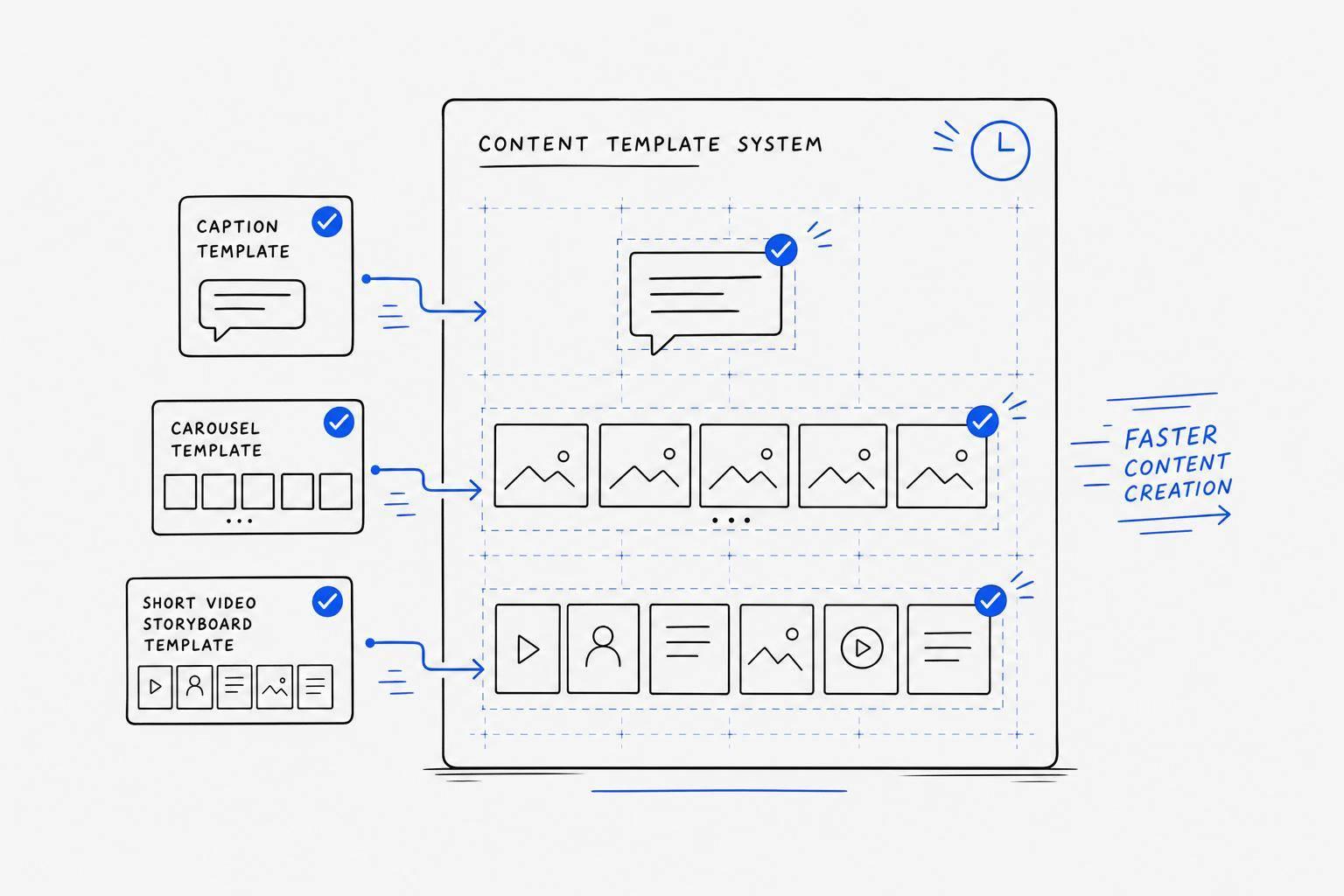
You can cut social content work from about 30–45 minutes per post to under 2–5 minutes when you use AI templates the right way. The main idea is simple: build a small set of repeat-use formats for text posts, carousels, and short video scripts, then batch them once a week.
If I had to boil the article down, it comes to this:
- Use templates, not one-off prompts
- Start with 3–5 content pillars
- Turn one idea into many formats
- Batch work weekly to cut context switching
- Edit AI drafts fast so they still sound like you
- Use tools like Draft AI to go from notes or voice memos to finished drafts
A few numbers stand out:
- Content time can drop from 30 minutes to under 2 minutes per post
- Some teams cut work from 45 minutes to under 5 minutes per post
- Switching between tasks can eat up 40% of content time
- Draft Pro costs $15/month or about $120/year
Here’s the short version: the win is not just faster drafting. It’s building a repeat-use weekly system for captions, carousels, and Reels/Shorts scripts so you can post more often without doing everything from scratch each time.
If you want a simple way to stay consistent, this is it.
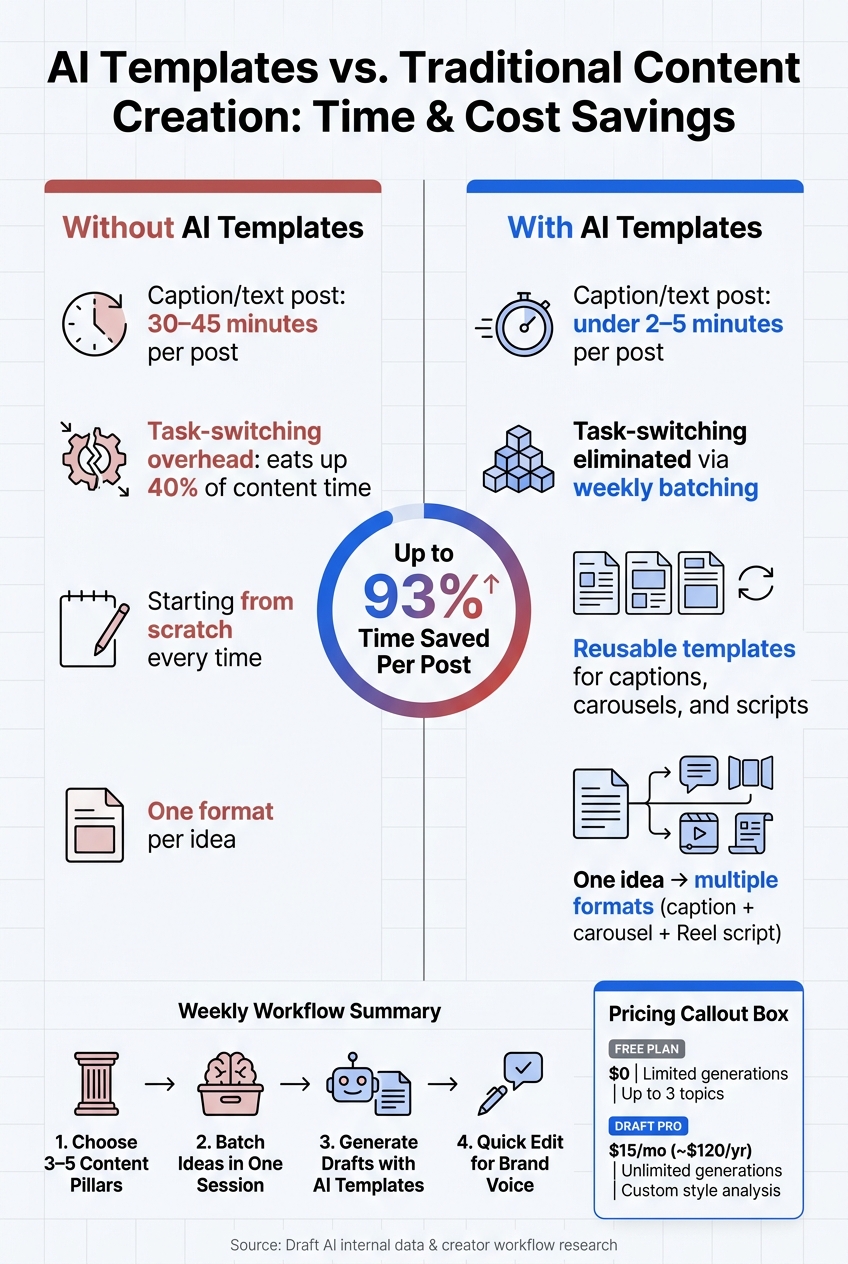
AI Templates vs. Traditional Content Creation: Time & Cost Savings
The Main AI Template Types for Posts, Carousels, and Scripts
Caption and Text Post Templates for Daily Publishing
Caption templates use fill-in-the-blank sections for the hook, the main point, and the CTA. You can also plug in details like product names, offers, or testimonials. That makes them useful for repeat content like weekly recaps, launches, and promos, without writing the same kind of post over and over.
You can sort these templates by content pillar too, such as educational posts, behind-the-scenes updates, customer stories, and promotional updates. That setup makes it much easier to keep your content calendar balanced without starting from zero each time. Once the caption structure is in place, you can carry the same logic into visual formats as well.
Carousel Templates That Turn One Idea Into a Slide-by-Slide Post
Carousels take one idea and stretch it into a multi-slide post on Instagram and LinkedIn. Each slide should do one clear job: hook, explain, prove, or close. With the right template, one input can turn into a full carousel without rebuilding the flow every time.
Three carousel formats handle most day-to-day needs:
- Step-by-step guides - Walk through a process one slide at a time
- Myth vs. Fact - Match a common misunderstanding with the right answer
- Before/After breakdowns - Show a shift or side-by-side comparison across two slides
Draft AI helps speed up carousel design with ready-made layouts, multiple aspect ratios, font and color controls, and image uploads. The same template logic carries over to short-form video too, where timing matters more than layout.
Short-Form Script Templates for Reels, Shorts, and Similar Videos
Short-form scripts tend to work best when they follow a simple flow: a fast hook, a clear problem, an easy-to-follow fix, and a payoff. The hook does most of the heavy lifting. Using a script template cuts planning time before filming, so it's easier to go from idea to camera.
Draft AI offers Expert, Story, and Dialogue-style scripts for Instagram Reels. You can send raw notes or even a voice message, and Draft AI turns that input into a structured script that fits the format.
With these core formats in place, the next step is turning them into a weekly workflow.
sbb-itb-9f5fe42
How to Build a Weekly AI Template Workflow That Saves Time
Start With Content Pillars, Goals, and Realistic Publishing Targets
Before you open any tool, choose 3 to 5 content pillars. These are the main themes your content comes back to again and again. For many small businesses and solo creators, that includes industry tips, behind-the-scenes moments, client wins, product highlights, and personal lessons.
This step matters because clear pillars cut the guesswork. They give your week direction, keep your batch focused, and make planning feel a lot less random. Once you have them, build one week of content at a time around those themes.
After that, set a weekly cadence you can stick with. For most people, a simple weekly batch is easier to keep up than a big monthly session. It helps your content stay current, keeps the tone from getting stale, and makes it easier to use recent performance data. If you want a bit more structure, break the session into separate parts for ideas, writing, visuals, and scheduling. Then match each post idea to one of your pillars so your calendar stays balanced.
Batch Ideas and Turn One Input Into Multiple Content Formats
Batch your posts, carousels, and scripts in one sitting. There’s a practical reason for that: switching between different kinds of content work can eat up to 40% of a creator’s time.
That’s why it helps to start with one strong input and stretch it into a few formats. A voice memo about a customer question, for example, can turn into a caption post, a carousel breakdown, and a short-form video script. From there, you can trim each one into shorter, platform-native versions using the same source material.
A good rule of thumb: start with the longest version first, then work downward. It’s much easier to cut than to build from nothing. That kind of repurposing chain is one of the simplest ways to get more content out of one idea without starting over every time.
Add Editing Rules So AI-Generated Drafts Still Sound Human
A quick 30-second edit can take AI copy from rough to ready. In most cases, the best fixes are small.
- Cut filler transitions like "moreover" or "furthermore."
- Swap vague claims for real numbers, names, or examples from your business.
- Remove the generic ending lines AI often adds.
- Read the draft out loud, and if part of it sounds stiff, rewrite that section.
That last step does a lot of heavy lifting. If it doesn’t sound like something you’d say, it probably needs another pass.
Draft AI’s personal writing styles and template controls can also help keep your brand voice steady across different formats. Once the workflow is in place, Draft AI can turn rough notes or voice messages into publish-ready drafts in minutes.
Using Draft AI to Create Content Faster Without Losing Brand Consistency
From Raw Notes or Voice Messages to Finished Drafts in Minutes
Once your template system is set up, Draft AI can take rough notes and turn them into a first draft FAST. You can drop in messy bullet points or a voice memo and get a draft back in minutes, whether you need a social post, carousel, or Reels script.
Marketers using dedicated AI tools report cutting content creation time from 45 minutes per post to under 5 minutes.
Draft AI also translates drafts for multilingual audiences. That means you can localize one post for different markets without rewriting the whole thing from scratch.
Features That Help Teams Keep Content On-Brand and Easy to Publish
Speed only helps if the output still sounds like you. That’s where custom writing style analysis comes in. This Pro feature learns your brand voice and applies it to new drafts, which makes high-volume publishing a lot less messy.
It also includes font and color customization plus direct photo uploads, so your carousels and text posts stay visually in line with the rest of your brand. Draft AI supports text posts, carousels, Threads and X posts, Reels scripts, and content hooks. And with LinkedIn export, getting content out the door takes less work.
When the Free Plan Works and When Draft Pro Makes Sense
The Free plan gives you enough room to try the workflow before you pay. It includes voice-to-content drafting, language switching, and up to 3 topics.
If you’re posting more often, Draft Pro starts to make more sense. At $15/month or about $120/year, it removes the cap with unlimited generations and unlimited topics. You also get custom style analysis, which helps keep your voice steady as output climbs.
| Plan | Price | Generations | Topics | Style Features |
|---|---|---|---|---|
| Free | $0 | Limited | Up to 3 | No custom style analysis |
| Draft Pro | $15/mo (~$120/yr) | Unlimited | Unlimited | Custom writing style analysis |
I Created 32 Social Media Posts in 10 Minutes Using Claude + Canva
Conclusion: A Simple Template System That Cuts Your Content Workload
AI templates work best when you treat them like a system you can use every week, not a one-off shortcut. That kind of repeatable setup can create social media posts in minutes while helping you publish more.
The best templates are the ones you can use again and again across captions, carousels, and scripts. That’s where the main upside shows up: not in a single draft, but in turning those formats into a weekly workflow that you can stick with.
Even strong templates still need a final edit to protect brand voice. When output goes up, brand voice can drift fast. That’s why the editing pass matters just as much as the template. Draft AI helps keep style steady by learning your voice from raw notes or voice messages and using it in new drafts.
You don’t need a big, complicated setup. A lean system is enough:
- A small set of core formats
- One weekly batching block
- A final review for tone, consistency, and clarity
That structure is what turns AI from a quick drafting tool into a dependable content system.
FAQs
How many templates do I need to start?
You only need a handful of templates to get started - about 3 to 5.
Pick templates you can tweak and reuse across platforms and content types. That saves time and helps keep your content consistent.
How do I make AI-written posts sound like my brand?
Train the AI on examples of your own content, such as past posts, voice recordings, or style guidelines. Draft AI can study your earlier work to pick up your tone, word choice, and sentence patterns, so the content it generates sounds more like you.
For steady post quality, set up a Brand Profile with your business details, brand rules, and SEO requirements. Then fine-tune the output by updating your style guidance and giving feedback on drafts.
What should I batch each week for the biggest time savings?
For the biggest time savings, batch your content work into focused weekly sessions.
Put your energy into:
- Social media posts
- Captions
- Visuals and carousels
- Content ideas and planning
When you group these tasks together, you stop switching gears all day. That alone can save a lot of time. Instead of spending hours on content every day, you can often get it done in just a few hours each week while staying efficient and consistent.


