Ultimate Guide to Social Media Templates by Industry
Social media templates are pre-designed layouts that simplify how you create social media posts that are consistent and visually appealing. But one size doesn’t fit all - each industry and platform demands tailored templates to meet its audience's expectations. Using industry-specific templates can increase engagement by 34% and speed up campaigns by 40%.
Here’s what you’ll learn:
- Why templates matter: Save time, ensure brand consistency, and boost ROI.
- Key template elements: Headline zones, visual areas, and branding cues.
- Industry-specific tips: Fashion, food, real estate, tech, and B2B all require different approaches.
- AI tools like Draft AI: Automate and refine your template-based workflow, cutting content creation time by 45%.
Templates aren’t just about design - they’re about strategy. This guide breaks down how to create templates that fit your brand, engage your audience, and make your workflow more efficient.
Core Principles of Customizable Social Media Templates
Key Elements of an Effective Template
An effective social media template typically includes three essential elements: a headline zone, a visual area, and subtle branding cues like a logo or consistent design features. These components create a cohesive structure that remains consistent across posts, even as the content changes week by week.
When designing templates, it's critical to tailor them to the dimensions of specific platforms. For example, LinkedIn requires a 1,200 × 627px format, while Instagram Stories demand 1,080 × 1,920px. Always account for safe zones - a margin of at least 100px around all edges - to ensure important text and logos aren't cropped by platform interface elements. Here's a quick reference for common platform formats:
| Platform | Format | Recommended Size | Aspect Ratio |
|---|---|---|---|
| Feed (Portrait) | 1,080 × 1,350px | 4:5 | |
| Instagram/TikTok | Stories / Reels | 1,080 × 1,920px | 9:16 |
| Post Image | 1,200 × 627px | 1.91:1 | |
| X (Twitter) | Post Image | 1,600 × 900px | 16:9 |
| YouTube | Thumbnail | 1,280 × 720px | 16:9 |
When testing templates, remember that thin fonts or low-contrast colors tend to disappear on smaller screens. Always preview your designs on a smartphone to ensure they remain clear and engaging.
"Subtle design works in brand guidelines; it fails in social media feeds." - TDS DaaS
Once the template's structure is in place, make sure it aligns with your brand identity to reinforce recognition and trust.
Aligning Templates With Your Brand and Audience
To ensure consistency, develop a brand kit - a central resource that defines your primary and secondary colors, font pairings, logo variations, and image style guidelines. But branding goes beyond visuals. The most memorable templates also reflect your brand's habits. This could mean using a specific border style, a recurring layout, or even a signature opening phrase in captions. As one content strategist explained:
"Templates should carry your brand's habits, not just its hex codes." - PostNitro
Your template design should also be guided by a clear purpose. Decide whether the post’s goal is to inform, attract, persuade, or convert, as this will influence everything from headline size to the placement of your call-to-action (CTA). For example:
- A promo card for a limited-time offer should feature a bold price badge and prominent CTA.
- A thought-leadership post should prioritize clean typography and ample white space.
Trying to combine multiple objectives in a single template often leads to cluttered designs and mixed messages, which can confuse your audience.
"If the post feels crowded in your design file, it will usually feel worse in the live feed. Strip away anything that does not support the main message." - Sense Central
Using AI to Customize Templates
Once your templates have a solid visual and branding foundation, AI tools can simplify customization. These tools handle repetitive tasks while keeping your creative direction intact. For example, Draft AI allows you to input raw materials - like voice notes, blog links, or product updates - and generates ready-to-use captions, hooks, and carousel templates tailored to your brand’s tone. It even offers multilingual translation, which is ideal for brands targeting diverse audiences.
With Draft AI’s swipeable interface, you can brainstorm content ideas, pick campaign-specific angles, and seamlessly integrate them into your templates. This method ensures your visual style stays consistent while keeping your messaging fresh. Brands that incorporate AI-powered tools have reported a 73% boost in engagement rates and 40% higher click-through rates compared to posts without optimization.
Think of AI as a creative assistant. While it can save time and improve efficiency, always review the content to ensure it aligns with your brand voice and resonates with your audience.
sbb-itb-9f5fe42
Adobe Express: Creating Social Media Templates With Liz Mosley

Social Media Template Frameworks by Industry
Every industry has its own rhythm when it comes to content creation - what grabs attention for luxury skincare might flop for B2B software. Below, we break down how different industries can tailor their social media templates for maximum impact.
Fashion and Beauty Templates
In fashion and beauty, visuals are EVERYTHING. People scroll fast, so your content has to grab attention in just a couple of seconds. This means sticking to a consistent aesthetic - think signature color schemes, typography, and grid layouts that create instant recognition.
Key template types for this industry include:
- Product hero shots: A single product showcased against a clean or lifestyle backdrop.
- Lookbook carousels: Multi-image posts that highlight entire outfits or routines.
- Styling tutorials: Step-by-step guides formatted as Reels or Stories, which tend to outperform static posts by a significant margin - Reels see 4.8% engagement compared to 2.9% for static posts in fashion.
For user-generated content (UGC), consider a dedicated template with consistent frames or borders. This ensures customer photos align with your brand’s look, keeping your feed visually cohesive.
Food and Restaurant Templates
Food content is all about making people hungry. Templates should prioritize vibrant, high-quality images - no dull filters or shadows that obscure the textures of a dish. Your design should enhance the food, not distract from it.
Popular formats include:
- Dish feature cards: A single image paired with the dish name and a short description.
- Seasonal promotion banners: Bold typography highlighting limited-time offers.
- Menu highlight carousels: Swipeable posts that showcase multiple menu items.
Keep text minimal and let the photos do the heavy lifting. Subtle branding - like a logo in the corner or a clean text strip - reinforces your identity without overwhelming the visuals.
Real Estate and Property Templates
Real estate content has to pack a lot of information into a small space - price, location, features, and a call to action. The challenge is avoiding clutter. A clean visual hierarchy is key: large property photos on top, with essential details neatly organized below.
Templates to consider:
- Listing announcements: Highlight new properties on the market.
- Open house promotions: Clearly display the date, time, and address.
- Neighborhood guides: Use carousels to showcase local amenities, walkability, and stats.
Neighborhood guides work especially well on platforms like LinkedIn or Instagram, where each slide can focus on a different aspect of the area. This structure keeps the content informative while maintaining a polished, branded look.
Tech and Startup Templates
Tech brands thrive on simplicity and clarity. The best templates in this space use bold headlines, clean white space, and a clear flow from hook to detail. Avoid cramming in too much text - if it takes three paragraphs to explain, simplify it.
"The strongest social media brands are recognizable before you see the logo - through consistent color use, typography, visual style, and compositional approach." - TDS DaaS
Essential templates include:
- Announcement cards: Perfect for product launches or updates, with one headline, a supporting line, and a strong visual.
- Feature highlight carousels: Break down a product's benefits into simple, scannable slides.
Behind-the-scenes content - like team moments or build process snapshots - also works well, especially in Stories. These can be less polished but should still incorporate brand colors and fonts to stay on-brand.
Professional Services and B2B Templates
For B2B and professional services, credibility is everything. Flashy designs or oversaturated colors can come across as unprofessional. Instead, focus on clean, text-driven templates with an editorial feel.
Top-performing formats include:
- Case study carousels: Walk through a problem, solution, and result - one slide for each.
- Client testimonials: Showcase quotes with the client’s name, company, and a subtle brand frame.
- Educational tip posts: Share actionable insights, with one tip per card.
On LinkedIn, document carousels (uploaded as PDFs) outperform static images for this audience. If you’re building a B2B template library, prioritize this format or use AI tools for carousel design to speed up the process. Tools like Draft AI can also streamline your process by generating consistent captions, carousels, and content variations.
| Industry | Core Template Types | Key Design Focus |
|---|---|---|
| Fashion & Beauty | Product shots, lookbook carousels, UGC frames | Signature palette, visual impact, grid aesthetics |
| Food & Restaurant | Dish features, seasonal promos, menu carousels | Appetite-driven imagery, minimal branding |
| Real Estate | Listing cards, open house banners, neighborhood guides | Clear hierarchy, polished details |
| Tech & Startups | Announcement cards, feature carousels, behind-the-scenes | Bold headlines, clean white space, innovation focus |
| Professional Services | Case studies, testimonials, educational tips | Text-focused, credibility-driven |
Building a Reusable Template Library
After identifying the right template types for your industry, the next step is making those templates easy to access and update. A well-organized template library can save significant time - standardized systems have been shown to reduce content production time by up to 40% while enabling teams to create three times more content without increasing staff.
How to Organize Your Template Library
Once you've tailored your templates, organizing them effectively is key to maximizing efficiency. Start by categorizing templates based on platform and content goals. For example, you might group templates under Instagram, LinkedIn, or Ads and further divide them into categories like Announcements, Testimonials, Educational, or Sales. If you're juggling multiple brands or industries, set up separate workspaces to maintain each brand's unique tone. For instance, a restaurant's seasonal promo templates should be kept distinct from a SaaS company's feature launch designs.
Clear naming conventions are essential. A file name like IG-Carousel-Educational-Minimal-v03 instantly tells your team what the file contains, even before opening it. Incorporate version tracking by noting the last-used date or reuse frequency to identify which templates are performing well and which should be retired.
"A good template removes low-value decisions and preserves high-value ones. The layout stays stable. The message, image, and emphasis change." - Qurratulain Awan, Digital Marketing Expert
Beyond full layouts, consider saving modular components - like headline blocks, CTA bars, badge shapes, and photo frames. These elements allow you to quickly assemble new content without starting from scratch.
Adjusting Templates for Different Platforms
Templates rarely work perfectly across every platform without some tweaks. To adapt, focus on maintaining your brand's core identity - such as typography, color palette, and spacing - while adjusting layout details like aspect ratio, text density, and visual weight to fit platform-specific social media formats. This balance ensures consistency while giving you the flexibility to optimize for different audiences.
Using Draft AI to Maintain and Scale Your Template System
Keeping your template library up to date is an ongoing process. Tools like Draft AI streamline this by generating fresh content variations based on your existing templates. Its AI-driven writing style ensures all outputs stay aligned with your brand as your content needs grow.
For teams managing multiple content pillars, Draft AI offers carousel and post generation tools that can produce platform-ready content in minutes. Simply input a core idea, and the tool delivers a polished output that fits seamlessly into your template structure. Pair this with regular library audits - refreshing about 20% of templates periodically rather than overhauling everything at once - to keep your system efficient, up-to-date, and ready to scale.
Measuring and Refining Template Performance
Social Media Engagement Benchmarks by Industry & Platform 2026
Tracking Template Performance by Industry
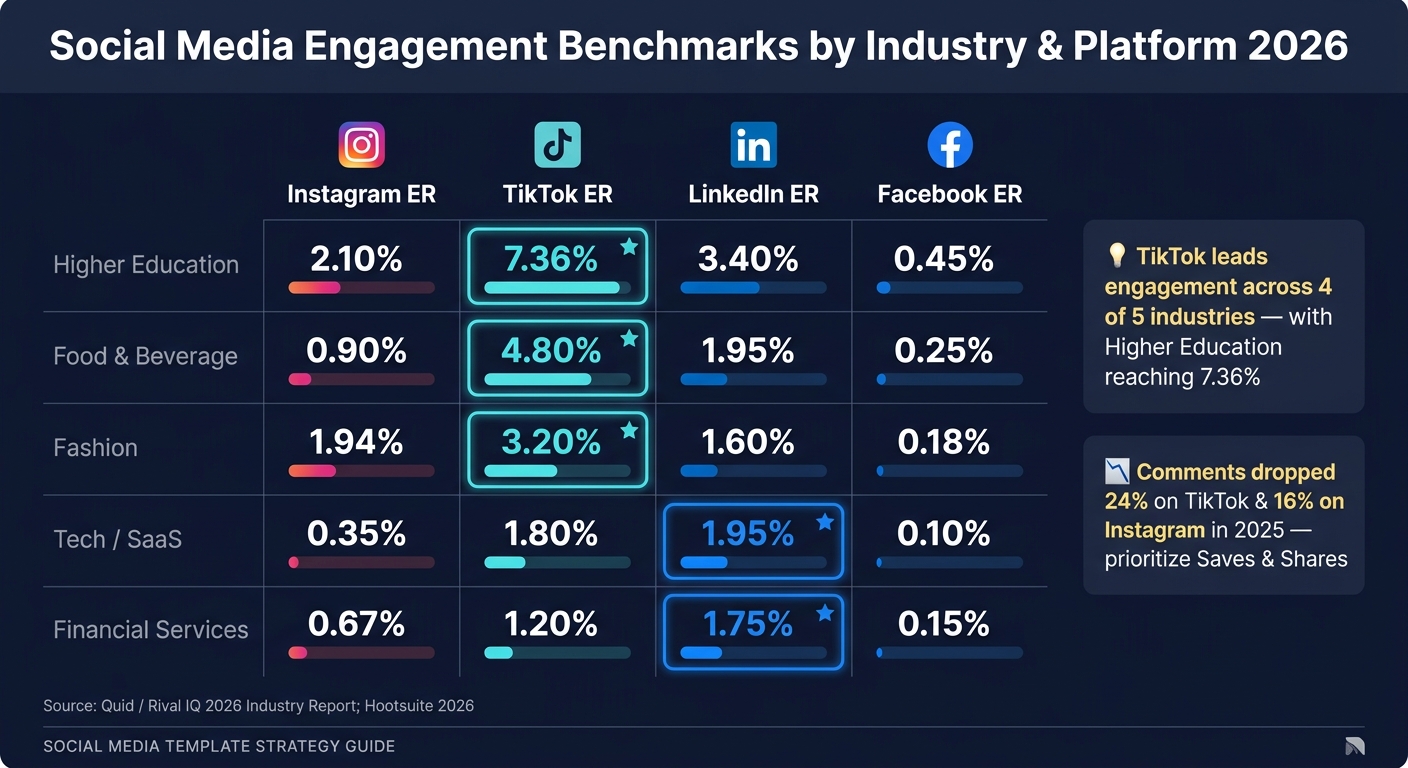
After designing your templates, the next step is tracking their performance - and this varies depending on the industry, platform, and goals. For example, a food brand on TikTok should aim for an engagement rate of 4.80% or higher, while a Tech/SaaS company on LinkedIn might consider 1.95% a good result.
Here’s a quick look at engagement benchmarks by industry for 2026:
| Industry | Instagram ER | TikTok ER | LinkedIn ER | Facebook ER |
|---|---|---|---|---|
| Higher Education | 2.10% | 7.36% | 3.40% | 0.45% |
| Food & Beverage | 0.90% | 4.80% | 1.95% | 0.25% |
| Fashion | 1.94% | 3.20% | 1.60% | 0.18% |
| Tech / SaaS | 0.35% | 1.80% | 1.95% | 0.10% |
| Financial Services | 0.67% | 1.20% | 1.75% | 0.15% |
Source: Quid / Rival IQ 2026 Industry Report; Hootsuite 2026.
While engagement rate is a key metric, consider prioritizing saves and shares over comments. Trends show that comments per post dropped by 24% on TikTok and 16% on Instagram in 2025, making saves and shares more reliable indicators of how well your template resonates. To track conversion-driven goals, use UTM parameters. This data can help uncover which template elements need adjusting.
Improving Templates Through A/B Testing
A/B testing is the go-to method for refining templates. The key is to adjust only one element at a time - like a headline or a visual - so you can clearly identify what’s driving changes in performance. Start by testing the core message. For example, does "save time" work better than "cut costs"? Once you’ve nailed the message, move on to smaller tweaks, such as colors or fonts.
For video templates, the first 2–3 seconds are critical. This short window determines whether viewers keep watching or scroll past. For static posts and carousels, focus on caption length. Make sure your main message appears within the first 80–125 characters - before the "see more" cutoff on Instagram and Facebook. Run each test for 7–14 days to account for daily fluctuations.
"The most effective creative programs now blend generative AI for speed with disciplined experimentation for signal." - Gartner
Testing pays off. Companies with structured testing programs see marketing ROI improve by 25–40% compared to those relying purely on intuition. Even small-scale experiments can lead to noticeable results.
Once testing highlights areas for improvement, you can refresh your designs using AI-generated variations.
Using Draft AI to Generate New Template Variations
No matter how effective a template is, its impact fades after 2–4 weeks. That’s where tools like Draft AI come in handy, making it easy to create updated versions of content that’s already performing well. This helps you refresh the structure with new hooks, angles, or formats.
Draft AI’s viral hook generator is particularly useful. You can input a high-performing post or topic, and it will suggest fresh hook ideas for testing. Plus, because it adapts to your brand’s writing style, the output stays consistent with minimal need for edits. Brands using AI-assisted workflows have been found to post 40% more often, which boosts engagement by generating more data and sharpening templates faster.
FAQs
How do I pick the right template type for my industry?
To create effective content, begin by pinpointing your industry specifics and understanding your customers' needs. Think about your sales cycle and any compliance guidelines you have to follow - these will shape your overall approach.
Next, focus on choosing templates that align with your content goals and the type of material you’re producing. Whether it’s educational, promotional, or storytelling content, the right template helps ensure your message fits the format and platform. For example, a storytelling template might work wonders on social media, while a more formal structure could suit email newsletters.
Tools like Draft AI make this process easier. They provide platform-specific templates tailored to your goals. You can even feed in raw data or voice notes, and the tool will help you craft polished, brand-consistent content.
Finally, look for templates that match your posting schedule. Consistency is key, so prioritize formats that align with how often you plan to publish.
What’s the fastest way to resize one design for every platform?
Draft AI offers a quick solution for streamlining content creation by automating platform-specific adjustments. With its smart layout feature, you can create content once, and the tool automatically adjusts text and visuals to match the dimensions and formatting requirements of platforms like Instagram, LinkedIn, and TikTok. It also provides pre-sized templates and exports content in formats ready for each platform, saving you the hassle of manual resizing and ensuring a polished, consistent appearance.
How can Draft AI help me create more template variations faster?
Draft AI simplifies the process of creating templates by automating layout tweaks and formatting. This means you can generate content 5–10 times faster. Just provide raw data, URLs, or even voice messages, and the tool instantly produces polished, platform-ready content. Its Template Briefs feature incorporates brand guidelines, while smart layout tools ensure your visuals stay consistent across formats like carousels and posts. Say goodbye to manual resizing and hello to major time savings.


