Top Tools for Optimizing Content Templates
Efficient content templates can save you hours every week. Tools like Draft AI offer structured frameworks for social media posts, helping you maintain brand consistency, reduce production time, and follow a content creation checklist to scale. Here's what to look for in a template optimization tool:
- Flexibility: Supports various formats (e.g., carousels, reels, threads) with customization options like brand kits.
- Automation: Automated content creation features cut production time by up to 87%, with bulk generation and scheduling.
- Consistency: Tools analyze past posts to replicate your tone and style.
- Multilingual Support: Create content in 100+ languages for global audiences.
- Ease of Use: Features like drag-and-drop dashboards and conversational commands simplify workflows.
Draft AI stands out by combining these features into one platform, offering pre-built templates, personalized voice models, multilingual capabilities, and content idea generation. For $15/month, it’s a time-saving solution for creators and teams. If you want to publish more without the hassle, tools like this are a game-changer for your workflow.
The Latest AI-Powered Content Creation Workflow for Business (Speed Challenge!)
sbb-itb-9f5fe42
What to Look for in a Content Template Optimization Tool
When scaling your social media content, choosing the right optimization tool can make all the difference. Focus on features that help you create social media posts in minutes.
Template Flexibility and Customization
Your tool should cater to multiple content formats - carousels, reels, stories, infographics, and scripts. A fill-in-the-blanks system works wonders, offering a fixed structure (like a hook, value statement, and CTA) while letting you tweak details such as dates, product names, or links. This keeps your posts consistent yet adaptable, saving time without sacrificing authenticity.
Another must-have? A built-in brand kit toggle. This feature applies your fonts, colors, and logo automatically, eliminating the need for manual adjustments and ensuring your posts always align with your brand identity.
Speed and Automation
Time-saving is a key benefit of these tools. AI-powered platforms can help users reclaim over 10 hours a week, while teams using automated workflows have reported up to an 87% reduction in content creation time. Features like bulk content generation from keyword lists and one-click scheduling further streamline the process, making it easier to manage high-volume campaigns.
Brand Consistency and Style Learning
As your team grows, keeping a consistent tone can become tricky. The best tools analyze your past posts and uploaded documents to mimic your tone, phrasing, and structure. This ensures your content remains cohesive, no matter how many people are involved in its creation.
Multilingual Support
Reaching a global audience? Using multilingual AI tools is a game-changer. Leading tools now support 100+ languages, allowing you to set the desired output language directly in the system. This eliminates the need for separate translation workflows, making it easier to manage localized campaigns while staying on-brand.
Ease of Use and Workflow Efficiency
Look for tools with user-friendly features like conversational commands (e.g., “make the tone more casual” or “optimize for mobile”) and centralized drag-and-drop dashboards. These features simplify transitions from drafting to scheduling, keeping your workflow smooth and efficient.
Draft AI: A Closer Look at Its Template Optimization Features
Draft AI brings together flexibility, speed, brand consistency, multilingual support, and ease of use - all in a single platform. Let’s break down how these features work in real-world scenarios.
Ready-to-Use Templates and Customization Options
Draft AI provides pre-built templates tailored for various content formats, including social media posts, Instagram and LinkedIn carousels, Instagram Reels scripts, X (formerly Twitter) threads, and other top AI tools for carousel design. You can tweak fonts, colors, and images to match your brand. Meanwhile, the platform automatically adjusts layouts and content length to fit each channel, ensuring your posts stay polished and consistent without extra effort.
AI-Driven Personal Writing Styles
One standout feature is Draft AI’s ability to analyze over 100 of your past posts to create a custom voice model. This model mimics your tone, sentence structure, and word choices, allowing the platform to produce content that feels like you wrote it yourself. It’s nearly ready to publish, minimizing the need for heavy editing.
Another time-saver is the "Patterns" feature, which lets you set up reusable content structures. Whether it’s weekly tips or product updates, the AI fills these templates in your unique voice, streamlining recurring tasks.
"It actually sounds like I wrote it on my best day. Docs updated, changelog generated, tweet thread ready. Productivity unlocked." - DevRel Dave, @dave_codes
Multilingual Translation and Localization
Draft AI supports content creation and translation in over 100 languages, making it easy to adapt your messaging for different markets. This feature is included in all pricing plans, so you don’t need additional tools to maintain a consistent brand voice across languages.
Content Idea Generation and Reusability
The platform’s idea generation tool uses a swipe-based interface to help you brainstorm content. Simply input your business details, and Draft AI curates a list of ideas. You can save the ones you like, building a backlog of content ideas to keep your pipeline full and eliminate the dreaded blank-screen moment.
Pricing and Plans
Draft AI offers straightforward pricing to suit different needs:
| Plan | Price | Best For | Key Limitation |
|---|---|---|---|
| Free | $0/mo | Testing the platform | Limited generations, 3 topics max |
| Draft Pro (Monthly) | $15/mo | Individual creators and teams | – |
| Draft Pro (Yearly) | ~$120/yr | Budget-conscious regular users | Requires annual commitment |
The Free plan is perfect for trying out the platform, though it comes with limited features. For $15/month - or about $120 annually with a 7-day free trial - the Draft Pro plan unlocks unlimited generations, personalized style analysis, and full access to all content formats. It’s an excellent choice for solo creators or small teams looking to streamline their content creation process.
How Optimized Templates Improve Your Social Media Workflow
Optimized templates can save marketers a whopping 10–15 hours every week, making daily tasks much more manageable.
Building Daily and Weekly Content Calendars
For most marketers, the hardest part of creating content isn't the writing itself - it's deciding what to write. By establishing 3–5 core content themes (like how-tos, industry insights, or customer stories), you can cut decision fatigue by 80%. Once you’ve nailed down these themes, reusable templates make it easy to batch an entire week’s worth of posts in one focused session.
"Batching beats daily posting because it removes the two things that make posting fail: decision fatigue and context switching." - Postory
Here’s a simple breakdown for a 2-hour content planning session: spend 20 minutes brainstorming, 50 minutes writing, 30 minutes on visuals, and 20 minutes scheduling. Tools like Draft AI’s swipe-based idea generator and reusable "Patterns" feature make this process even smoother, giving you ready-to-go ideas and drafts before you even start planning. This streamlined approach works wonders for multi-format and localized campaigns too.
Running Multi-Format Campaigns
Once you’ve planned your content calendar, optimized templates make it easy to adapt your ideas across multiple platforms. Instead of starting fresh for each platform, templates let you transform a single concept into LinkedIn posts, Instagram carousels, X threads, or even Reels scripts. This cuts production time for each post from 45 minutes to under 5 minutes.
Each platform has its quirks - LinkedIn posts, for example, might be 200–300 words and professional, while X posts need to be snappy and under 280 characters. Templates handle these differences automatically, saving you from reformatting manually every time.
Creating Localized and Multilingual Campaigns
When it comes to localization, templates truly shine. Research shows that 75% of consumers prefer content in their native language, and localized posts see 3x higher engagement in non-English markets compared to English-only posts.
Effective localization goes beyond translation - it’s about adjusting tone, idioms, and references to match the local audience. Draft AI’s multilingual support makes this process seamless, allowing you to write in your primary language and then adapt it for different markets without starting from scratch. This eliminates the need for separate localization tools, keeping your workflow simple and efficient.
Measuring the Results of Template Optimization
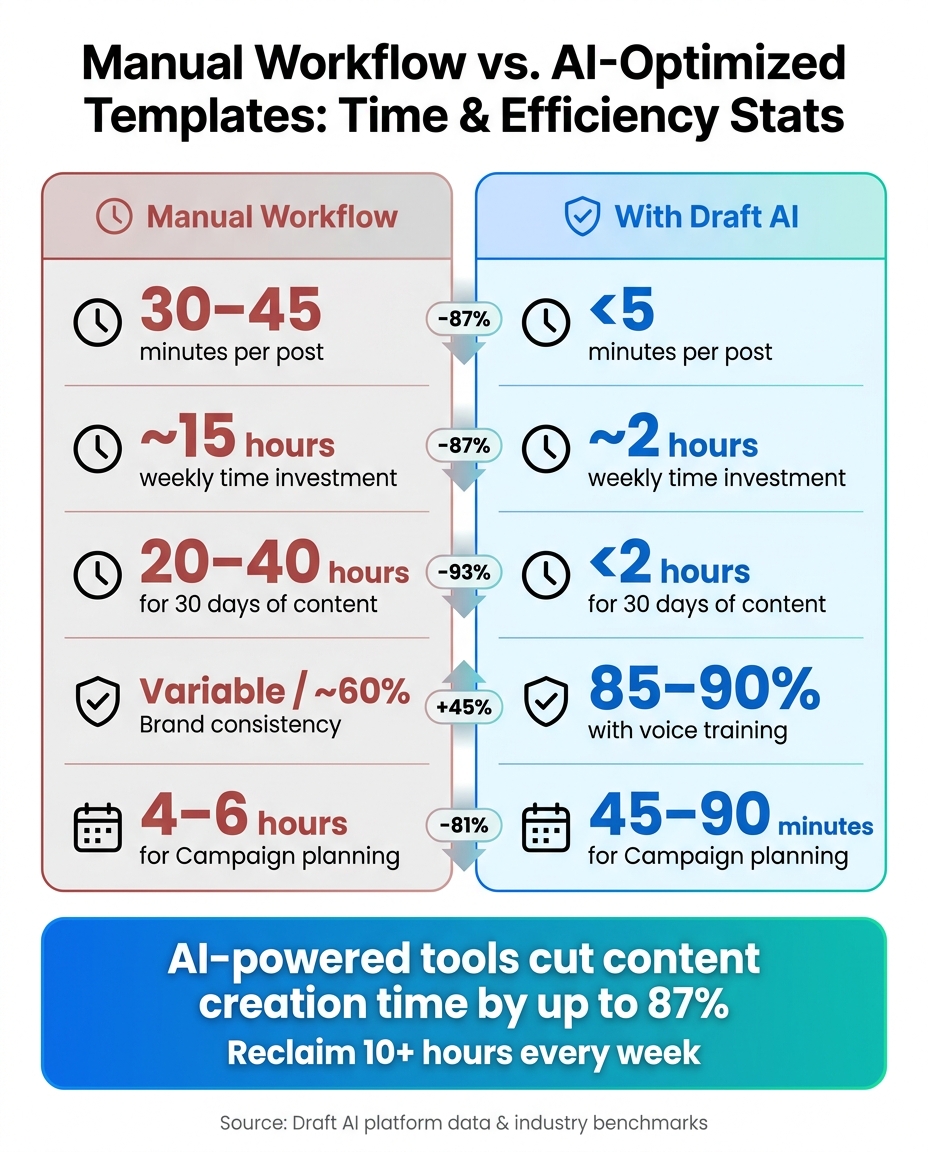
Manual Workflow vs. AI-Optimized Templates: Time & Efficiency Stats
Evaluating the success of your streamlined workflow starts with tracking specific metrics that showcase your progress.
Key Metrics to Track
Focus on metrics like time-to-publish, content output volume, brand consistency, and engagement rates to measure the impact of your efforts. For example, optimized templates can cut the time required to create a single post from 30–45 minutes to under 5 minutes. With a finely tuned system, generating 30 days' worth of multi-platform content can take less than 2 hours.
Brand consistency is another crucial metric. Typically, AI-generated content aligns with brand guidelines about 60% of the time. However, with proper template training and a well-defined brand voice, this figure can jump to 85–90%. A straightforward 5-point quality check - covering accuracy, brand alignment, platform suitability, sensitivity, and originality - helps ensure consistent scoring.
Finally, monitor engagement metrics like likes, comments, shares, saves, and click-through rates to confirm your content resonates with your audience. These data points provide a clear picture of improvement.
Before and After: The Draft AI Difference
The following table highlights how Draft AI's optimization transforms key metrics:
| Metric | Manual Workflow | With Draft AI |
|---|---|---|
| Time per post | 30–45 minutes | <5 minutes |
| Weekly time investment | ~15 hours | ~2 hours |
| 30 days of content | 20–40 hours | <2 hours |
| Brand consistency | Variable | 85–90% with voice training |
| Campaign planning | 4–6 hours | 45–90 minutes |
These numbers demonstrate how optimized templates not only save time but also improve consistency and quality. Ryan Whitton, Senior Content Strategist at Tested Media, sums it up well:
"A 30 minute training session usually moves output quality from 60% on brand to 85% on brand. Worth the time."
Draft AI takes this a step further with its "Copy Your Style" feature. This tool analyzes your existing content to learn your tone and voice, ensuring every new post feels authentically yours - just created in a fraction of the time. To maintain and enhance results, conduct a quick monthly audit: review your top 10% and bottom 10% performing posts, then use those insights to refine your templates and voice settings.
Conclusion: Choosing the Right Tool for Faster Content Creation
The right content template optimization tool can completely change the way you work. Instead of pouring hours into crafting each post from scratch, these tools allow you to produce top-tier content quickly and efficiently. This means you can focus your energy on the bigger picture - like refining your ideas or connecting with your audience. With the ability to turn a single concept into multiple polished posts, these tools save time while maintaining quality.
Draft AI exemplifies this efficiency. Its "Copy Your Style" feature ensures that every piece of content aligns with your voice, making the output feel personal and genuine. The platform also includes an intuitive system for discovering new ideas - you can browse AI-generated concepts, save the ones you like, and develop them into polished posts effortlessly. For just $15/month with Draft Pro, users gain access to unlimited content generations, support for various formats, and even multilingual translation - all within a single platform.
The goal here isn’t to replace creativity but to remove the barriers that slow it down.
"We are not replacing creativity. We are removing the friction of creation." - trydrafts.com
If you’re juggling a busy schedule and want to publish more without feeling overwhelmed, the best tool isn’t necessarily the one packed with features - it’s the one that seamlessly integrates into your process. Draft AI is built with this in mind, offering a streamlined approach to content creation that helps you stay productive and consistent. Give Draft AI a try and see how it can simplify your workflow while boosting your social media impact.
FAQs
How do I build a reusable template library for my brand?
Take a close look at your existing content to pinpoint the formats you rely on the most and those that perform best. Group these into categories such as blog posts, social media updates, or newsletters. For each category, create templates that include clear instructions, placeholders, and examples to make them easy to use.
Leverage tools like Draft AI to save your content briefs as templates. This ensures your brand voice stays consistent while speeding up your content creation process. Make it a habit to regularly revisit and update your template library so it remains accurate and aligned with your current goals.
What should I measure to prove templates are saving time?
Tracking the time spent on content creation each month can reveal just how much more efficient your process has become with templates. Start by measuring the hours from the initial brief to the final draft. Templates often cut this time by as much as 75%, which is a huge difference.
You should also keep an eye on how quickly content gets repurposed for different platforms. With templates, this can happen 80%-85% faster, making it easier to maintain a consistent presence across channels. Don’t forget to evaluate the time saved through automated scheduling and publishing tools - these can free up even more hours for other tasks.
How do I localize posts without losing my brand voice?
To maintain your brand voice across localized content, leverage Draft AI's Brand Profile and training tools. By setting up a Brand Profile, you can input your business details, style guidelines, and SEO preferences to ensure all messaging stays consistent.
Draft AI can even analyze your previous posts or voice recordings to align with your tone and style seamlessly. Plus, its multilingual translation feature adjusts your messaging to fit local norms while keeping your brand's personality intact.


