Batch Content Creation with AI Templates
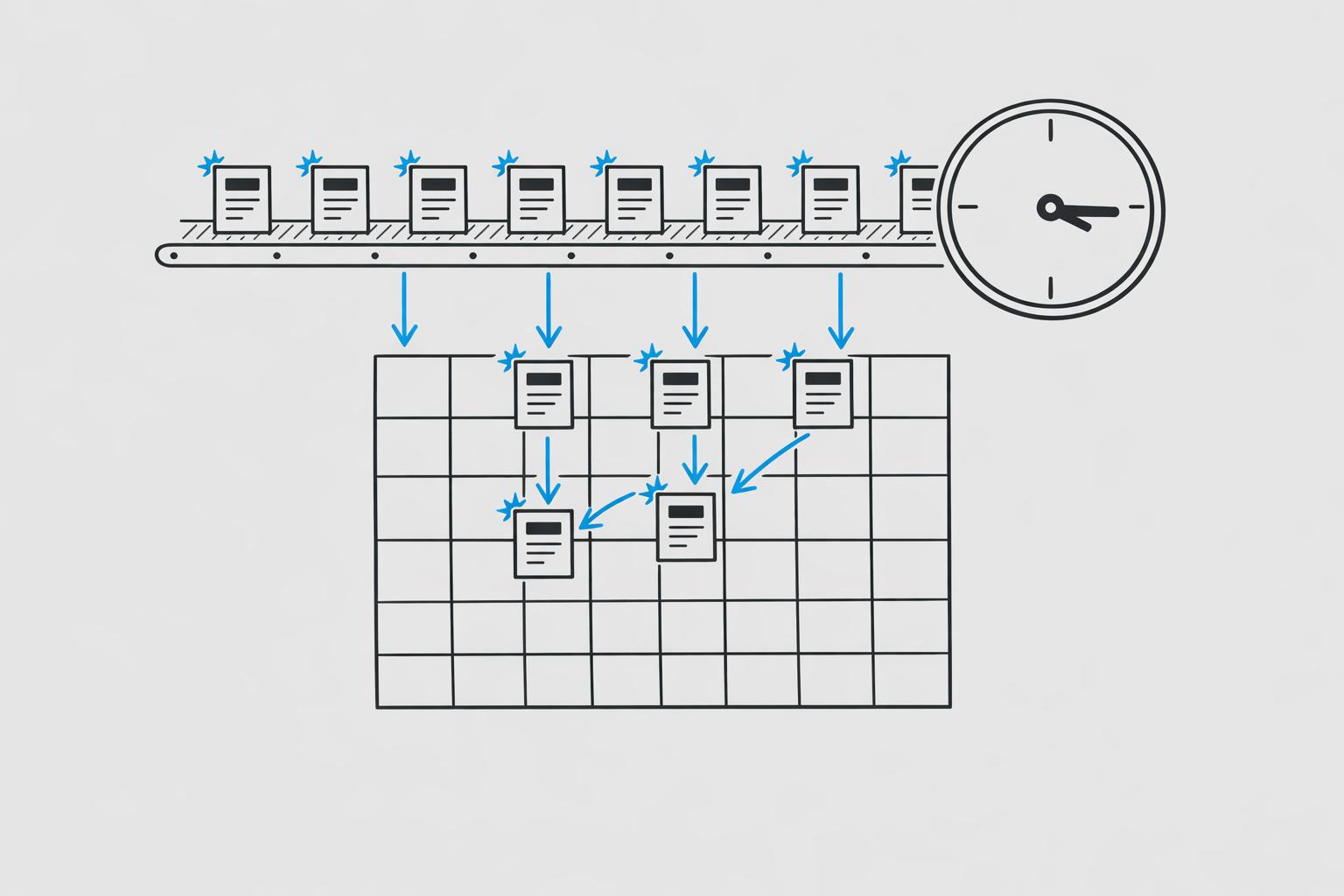
Spending hours daily on social media posts? Here's a better way. Batch content creation, powered by AI templates, can reduce your monthly content creation time from 15 hours to just 3–4 hours. By dedicating a single focused session, you can produce an entire month’s content in minutes while ensuring consistency and quality.
Key Highlights:
- Time Savings: Daily posting takes ~30 hours/month; batching with AI cuts it to 3–4 hours.
- Efficiency: AI tools streamline tasks like writing captions, designing graphics, and formatting.
- Real Results: Users like Sarah (fitness coach) grew their audience tenfold in six months using AI batching.
- Cost-Effective: Replace expensive social media managers with tools like Draft AI ($15/month).
Batching helps you plan ahead, maintain consistency, and focus on audience engagement - all while saving time and resources. Let's break down how to make it work.
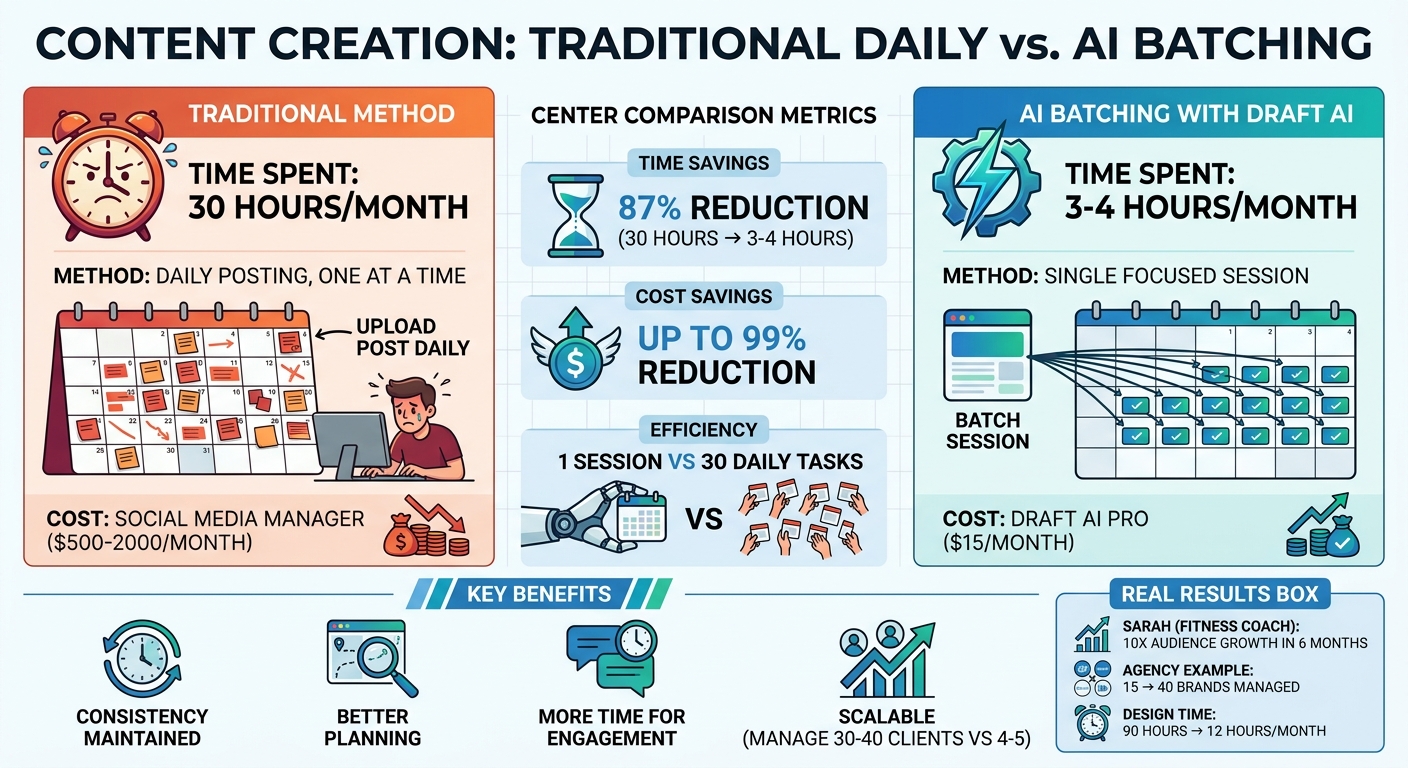
Traditional vs AI-Powered Batch Content Creation Time Comparison
How I Create 30 Days of Content in 30 Minutes (With AI)
sbb-itb-9f5fe42
Setting Up Your Batch Workflow with Draft AI
Draft AI makes it easy to set up a workflow that aligns with your brand's voice. In just 15 minutes, you can turn a single session into content for an entire month. However, the final results depend on how you configure your account at the start.
Creating Your Draft AI Account
Head to the Draft AI website and choose either "Start Creating Free" for the basic plan or "Start your free trial" to explore Pro features. The Pro plan unlocks unlimited content generation, custom style analysis, and full-format support, including text posts, carousels, Threads/X posts, and Instagram Reels scripts. The free plan is a great starting point, offering limited generations and up to three content topics - perfect for testing the waters.
The Pro plan costs $15 per month or about $120 annually, and it comes with a 7-day trial. One standout feature is voice cloning, which allows Draft AI to replicate your unique style. By analyzing over 100 of your past posts, the platform adjusts to your tone, sentence structure, and vocabulary, ensuring your content feels authentic. As DevRel Dave, an early adopter, put it:
"The consistency is insane. It actually sounds like I wrote it on my best day. Docs updated, changelog generated, tweet thread ready. Productivity unlocked."
Once you've set up your account and activated voice cloning, you can dive into the platform's wide range of templates designed for various content formats.
Available Templates for Different Content Formats
Draft AI offers templates for all kinds of content, from LinkedIn and Facebook posts to Instagram Reels scripts. Here’s what you can create:
- Text posts for platforms like LinkedIn, Facebook, or Telegram
- Carousels for Instagram and LinkedIn
- Threads/X posts
- Instagram Reels scripts in three styles: Expert, Story, or Dialogue
The platform also includes Content Hooks to grab attention right from the start. You can take a single idea and instantly transform it into multiple formats - Twitter threads, LinkedIn posts, newsletter intros, and more - without having to rewrite anything. For even more efficiency, you can create Template Briefs that store consistent details like brand overviews and resource links. Access all your saved templates anytime at https://app.draft.co/saved/templates to kick off new content requests quickly.
Next, fine-tune your setup by adding your business details to ensure every piece of content reflects your brand.
Adding Your Business Details for Custom Content
To make your content even more tailored, set up your Brand Profile - a one-time task that will save you hours in the long run. From your Draft dashboard, navigate to "Brand Profile" and input your business details, brand guidelines, and any SEO requirements. You can also link to external brand documents for added context. Once completed, this information will automatically be applied to every piece of content generated, keeping your brand voice consistent across the board.
Draft AI also helps spark creativity with swipeable content cards. By sharing your brand details, you can generate a stack of cards filled with potential hooks and ideas. Swipe through them to find inspiration for your batch posts, saving your favorites to develop into full posts later. This feature eliminates the dreaded "blank screen" problem and provides a ready-to-use library of ideas, making batch production smooth and efficient. Every post will be on-brand and primed to engage your audience.
Creating and Customizing Content in Bulk
Once your Brand Profile is set up - covered in the earlier section - you’re ready to start producing content on a large scale. Draft AI offers flexibility with input methods, letting you choose from raw text, voice messages, or structured datasets. Let’s break down how to efficiently prepare and integrate your data for bulk content creation.
Uploading Input Data for Batch Generation
Draft AI simplifies the process of turning raw data into polished content through CSV file uploads. To begin, head to the input tab in your workflow and select "Upload Dataset." Your CSV file should include the source material, such as product descriptions, blog summaries, or other relevant data points. The platform supports up to 200 entries per dataset, so it’s perfect for batch processing.
Once uploaded, you’ll need to map the spreadsheet columns to Draft AI’s input fields. Be sure to include key details, like identifiers, within the description fields. After reviewing and publishing your workflow, Draft AI uses parallel processing to handle multiple entries simultaneously. This means processing a large batch takes roughly the same time as a single entry. The system also highlights successful and failed entries, making it easy to spot issues. If you notice a low success rate, review the failed entries for patterns and tweak your prompt templates as needed. For even larger-scale operations, you can automate the process by integrating Draft AI with tools like Google Sheets or Make.com.
Customizing Templates for Your Brand
Once your dataset is uploaded, it’s time to make sure your templates match your brand’s identity. Draft AI offers a variety of customization tools to ensure your content aligns with your visual and stylistic standards. You can tweak fonts, colors, and layouts directly on the platform - ideal for visually rich formats like carousel posts, which can be created using top AI tools for carousel design. You can also upload your own images to replace default visuals and use the layout tool to arrange text and images in a professional design.
For those using the Pro plan, the AI-driven personal writing style feature is a game-changer. It adapts to your tone, sentence structure, and vocabulary based on your previous posts. Need to make adjustments? You can reset and refine your style guidelines anytime through the style customization settings.
Using Multilingual Translation and Viral Hooks
With your templates ready, it’s time to expand your content’s reach and engagement. Draft AI includes multilingual translation capabilities, helping you adapt a single batch of content for different language markets. Basic language switching is available to all users, but Pro subscribers enjoy access to an extensive range of languages.
To boost engagement, start your posts with a viral hook - something that grabs attention immediately, like a bold statement, intriguing question, or direct opener. When creating content in batches, organize by content pillars and focus on writing captions for one pillar at a time. This approach keeps your tone consistent and streamlines your workflow. A proven caption structure includes three key elements: Hook (grab attention), Value (offer insights or tips in 2–3 sentences), and a Call-to-Action (encourage interaction). Use the scheduling phase as your final chance to fine-tune hooks and ensure they align perfectly with your visuals.
Reviewing, Exporting, and Scheduling Your Content
Reviewing and Refining AI-Generated Content
Once Draft AI creates your batch, you'll see content cards that are easy to swipe through. This user-friendly setup allows you to quickly review dozens of posts. As you go, save the ideas you like for future refinement or immediate use.
Before exporting, organize your content using a tiered rating system. Label your best posts as "A-tier" - these are your standout pieces, ideal for posting during peak engagement times like 9:00 AM or 7:00 PM local time. Mark other solid options as "B-tier" for backup slides or filler posts, and remove anything that doesn’t align with your brand. This sorting process generally takes about 10–15 minutes, ensuring you only keep content that reflects your brand's identity.
Spend an additional five minutes reviewing for any AI-generated quirks and tweaking phrasing. While AI handles most of the work, take this time to add personal touches, such as brand-specific details or stories, to make the content feel authentic. Double-check that your captions follow the Hook-Value-CTA structure and verify that visual elements align with your saved brand assets.
Once your posts are rated and refined, export them for platform-specific use.
Exporting Content for Social Media Platforms
Draft AI simplifies the export process, allowing you to download content directly for platforms like LinkedIn and Instagram in their proper formats. For carousel posts, you can choose between multi-slide PDFs or individual images, depending on your scheduling tool's requirements. Text posts are exported with optimized formatting, including line breaks and character counts tailored for each platform.
If you're managing multiple platforms, exporting as a CSV file can save time. Organize your spreadsheet with columns for Date (YYYY-MM-DD), Time (24-hour format), Platform, Caption (using \n for line breaks), Hashtags, and Media file paths. This format works with most scheduling tools, cutting down on manual effort. Keep in mind that carousel posts tend to perform better, generating 303% more engagement on LinkedIn and 114% more engagement on Instagram compared to single-image posts.
Scheduling Batches for Maximum Efficiency
Once your content is exported, use scheduling tools to ensure timely and consistent posting. Platforms like Buffer (starting at $6/month per channel), Later (starting at $25/month), or Meta Business Suite can automate your posting process. To maximize efficiency, follow the 80/20 rule: schedule 80% of your content in advance while leaving 20% of your calendar open for trending topics or spontaneous posts.
"Your batch is a plan, not a contract. If something important happens in your niche, replace a planned post and respond to the moment." - Mosaiq Team
When scheduling, alternate between content pillars - such as educational, inspirational, and promotional posts - to keep your audience engaged. Use your analytics to post A-tier content during peak engagement times. A typical 30-day content mix might include 40% educational, 30% entertaining, 20% inspirational, and 10% promotional content. At the end of the month, analyze your top 5 and bottom 5 posts, then feed this data back into Draft AI to refine your next batch.
Getting More from Draft AI Pro Features
Free vs. Pro Plan Features
Draft AI Pro offers advanced tools to supercharge your automated content creation process, especially if you're working on large-scale projects. While the Free Plan is great for occasional use or testing, the Pro Plan is designed for creators who need more flexibility and control.
The Free Plan includes limited content generations, voice-to-content creation, and access to three topics. It's sufficient for light use but can quickly feel restrictive if you're regularly batching content. On the other hand, the Pro Plan, priced at $15/month or about $120/year (with a 7-day free trial), eliminates these barriers. It offers unlimited generations, so you can create as much content as needed without worrying about hitting a ceiling. Additionally, the Pro Plan introduces custom style learning, allowing the AI to analyze your existing posts and Reels to replicate your unique tone. It also supports unlimited topics, making it easier to manage content for multiple brands or campaigns.
| Feature | Free Plan | Pro Plan |
|---|---|---|
| Generations | Limited (credit-based) | Unlimited |
| Style Customization | Standard templates only | Custom style learning + style reset |
| Topic Management | 3 topics maximum | Unlimited topics |
| Brand Consistency | Manual adjustments | Saved brand templates |
| Workflow Efficiency | Standard export | Advanced batching + multi-platform export |
With these features, the Pro Plan provides the tools to streamline your workflow and create content at scale, all while maintaining brand consistency.
Tips for Batch Content Creation
Using the Pro Plan effectively can make your batching sessions more productive and less stressful. Here are some practical tips to get the most out of the advanced features:
- Upload Top-Performing Posts: Start by uploading 5–10 of your best-performing posts. This helps the AI learn your tone and style, reducing the time you need to spend tweaking drafts later.
- Create Brand-Specific Templates: Set up templates for fonts, colors, and other design elements to ensure your graphics stay consistent with your branding. Templates also speed up the batching process significantly.
- Define Content Pillars: Choose 3–5 key themes for your content, such as nutrition, workout tips, or client success stories if you're in the fitness niche. Organize each pillar as a separate topic in Draft AI, then batch-generate posts for each one. This approach keeps your content focused and cohesive.
- Leave Room for Flexibility: While it's tempting to plan weeks of content in advance with unlimited generations, make sure to leave 20–30% of your calendar open for trending or reactive content. Use your batching sessions to handle evergreen posts, but stay adaptable for timely updates.
- Post Consistently: Aim to post 3–5 times per week. Many creators find that sticking to this schedule not only boosts audience growth but also improves the overall quality of their content. Draft AI's Pro Plan makes it easier to maintain this rhythm without feeling overwhelmed.
Conclusion
Batching content creation with AI templates can completely reshape your workflow. Traditionally, creating 20 posts might take 10–15 hours spread over a month. With AI-powered batching, that same workload can be condensed into just 3–4 hours in a single session. This shift allows you to focus more on strategy, engagement, and analysis rather than getting bogged down by repetitive formatting tasks.
Draft AI makes this transformation possible by removing the mechanical roadblocks that often slow creators down. By preparing your content in advance, you avoid the daily grind of formatting. Features like unlimited generations, custom style learning, multilingual translation, and viral hooks ensure your content stays aligned with your brand while helping you scale efficiently.
This method doesn’t just save time - it gives you a real competitive advantage. For example, creators using AI-powered workflows can manage 30–40 clients with the same effort it once took to handle just 4–5. Consider the case of a growth marketing agency in early 2026: they managed 15 e-commerce brands but switched to an AI-powered pipeline, reducing their design time from 90 hours a month to just 12. This change allowed them to increase their client capacity from 15 to 40 brands while doubling revenue per employee. It proves that consistency isn’t about working harder - it’s about working smarter with the right tools.
Draft AI enables creators to turn daily content demands into a streamlined, scalable process. Whether you’re an individual creator or managing multiple clients, the question isn’t whether to adopt AI tools, but how soon you can start. Incorporate Draft AI into your workflow today and position yourself to outpace the competition.
FAQs
What should I prepare before a batching session?
Before diving into batching, it's crucial to establish your content pillars or main themes. These act as a roadmap, keeping your content creation focused and aligned with your goals.
Once your themes are set, gather all the raw data, ideas, or assets you'll need. Whether it's research, visuals, or notes, having these materials ready ensures tools like Draft AI can perform at their best. This preparation not only saves time but also helps produce consistent, high-quality content that feels well-organized and cohesive.
How do I make AI posts still sound like me?
To make AI-generated posts sound more like you, start by training the AI with examples of your writing. Tools such as Draft AI can study your previous content to mimic your tone, choice of words, and overall style. Features like Style Definition Documents and Custom Instructions allow you to fine-tune the output even further. By giving feedback on drafts, you can help the AI learn and improve, ensuring it consistently produces content that aligns with your personal voice.
How many posts should I schedule vs. leave flexible?
Scheduling about 20-30 posts ahead of time - enough to cover approximately four weeks - can help maintain consistency without the hassle of daily planning. That said, it’s smart to leave some space for spontaneous posts. This way, you can respond to trending topics or engage in real-time with your audience. Leveraging AI tools can make this process smoother, allowing you to manage your planned content while staying flexible for those last-minute updates.


