How AI Simplifies Content Batch Scheduling
Struggling to keep up with daily social media posts? AI-powered content batch scheduling can save you time and energy by automated content creation and streamlining your workflow. Here's what you need to know:
- What is it? Content batch scheduling means creating and organizing multiple posts in one focused session, reducing the need for daily content creation.
- Why it matters: Switching tasks costs you up to 40% of your productivity. Batching helps you focus and stay efficient. Using a social media content creation checklist can further streamline this process.
- How AI helps: AI tools handle tedious tasks like writing captions, generating ideas, and optimizing posts for different platforms, cutting planning time by up to 78%.
- Key steps: Define content themes, structure your workflow into phases, and use AI tools to plan, create, and schedule posts.
The Latest AI-Powered Content Creation Workflow for Business (Speed Challenge!)
sbb-itb-9f5fe42
Planning Your Content Batch Strategy
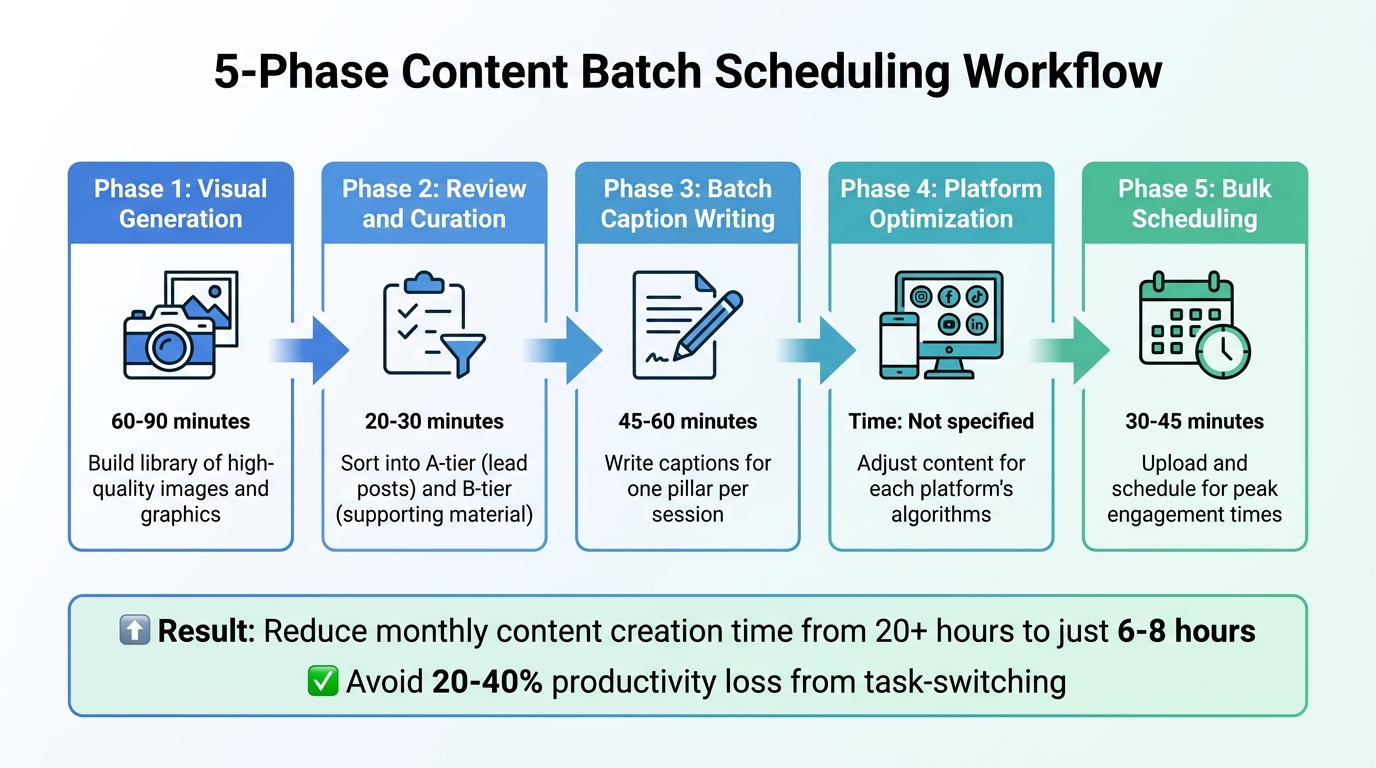
5-Phase AI Content Batch Scheduling Workflow
A well-thought-out content batch strategy ensures your posts are purposeful and connect with your audience. Let’s dive into the key components of crafting an effective plan.
Defining Your Content Pillars
Content pillars are the 3–5 main themes that shape your messaging and provide consistency across your posts. For example, a B2B software company might structure its content like this:
- 30% Educational: Share insights or tips to showcase expertise and encourage engagement.
- 25% Thought Leadership: Position your brand as an authority in your field.
- 20% Social Proof: Use testimonials or case studies to build trust.
- 15% Brand Culture: Highlight your company’s values and personality.
- 10% Promotional: Focus on driving conversions with clear calls to action.
Each pillar should serve a specific purpose. Educational posts help you connect with your audience by offering value, while Social Proof builds credibility. Meanwhile, Promotional content is all about converting interest into action.
"Content pillars for social media aren't complicated. They're just organized consistency." – BrandGhost
Stick to 3–5 pillars and write a brief, one-sentence description for each to ensure clarity. Test these themes over 4–8 weeks, then analyze your performance data to see which ones resonate most with your audience.
Structuring Your Batch Scheduling Workflow
Once your pillars are established, divide your content creation into distinct phases. This approach minimizes decision fatigue and keeps you focused on one task at a time. Here’s a breakdown of the workflow:
- Phase 1: Visual Generation (60–90 minutes): Build a library of high-quality images and graphics.
- Phase 2: Review and Curation (20–30 minutes): Sort your content into A-tier (lead posts) and B-tier (supporting material). Remove anything that doesn’t meet your standards.
- Phase 3: Batch Caption Writing (45–60 minutes): Write captions for one pillar in a single session to maintain consistency.
- Phase 4: Platform Optimization: Adjust your content to fit the algorithms and quirks of each social platform.
- Phase 5: Bulk Scheduling (30–45 minutes): Upload your posts and schedule them for peak engagement times.
This phased method can cut your monthly content creation time from over 20 hours to just 6–8 hours. Plus, it helps you avoid the productivity loss caused by constant task-switching, which can eat up 20–40% of your time.
Using AI to Plan and Organize
With your workflow in place, AI can take your planning process to the next level. Beyond content creation, AI tools are excellent for organizing and streamlining your batches.
For instance, platforms like Draft AI can generate and organize content ideas based on your business details. Instead of starting from scratch, you’ll receive a stack of ideas categorized by your content pillars. This includes a mix of evergreen and trending topics, ensuring your calendar stays balanced.
Draft AI also adapts to your writing style and creates platform-specific versions of your posts, saving you the hassle of rewriting for different channels.
A smart move is to dedicate 80–90% of your calendar to pre-scheduled content while leaving 10–20% open for reactive or trending posts. This approach keeps your feed efficient while allowing room for timely updates.
Using AI for Content Ideation and Creation
Once your workflow is set, AI becomes a helpful partner in brainstorming ideas and turning them into polished posts. The trick is providing the right input and refining the output to fit your needs.
Generating Content Ideas That Work
AI takes the pressure off when it comes to generating ideas. Instead of starting with a blank page, you can choose from a selection of suggestions that align with your goals.
Tools like Draft AI simplify this process further. By sharing details about your business, you receive a curated list of content ideas you can swipe through. Pick the ones that click, save them, and use them later for posts. This ensures your ideas stay in sync with your broader strategy.
To get the best results, provide the AI with your "System Context." This means including descriptive words about your brand (like "friendly" or "analytical"), demographic info about your audience, and examples of your most successful posts. Feeding top-performing content into the AI helps it learn patterns and generate variations that could increase engagement by up to 2.4x.
These tailored suggestions can then flow directly into your drafting process.
Creating High-Quality Drafts in Minutes
AI makes turning raw input into polished drafts incredibly fast - often under five minutes. Stick to the 80/20 rule: let AI handle 80% of the work, then spend the remaining 20% adding your personal touch.
"The fastest batch creators use AI to generate content, then spend 10-15 minutes adding personal touches... This gives you 90% time savings from AI automation and 100% authentic voice." – MyMarky
With Draft AI, you can send a voice note or rough text and quickly get a high-quality draft. The platform even creates platform-specific variations automatically, saving you the hassle of rewriting the same content in multiple styles.
Once the draft is ready, take some time to refine it so it fully reflects your brand's personality.
Customizing AI-Generated Content
The final step is making sure the content feels like you. While AI can do most of the heavy lifting, the last 20% - adding your unique voice and specific details - is what makes your content stand out.
Draft AI offers tools to help with this, like analyzing your past posts and Reels to learn your style (available with the Pro plan). It can then apply this knowledge to new drafts. You can also tweak fonts, colors, and layouts to ensure everything aligns with your brand.
Tailoring content for each platform is just as important. What works as a professional, long-form post on LinkedIn might not fit Instagram’s casual, emoji-filled vibe or TikTok’s laid-back style. AI can adapt your core message to match the tone of each platform. Plus, Draft AI’s multilingual translation feature ensures your message stays consistent across different regions.
The aim isn’t to automate everything - it’s to handle the repetitive tasks so you can focus on strategy and connecting with your audience. Keep some time open for creating timely, trending posts to keep your brand fresh and relatable.
Optimizing Content for Multiple Platforms
AI tools have made it easier than ever to adapt content for the unique demands of different social media platforms. Each platform operates with its own style, technical specifications, and audience preferences. What resonates on LinkedIn may not work at all on TikTok. AI steps in to handle these adjustments, ensuring your content aligns with each platform's specific culture and constraints.
Generating Platform-Specific Variations
Start with a solid piece of content and let AI transform it to suit different platforms. For instance, a data-heavy, professional post might thrive on LinkedIn with over 1,300 characters. That same post, however, needs a casual tone with emojis for Instagram, a sharp and concise style for X, and an informal, relatable vibe for TikTok.
"I draft one caption, then use ChatGPT to rewrite it for LinkedIn (professional), X (punchy), and Threads (conversational). Each adaptation takes about 30 seconds." – Mike, SaaS Founder
AI tools also handle visual adjustments, like resizing images to fit platform requirements - 1080x1080 for Instagram, 1080x1920 for TikTok or Reels, and 1200x627 for LinkedIn. Even hashtag strategies are optimized: Instagram posts perform better with 3-5 targeted tags, while X prefers just 1-2.
Tools like Draft AI simplify this process by creating tailored versions of content from a single input. Whether you provide a voice note or rough draft, it adapts your message for each platform while keeping your brand's core identity intact. This eliminates the need to manually rewrite content multiple times. Once your posts are live, you can monitor their performance to improve future outputs.
Testing and Iterating with AI
Once your platform-specific content is published, AI analytics can help fine-tune your strategy. Dedicate just 15 minutes a week to reviewing analytics. If certain formats or tones aren’t performing well, AI can quickly adjust future posts in your content queue.
At the end of each month, analyze your top 5 and bottom 5 performing posts by feeding them into an AI tool. This helps uncover trends and generate fresh ideas, such as "5 Additional Ways to [Topic]" or "Common Pitfalls of [Topic]". Posts created using these insights tend to see 2.4x higher engagement rates on average.
The key is constant improvement. Use insights from one batch of posts to make the next round even more engaging and effective.
Scheduling and Publishing with AI
AI doesn’t just help create content - it also simplifies the way it’s published, ensuring your social media stays active and consistent. Once you’ve crafted and fine-tuned your posts, AI takes over by scheduling weeks' worth of content in one go. This can significantly ease the workload for social media managers, helping to combat the 77% burnout rate they often face. Let’s dive into how AI automates scheduling and balances it with dynamic posting.
Automating Scheduling and Publishing
AI-powered scheduling tools go beyond generic advice like "post at 11:00 AM on Wednesdays." Instead, they analyze your audience’s behavior to pinpoint the best times for engagement based on your specific followers. Features like "smart queues" take this further by automatically arranging posts to hit these peak engagement windows.
Platforms such as Draft AI combine content creation and scheduling into one seamless process. For teams juggling multiple accounts, bulk scheduling through CSV uploads is a game-changer. This method allows you to prepare a spreadsheet with captions, dates, times, and media links, then schedule hundreds of posts in minutes.
On average, marketers save 12.5 hours per week using AI tools for scheduling. Pair this with content batching, which can cut production time by 60% to 80%, and you’ll find it much easier to maintain a consistent posting schedule. Building a two-week buffer ensures your accounts remain active, even during hectic periods.
Balancing Automation with Real-Time Posts
Automation is a powerful tool, but it’s important to pair it with real-time content to keep your strategy authentic and engaging. While scheduled posts provide consistency, spontaneous updates and timely interactions add a human touch.
"Scheduled content provides the backbone, but real-time engagement provides the soul." – Schedulala
To keep things personal, share Stories, quick updates, and behind-the-scenes moments manually. Even with an automated schedule, set aside 15 to 30 minutes each day to respond to comments and DMs. This balance can boost your reach by up to 23%, as accounts that post consistently tend to perform better than those with irregular activity.
Lastly, always have a "pause all" option in place. During crises or sensitive events, the ability to stop scheduled posts instantly can prevent your brand from appearing out of touch.
Ensuring Quality and Consistency in AI-Generated Content
AI can churn out content quickly, but the difference between effective and subpar output lies in the quality control process. By 2025, 74.2% of new web pages will feature some AI-generated content, yet only 2.5% of these will be entirely untouched by human hands. The key to creating trust-building content is thorough review and refinement of AI drafts.
Reviewing for Tone and Accuracy
The "AI drafts, human edits" approach emphasizes the importance of human intervention, with 25% to 40% revision needed for polished, high-quality results. Editing below 15% often leaves room for errors and inaccuracies. Start by scanning for telltale AI quirks like overuse of em-dashes, rigid list structures, and hedging phrases.
To ensure factual accuracy, rely on the "Source Sandwich" technique: copy the claim and its cited source into a search engine, then confirm it with at least two independent, credible sources. Never assume AI-provided links are reliable without verifying them - AI can confidently fabricate data and quotes.
Next, incorporate elements that only humans can bring to the table: personal insights, opposing viewpoints, proprietary data, and specific references. Keep a banned word list handy to remove repetitive AI-generated terms such as "delve", "leverage", and "navigate". If recurring tone issues arise, adjust your AI prompt or brand anchor configuration to address the root cause instead of repeatedly fixing the same mistakes.
Once your content meets tone and accuracy standards, shift your focus to maintaining a consistent brand voice.
Maintaining Brand Consistency Across Batches
After verifying content accuracy, consistency becomes the next priority. Theme batching is a useful method for achieving uniformity. For example, writing all educational content in one session helps you maintain a teaching-focused tone, avoiding the inconsistencies that arise when switching between different content types. Tools like Draft AI simplify this by allowing you to set brand anchors - rules for tone, banned words, and reference examples - that apply automatically to all generated content, saving time on edits.
For visual content, such as carousels, stick to consistent templates to reinforce your brand identity. Before publishing, use a pre-launch checklist to catch typos, verify links, and ensure media displays correctly across platforms. With only 17% of U.S. adults fully trusting workplace AI, a final human review remains essential to ensure quality.
"Editing is what separates AI content that ranks, converts, and earns trust from AI slop that wastes the reader's time." – Atom Writer Blog
Conclusion
AI-powered content batch scheduling has transformed workflows, reducing the time required from a staggering 40–75 hours down to just 6–8 hours. With AI workflows, planning cycles are cut by 78%, and social media posting time drops by an impressive 90%. Even better, posts created using platform-specific AI frameworks generate 2.4 times higher engagement compared to generic content.
"The brands that win on social media in 2026 are not the ones with the biggest teams or budgets. They are the ones that have built repeatable content engines powered by AI." – Digital Applied
But it’s not just about saving time. AI reduces the need for constant task-switching, ensures consistency (boosting reach by 35%), and enables you to scale content production - no burnout required. Tasks that once demanded three to five specialists can now be managed by a single strategist equipped with the right tools. These advancements free you up to focus on what truly matters: strategic growth and deeper audience connections.
Take back your time and future-proof your content strategy. Tools like Draft AI handle everything from idea generation and drafting to platform-specific customizations - so you can zero in on the efforts that drive real results for your business.
FAQs
How many posts should I batch at once?
The ideal number of posts to create in a batch depends on what works best for your workflow and objectives. A common suggestion is to aim for a full month’s worth of content - roughly 30 posts - in one go. This method can help simplify your process, save time, and reduce the risk of feeling overwhelmed.
What should I provide the AI to match my brand voice?
To make sure the AI matches your brand's voice, give it clear instructions on tone, style, and preferences. Share examples of your current content to set a benchmark. Define whether your tone is more professional or playful, and outline specific details like preferred vocabulary and formatting rules. Tools such as Draft AI can use this input to produce content that stays consistent with your brand identity. Additionally, providing details about your business or blog can help the AI craft ideas and drafts that feel more personalized and aligned with your goals.
How do I mix scheduled posts with real-time content?
To blend scheduled posts with real-time content seamlessly, it's important to plan ahead while staying flexible for spontaneous updates. Tools like Draft AI can assist in creating and scheduling content in bulk, saving you time and effort. For those real-time posts, keep an eye on trending topics or events and be ready to pivot quickly.
A content calendar can be a game-changer here. It helps you maintain a steady flow of pre-scheduled posts while leaving room for timely updates. This way, you can ensure your strategy remains consistent and relevant without missing out on current opportunities.


