How To Keep Your Voice When Writing With AI
AI can help you write faster, but it often makes your content feel generic. To keep your unique voice, follow these steps:
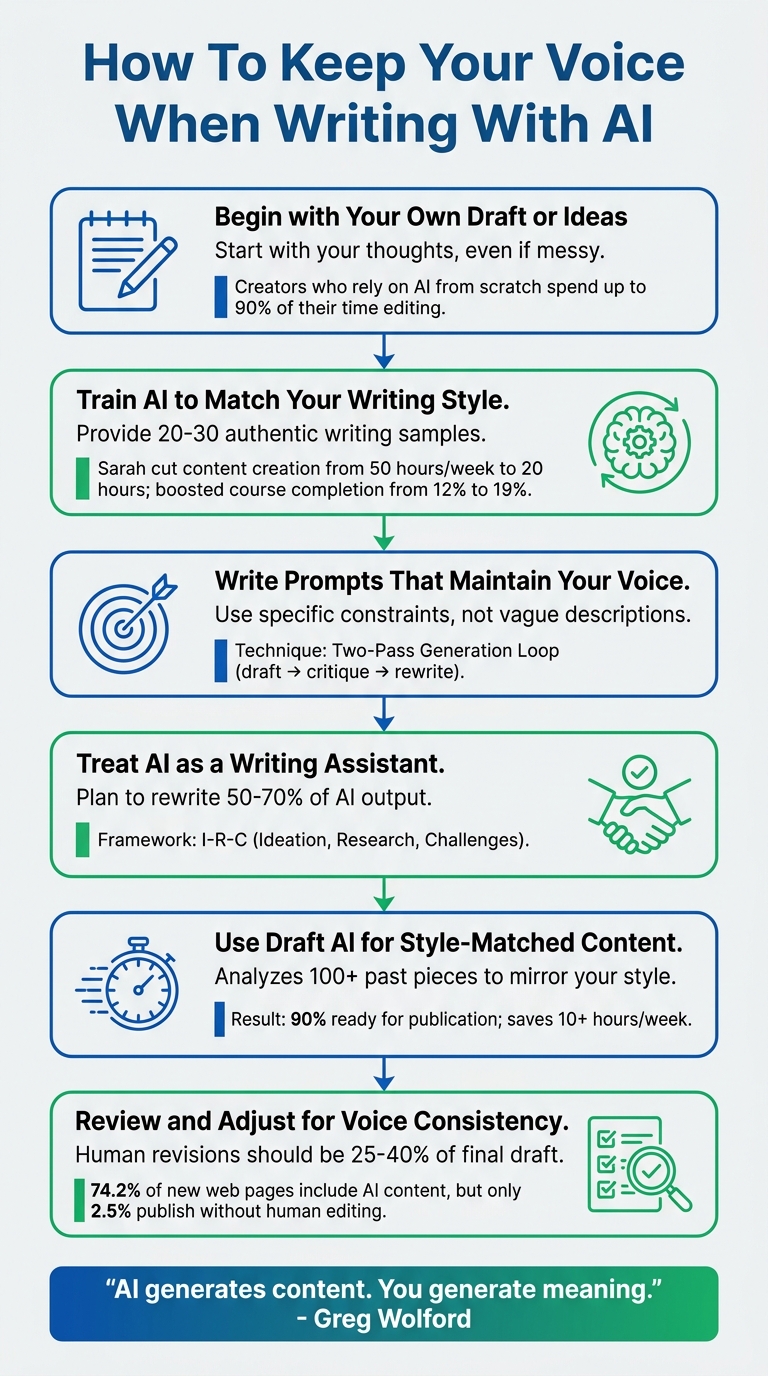
- Start with your own draft or ideas: Avoid letting AI write from scratch. Begin with your thoughts, even if messy, to guide the AI.
- Train AI to match your style: Provide 20–30 examples of your writing to teach the AI your tone, sentence structure, and preferences.
- Write clear prompts: Be specific about what you want, and include a "Don't" list of phrases or styles to avoid.
- Treat AI as an assistant, not a replacement: Use content creation tools for brainstorming or editing, but add personal insights and rewrite generic parts.
- Review for consistency: Edit at least 25–40% of the output to ensure it sounds like you.
6-Step Process to Keep Your Voice When Writing With AI
Teach AI to Write and Sound Like You!
sbb-itb-9f5fe42
Step 1: Begin with Your Own Draft or Ideas
While automated content creation tools offer efficiency, letting AI write from scratch often results in content that feels generic or detached. As James Harbeck aptly puts it:
"You don't need to find your voice. You already have a voice. You develop it by using it."
Starting with your own draft ensures the final product stays true to your personal style.
Write Your Original Draft First
Your first step? Create a rough draft yourself. It doesn't have to be polished - use voice memos, bullet points, or even a messy outline. This raw material acts as the foundation for AI to refine while keeping your unique tone intact. These initial drafts, often referred to as "Golden Samples", help AI understand and replicate your voice rather than guessing it.
Skipping this step can lead to frustration. Many creators who rely on AI to generate content from scratch report spending up to 90% of their time editing the output because it doesn’t match their style. By starting with your own ideas, you provide the emotional depth and personal connections that only you can bring to the table.
Give AI Clear and Specific Instructions
When working with AI, vague prompts like "write like me" won’t cut it. Be as specific as possible about what you want. Instead of saying "make it casual", describe your preferred sentence structure, the types of transitions you favor, or how formal or informal your tone should be.
It also helps to create a "Don't" list of phrases or styles you dislike. For example, you might want to avoid overused expressions like "In today's fast-paced digital landscape" or "Let's dive into". The more precise you are about your preferences, the less likely the output will feel bland. As Ilia Ilinskii, founder of Rephrase-it, explains:
"If you don't specify [constraints], the model falls back to the safest general-average email voice. That's the blandness you're hearing."
Step 2: Train AI to Match Your Writing Style
After creating your initial drafts, the next step is refining the AI to imitate your personal voice. This isn't just about labeling your style as "casual" or "professional" - those generalizations don't work. As Wilfred Okajevo, an ML and Cognitive Science Engineer at Noren, explains:
"A 50-line document of concrete patterns outperforms a 5-line paragraph of adjectives every time."
The goal here is to provide the AI with enough examples so it can identify and replicate your specific patterns.
Use AI Style Analysis Features
Modern AI tools can dig into your past work to uncover the nuances of your writing style. This isn't about superficial mimicry. The AI analyzes measurable traits like your average sentence length, paragraph structure, and even your use of punctuation.
For the most accurate results, you'll need to provide 20–30 authentic writing samples. While fewer samples - say, 3 to 5 - might help capture your basic rhythm, deeper patterns like how you frame arguments or your choice of analogies only become clear with more examples. Use unedited materials like emails, social media posts, or voice message transcripts. These raw samples showcase your unfiltered voice better than polished, heavily edited pieces.
Platforms like Draft AI can analyze these samples to identify your sentence structure, vocabulary, and tone. Once the AI understands your style, it can apply those patterns to new content. This means less time spent editing AI outputs because they already align with your natural voice.
Set Your Tone and Style Preferences
Once your style has been analyzed, it's time to define your voice with precision. This is where a "Voice Contract" comes in - a detailed set of rules the AI will follow. Think of it as a guidebook for your writing style. It should include:
- Preferred sentence length: For example, "12–15 words per sentence."
- Sentence variety: Specify the balance between short, punchy sentences and longer, detailed ones.
- A "Don't" list: Outline phrases you want to avoid, especially generic or overused terms like "delve", "tapestry", or "in today's rapidly evolving landscape".
Take Sarah, a health course creator with 800 students, as an example. In February 2026, she used this approach by feeding 25 unedited newsletter samples into a Custom GPT. The AI identified her unique patterns, such as starting with relatable scenarios and using food-based analogies. This cut her content creation time from 50 hours a week to just 20 hours and boosted her students' course completion rates from 12% to 19%.
A helpful strategy is the "Two-Pass" method. First, have the AI generate a draft. Then, use a second prompt to refine that draft based on your style guide. To keep things fresh, revisit and update your style preferences every 3–6 months as your writing naturally evolves.
Step 3: Write Prompts That Maintain Your Voice
Once you've trained your AI to mimic your style, the next step is crafting prompts that keep your voice intact. This isn’t about vague instructions like “sound casual” or “be professional.” Those kinds of prompts often result in bland, generic output. As Ilia Ilinskii, Founder of Rephrase-it, explains:
"Your voice is a bundle of constraints (not a vibe)."
Think of your voice as a set of specific, testable rules rather than abstract qualities. This approach ensures clarity and consistency in the AI's output.
Structure Your Prompts Clearly
The best prompts provide the AI with detailed instructions it can easily follow. Start with a "Voice Wrapper" - a clear system instruction that lays out your writing style. For instance: "Write as a consultant who is direct, approachable, and uses sports analogies. Avoid jargon. Keep sentences under 20 words.". This eliminates any guesswork about what "casual" or "professional" might mean.
Add a "Don't" list to block overused or generic phrases like "circle back", "at your earliest convenience", or "delve". This level of detail makes a big difference. In fact, a 2025 study involving 331 professionals found that AI tailored with specific constraints produced outputs rated higher in creativity and quality compared to generic AI.
Another effective technique is inverse prompting. Here’s how it works: have the AI analyze 6–10 samples of your writing to identify your unique "linguistic DNA". Then, include that analysis in your prompts. This ensures the AI bases its responses on your actual writing patterns rather than assumptions.
Once your prompt is structured, the next step is testing and fine-tuning it.
Test and Adjust Your Prompts
Your first attempt at a prompt likely won’t be perfect. That’s where testing and refining come in. Use the "Two-Pass Generation Loop" to improve results. This method involves three steps: the AI drafts content, critiques it against your voice rules, and rewrites it to address any mismatches. By building self-correction into the process, you’ll get closer to your ideal output.
When giving feedback, avoid vague comments like “this doesn’t sound like me.” Instead, offer specific corrections like, “Replace 'utilize' with 'use'” or “Start this paragraph with a question”. Reading the output aloud can also help - if something doesn’t sound like something you’d say, note it and adjust the prompt accordingly.
If a prompt consistently produces results that match your voice, save it as a template. If not, tweak one element at a time - adjust the sentence length, refine tone descriptors, or add new “don’t” phrases - and test again. Over time, you’ll develop a collection of prompts that reliably reflect your style.
Step 4: Treat AI as a Writing Assistant, Not a Replacement
Once you've mastered training and prompting AI to align with your voice, the next step is to view AI as a partner in your writing process - not as a substitute for your creativity.
AI excels at putting words together in grammatically correct ways. But here's the catch: it can't create meaning. True meaning stems from human experience, judgment, and perspective. Since AI is essentially a prediction machine trained on vast amounts of text, it tends to default to the "average" of what it's been exposed to. The result? Text that might be polished but feels generic and forgettable. It lacks the quirks, boldness, and rhythm that make writing truly stand out.
The best approach is to treat AI like a collaborator. Use it to brainstorm ideas, test your arguments, or identify structural weak spots in your draft. But when it comes to crafting the heart of your message or those emotionally charged moments, that responsibility lies with you. This method ensures AI plays a supportive role while your unique perspective remains at the forefront.
Edit and Add Personal Touches to AI Content
To make AI-generated content truly yours, plan to rewrite around 50%–70% of its output. Start by reading the text aloud. If something feels off or unnatural - like it’s not how you'd normally express yourself - rewrite it in your own words. Pay attention to AI's verbal habits and trim overused phrases like "moreover", "furthermore", or "it's important to note". Replace vague descriptions with vivid, specific details drawn from your own experiences. For example, instead of saying "a messy room", paint a more relatable picture: "coffee rings on the table and the lingering smell of old takeout".
Next, layer in your personal insights. Use a first-person perspective ("I", "we") to make the content feel grounded and genuine. Share contrarian viewpoints that challenge conventional thinking or include data points from your own expertise - elements AI simply can't generate. These touches signal to readers that there’s a real person, with real-world experience, behind the writing.
By refining AI's suggestions and adding your unique voice, you ensure the final work feels authentic and distinctly yours.
Keep Creative Control Over Your Content
Your voice is most evident in the initial draft, where you decide the structure, tone, and key messages. To preserve that authenticity, always start the draft yourself. AI can be helpful in polishing and refining later, but if it creates the first version, you risk losing the personal touch that makes your writing stand out.
Greg Wolford's I-R-C Framework offers a smart way to collaborate with AI: use it for Ideation (brainstorming ideas), Research (finding tailored explanations), and Challenges (spotting gaps in your logic or structure). This approach ensures you retain creative control while leveraging AI’s strengths. By keeping the drafting process in your hands, you maintain the emotional depth and originality that only you can bring to the table.
Think of AI as a modern-day thesaurus. It can suggest options, but you decide which ones fit your style and rhythm best. Review its suggestions line by line, tweaking them to align with your voice. This level of oversight ensures the final product is unmistakably yours, with every word reflecting your personal style and intent.
Step 5: Use Draft AI for Style-Matched Content

Once you've mastered collaborating with AI while keeping your creative edge, it's time to consider a tool designed to reflect your unique voice: Draft AI. This platform takes your existing content - analyzing over 100 past pieces - and builds a custom model that mirrors your writing style. By capturing your quirks and perspective, Draft AI ensures that your output feels personal and aligned with your tone. Let’s dive into what makes this tool stand out.
Draft AI Features That Keep Your Voice Intact
One of Draft AI's standout features is its sentence-by-sentence editing control. You can approve or reject individual suggestions, ensuring your style stays consistent. This level of control directly addresses the issue of overly generic AI outputs. Plus, the platform offers specialized tone tuners - like Empathy, Simplify, or More Exciting - that adjust the tone while keeping your voice at the forefront.
"Draft AI is different. We train a custom model on your previous content. The result is AI that actually sounds like you, allowing you to scale your presence authentically." – Draft AI
For example, in April 2026, Alex, a startup founder, used Draft AI to craft a LinkedIn post about product-market fit and automation. His post resonated with his audience, earning 842 likes and 124 shares. Similarly, Sarah from TechCorp experimented with a casual, meme-inspired tone for her campaign. Her AI-generated, personalized content outperformed the traditional corporate version by 300% in conversion rates, with 412 likes and 89 comments.
Speed and Consistency with Draft AI
Draft AI isn’t just about preserving your style - it’s a time-saver, too. The platform produces content that’s typically 90% ready for publication right out of the gate. Users report saving over 10 hours per week and can create a month’s worth of tailored content in just 15 minutes. Whether you’re crafting Twitter threads, LinkedIn posts, or newsletter intros, Draft AI adapts your ideas across formats while maintaining your voice.
"It actually sounds like I wrote it on my best day. Docs updated, changelog generated, tweet thread ready. Productivity unlocked." – DevRel Dave
The secret to its accuracy lies in the input. Providing at least 100 examples of your previous work ensures that Draft AI can clone your tone with precision. By investing effort upfront, you set the stage for consistent, high-quality content that feels like you wrote it yourself.
Step 6: Review and Adjust for Voice Consistency
Once you've trained your AI and made your personal edits, this final review ensures your unique voice shines through. Even with tools like Draft AI, the final review is where your personal touch becomes unmistakable. As of 2025, 74.2% of new web pages include AI-generated content, but only 2.5% make it to publication without human editing. That gap exists for a reason - AI can stray from your voice, especially in longer pieces. By the time you’re a few paragraphs in, the AI might drift from your initial tone and fall into generic writing patterns. Your job is to catch these shifts before hitting publish.
Follow a Review Process
Start with a quick "Smell Test" - a three-minute scan to spot signs of AI-generated content. Watch for patterns like too many em-dashes (more than two in 200 words), lists of exactly three items, or sentences that all stick to a 15–25 word range. Pay special attention to the opening and closing paragraphs. Ask yourself: Does the first sentence sound like you wrote it, or does it feel like a bland corporate press release? Add personal touches, like first-person language ("I", "we", or "in my experience"), where it feels appropriate.
Reading the content aloud is another great way to catch anything that feels off. In workflows that use AI effectively, human revisions typically make up 25–40% of the final draft. If you're editing less than 15%, there's a good chance too much generic AI language is slipping through. Keep a "banned word list" of terms the AI tends to overuse, such as "delve", "leverage", "tapestry", or "harness", and search for them in every draft. Once the content flows naturally, use what you’ve learned to improve your AI prompts for next time.
Use Feedback to Improve Your AI Prompts
When the content is finalized, take what you’ve learned and refine your AI prompts. Use your review process to tweak prompts for future projects, updating your master prompt to reflect recurring adjustments.
Keep track of which prompts lead to your best results by saving them in a "best lines" file. Over time, you'll start to see patterns in what works. Since most AI tools don’t retain corrections between sessions, maintaining this file yourself is essential. Revisit your voice instructions every few months to ensure they align with your evolving style. Consistency in how your brand is presented can have a big impact - research shows it can boost revenue by up to 33%.
Conclusion
Your voice is what sets your writing apart. While AI can speed up the content creation process, it can't replicate the personal perspective, rhythm, and personality that only you can bring. As writer Greg Wolford aptly states:
"AI generates content. You generate meaning".
This guide's six steps provide a straightforward approach: begin with your ideas, train AI to understand your style, craft precise prompts, treat AI as an assistant, and always review for consistency. By following these steps, you ensure that AI supports and enhances your voice rather than overshadowing it.
Tools designed to combine your unique style with AI efficiency can be a game-changer. For example, platforms like Draft AI let you create content that mirrors your personal style with AI-powered features available on their Pro plan ($15/month). These tools should serve as collaborators to refine your ideas, not as substitutes for your creativity.
Every time you tweak an AI-generated sentence, add your own flair, or rework a phrase that doesn’t feel quite right, you’re reinforcing your unique voice. By blending AI’s capabilities with your creativity, you can produce content that’s both efficient and unmistakably yours.
FAQs
How do I define my voice for AI?
To help an AI reflect your personal writing style, you can share 15–20 examples of your work. These examples allow the AI to learn your tone, preferred vocabulary, and overall approach. Tools like Style Definition Documents or Custom Instructions can further refine elements like your sense of humor or desired level of formality.
You can also fine-tune the output by tweaking prompts or offering feedback. This ensures the AI mirrors your personality while staying effective and consistent.
What should I include in a 'Don’t' list?
To keep your voice intact when working with AI, it's crucial not to lean on it so much that your personal style fades away. Always review AI suggestions carefully instead of accepting them blindly, as this can dilute the authenticity of your writing. Rather than letting AI take over your entire process, treat it as a tool to fine-tune your work. And most importantly, hold on to what makes your writing distinct - your favorite phrases, tone, and quirks - by practicing regularly and weaving those elements into the prompts you give the AI.
How much should I rewrite AI output?
To make your writing feel genuine, don't settle for minor tweaks. Rewrite sentences with care, ditch overused phrases, and let your personality shine through. Aim for a tone that feels natural and conversational, not robotic or stiff. By reworking the structure and refining the flow, you can create content that truly reflects who you are.


