AI Strategies for LinkedIn Networking
LinkedIn in 2026 is more competitive than ever. With over 700 million members, standing out requires more than just posting - it’s about using tools like AI to save time, create better content, and connect with the right audience. Here’s what you need to know:
- Why AI Matters: AI helps busy professionals turn rough ideas into polished LinkedIn posts in minutes, saving up to 8 hours a week.
- What Works: Posts with 70% personal input and 30% AI assistance get 3.2x more engagement than fully AI-generated ones.
- Avoid Penalties: LinkedIn’s "Authenticity Update" rewards posts with personal tone and penalizes generic AI content by cutting reach by up to 47%.
- Boost Visibility: Use formats like AI carousel design tools (3.2x more engagement) and personal narratives (41% more comments). Keep posts between 1,200–1,600 characters.
- Engagement Goals: Focus on meaningful interactions like comments and profile visits, not just likes.
AI tools like Draft AI simplify content creation while keeping your voice intact. Whether you’re targeting clients, peers, or decision-makers, combining AI with your expertise can help you stay consistent, reach the right audience, and build stronger connections.
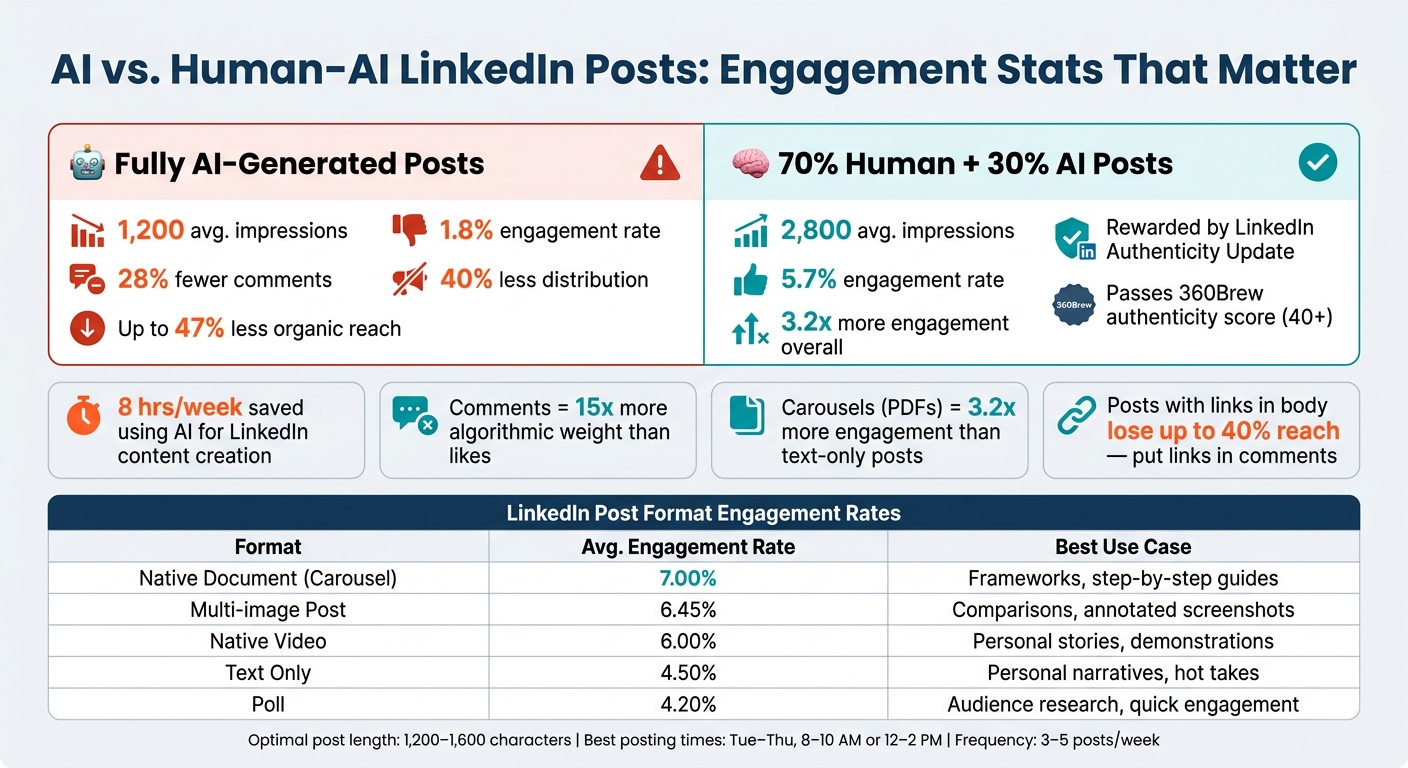
AI vs. Human-AI LinkedIn Posts: Engagement Stats That Matter
Building the Right Base for AI-Assisted LinkedIn Networking
How LinkedIn's Networking System Works
LinkedIn's algorithm has undergone big changes since 2026. Now, it factors in dwell time, content relevance, and network depth to determine what users see in their feeds. The focus has shifted toward encouraging genuine engagement instead of passive scrolling.
One of the biggest updates is the move from a relationship graph to an interest graph. Instead of showing posts only to your direct connections, LinkedIn now distributes content based on topic relevance and your engagement history. This means your posts can reach decision-makers you aren’t directly connected with. Considering there are 65 million decision-makers on the platform, this update opens up opportunities to connect with key individuals - no warm introduction needed.
AI becomes most effective in this system when it helps you create content that grabs attention and encourages interaction. However, fully AI-generated posts tend to fall short - receiving up to 40% less distribution compared to posts that combine AI with human input. Understanding these changes is essential for using AI in a way that enhances your content and makes it resonate with your audience.
Using AI on LinkedIn Responsibly
In March 2026, LinkedIn rolled out its "Authenticity Update", which penalizes generic AI-generated posts by cutting their organic reach by up to 47%. The platform’s scoring model, 360Brew, rates posts on a 0–100 authenticity scale. Posts scoring under 40 are deprioritized in users' feeds.
What triggers these penalties? Posts that rely on limited vocabulary, predictable structures, and lack a personal tone are flagged. As Ron Fybish, author of Foundera, puts it:
"360Brew isn't hunting AI. It's hunting laziness. The algorithm flags posts where you haven't shown up."
To avoid these penalties, make sure to rewrite your opening hook and closing call-to-action. Include at least one specific, verifiable personal detail - like a client outcome, a date, or a measurable result - within the first three sentences. A good rule of thumb is to aim for a 70/30 split: 70% of the content should reflect your own ideas and voice, while AI can help with structure and polish. This balance keeps your content engaging and maximizes its visibility.
Once you’ve ensured authenticity, the next step is to clearly define your networking goals and audience.
Setting Clear Networking Goals and Target Audiences
Before diving into AI tools, take time to define your target audience and goals. A narrow, specific focus works better than a broad, generic one. For example, "helping SaaS founders reduce churn through onboarding improvements" is far more effective than "helping tech companies grow".
To refine your approach, break your target network into four key groups:
- Potential clients: These are your direct revenue opportunities.
- Referral partners: Non-competing peers who can exchange leads.
- Industry peers: People who can amplify your reach.
- Strategic contacts: Journalists, event organizers, or others who can boost your authority.
By feeding this context into AI tools, you can tailor your posts to match the tone, topics, and calls-to-action that resonate with each group. Defining your audience with this level of clarity also helps you create posts that are more engaging and measurable in terms of performance.
"One AI-assisted post per week that attracts your ICP outperforms five generic AI posts that attract the wrong audience." - ConnectSafely Editorial Team
Finally, review your top five performing posts from the last 90 days using LinkedIn Analytics. Look for patterns in topics, hooks, and formats that worked well. This insight will make your future AI prompts sharper and more effective.
sbb-itb-9f5fe42
Building a LinkedIn Content Strategy with AI
Matching Post Types to Networking Goals
Selecting the right LinkedIn post format is all about aligning it with your social media content creation checklist and networking objectives - whether you're looking to establish authority, generate leads, or spark meaningful conversations.
Back in 2026, document carousels became a standout format, delivering 3.2x more engagement compared to text-only posts. These are perfect for step-by-step guides or educational frameworks. On the other hand, personal narrative posts generated 41% more comments than how-to content. Since comments carry 15x more weight in LinkedIn’s algorithm compared to likes, they’re a fantastic way to build authentic relationships.
| Format | Avg. Engagement Rate | Best Use Case |
|---|---|---|
| Native Document (Carousel) | 7.00% | Frameworks, step-by-step guides |
| Multi-image Post | 6.45% | Comparisons, annotated screenshots |
| Native Video | 6.00% | Personal stories, demonstrations |
| Text Only | 4.50% | Personal narratives, hot takes |
| Poll | 4.20% | Audience research, quick engagement |
One effective method to maximize content ideas is the Pillar-to-Spokes model. Start with a strong concept, like an industry insight or client success story, and use AI to reformat it into multiple post types. For instance, transform one idea into a carousel, a poll, or a text post to connect with different audience segments - all without reinventing the wheel.
Once your formats are dialed in, it’s time to focus on finding topics that resonate and drive engagement.
Using AI to Find and Research Topics
With your post formats in place, the next challenge is uncovering topics that captivate your audience. AI tools can help you do this by analyzing existing content and surfacing insights you may have overlooked.
For instance, you can upload an industry report, client research, or even internal notes into an AI tool. Ask the tool to highlight surprising or counterintuitive findings, and you’ll have a week’s worth of data-driven content ready to go - content that’s more likely to spark meaningful comment threads. AI can also identify "tension points" - contrarian opinions or underexplored debates in your industry - that tend to grab attention from decision-makers.
"The algorithm builds what it internally calls a 'topic fingerprint' for every creator. If your fingerprint is clear and consistent, your content travels." - Udit Goenka, Founder & CEO, Autoposting.ai
Focusing on 2–3 core topic pillars is more effective than spreading yourself thin across many subjects. LinkedIn’s Interest Graph favors creators who demonstrate expertise in specific areas, so narrowing your focus can significantly boost your visibility. Tools like Draft AI can help by generating content ideas tailored to your business perspective, eliminating the frustration of staring at a blank page.
Building a Consistent Posting Schedule
When it comes to LinkedIn, consistency matters more than sheer volume. The key is to batch your content creation so you can stick to a manageable weekly schedule. In just 30–60 minutes, you can draft and plan posts for the entire week.
"The creators who win are not the ones who post the most. They are the ones who build systems that make consistency effortless." - Mara Martins, AI Content Strategist
A good rule of thumb is to pre-plan about 60% of your posts - like educational content, frameworks, or carousels - and leave 40% for reactive posts based on current events or industry updates. This balance keeps your feed fresh without feeling overly automated.
Timing also plays a big role. Schedule your posts during peak engagement hours - typically Tuesday through Thursday, from 8:00–10:00 AM or 12:00–2:00 PM. Limit yourself to 3–5 posts per week, with at least 24 hours between posts to avoid overwhelming your audience. And here’s a pro tip: always place external links in the first comment rather than the post itself, as LinkedIn reduces the reach of posts with links in the body by up to 40%.
Writing LinkedIn Posts That Drive Engagement with AI
How to Structure a LinkedIn Post for More Engagement
Crafting an engaging LinkedIn post starts with a solid structure. A proven AI-assisted framework divides your post into five key sections:
- Hook: A captivating opening line that grabs attention.
- Context: Explains why your topic matters to the reader.
- Value: Shares actionable steps or insights.
- Proof: Backs up your points with a specific result or metric.
- CTA: Ends with one clear call to action.
Keeping your post between 1,200–1,600 characters hits the engagement sweet spot. AI tools can help brainstorm 5–10 variations of your opening hook, which you can refine to match your voice. Hooks that use a first-person perspective, like "I did X" or "Here's what happened when I…", can boost engagement by 2.3x compared to third-person openers.
For readability, focus on one idea per line and use plenty of white space - especially for mobile users. AI tools also excel at breaking down dense paragraphs into easy-to-scan formats, making your content more digestible.
Keeping Your Personal Voice When Using AI
Fully AI-generated posts often fall flat, receiving 28% fewer comments and potentially facing up to 47% less organic reach on LinkedIn. But you don’t have to ditch AI completely. The key is using it as a tool to enhance your content, not replace your voice.
A 70/30 framework works best: 70% of your post should reflect your own ideas, stories, and experiences, while AI can handle the remaining 30% - helping with structure, formatting, and minor edits. Start by jotting down your thoughts, let AI draft the post, and then rewrite the opening and closing in your own words.
"The best LinkedIn posts combine AI efficiency with human authenticity. The key is treating AI as a writing assistant, not a replacement." - Paul Irolla, Founder & CEO, Meet Lea
To maintain your voice, try voice fingerprinting. Feed 3–5 of your previous posts into an AI tool to teach it your style - your tone, sentence structure, and vocabulary. Tools like Draft AI even offer features like "Copy Your Style", which applies your unique voice to new drafts. Afterward, refine the AI's draft by trimming about 20%, removing generic buzzwords like "game-changer", and adding specifics only you can provide, like client names, timelines, or real outcomes.
Using AI to Create Different Post Formats
AI can also help you repurpose a single idea into multiple formats, reaching different segments of your network. For example, a takeaway from a client call could be turned into a text post, a 5-slide carousel, or even a short video script.
For carousels, AI can help you create a 5-part sequence:
- Hook slide: Introduces the main tension or result.
- Context slide: Sets the stage.
- Insight slides: Shares key lessons or steps.
- Proof slide: Features data or a case study.
- Closing slide: Ends with a clear CTA.
When uploading carousels, always export them as PDFs instead of image sets. LinkedIn prioritizes PDFs as "documents", which can boost their reach. Tools like Draft AI simplify the process, letting you customize the design before exporting, saving you time.
"The useful shift isn't 'AI writes for me.' It's 'AI gets me to a strong draft faster, so I can spend my effort where it matters.'" - Qurratulain Awan, Digital Marketing Expert
If a text post performs well, consider expanding it into a long-form article or condensing it into a carousel. Repurposing your successful posts is one of the smartest ways to maximize your LinkedIn presence.
Stop Getting "Pitch Slapped": Smart LinkedIn Strategy with A.I. | Al Kushner
Measuring Results and Refining Your AI-Driven Strategy
Once you've laid the groundwork for creating and sharing content, the next step is to evaluate its performance and fine-tune your approach. This is where tracking the right metrics and leveraging AI tools can make all the difference.
Metrics That Matter Beyond Likes
Counting likes is easy, but it doesn't tell the whole story. In 2026, LinkedIn’s algorithm prioritizes a "Depth Score" - a metric that values meaningful interactions like dwell time, saves, shares with added commentary, and thoughtful comments over simple reactions. Essentially, quality engagement trumps quantity. A post with a handful of detailed, multi-sentence comments can outperform one with far more generic reactions.
"A post with 5 thoughtful, multi-sentence comments is outperforming one with 15 'great post!' replies." - JustPollen Editorial
Another key metric to watch is your profile visitors. Who's checking out your profile? Their job titles, industries, and company sizes often matter more than the number of views. For example, if you're targeting VP-level decision-makers at mid-size tech companies but your profile is attracting students or professionals from unrelated industries, it’s a sign to rethink your content strategy. Similarly, inbound connection requests and direct messages from relevant individuals are clear indicators that your content is resonating with the right audience.
Using AI to Review and Improve Post Performance
AI shines when it comes to spotting patterns. You can ask an AI tool to analyze your top-performing posts and identify what they have in common - whether it’s the opening hook, word count, tone, or subject matter. This kind of analysis, which might take weeks manually, can be done in just 20 minutes with AI.
For instance, posts between 600 and 1,200 characters tend to achieve a 10.3% engagement rate, while those over 2,000 characters often see that number drop to just 1.9%. AI can alert you if your drafts are too long and might underperform. Keeping your AI audience profile updated every four weeks with fresh data ensures your content stays relevant and aligned with your audience’s preferences.
"The goal isn't just to use AI - it's to use it smartly. Stay true to your voice, keep your audience at the heart of your strategy, and embrace the efficiency AI brings." - Renitha Sunil, Draftly
This kind of insight allows you to focus your efforts on what works, setting the stage to turn strong engagement into meaningful connections.
Turning Post Engagement Into Real Relationships
Engagement metrics are important, but the ultimate goal is to turn those interactions into professional relationships. The best way to do this is by following a structured approach. Start by commenting on a prospect’s post, then send a personalized connection request referencing that interaction, and finally, initiate a low-pressure direct message. This method, often called the "Engagement Ladder", feels organic rather than transactional.
AI can help streamline this process. After posting, it can identify users who engaged with your content, categorize them by role or industry, and even draft tailored follow-up messages. A generic "Thanks for the comment!" won’t cut it - referencing a specific detail from their comment can open the door to a meaningful conversation. Tools like Draft AI make crafting these personalized messages quicker and easier.
"The comment section is the new networking event. When you leave a thoughtful, insightful remark on a prospect's post, you are not just speaking to them; you are stepping onto a stage in front of their entire audience." - Linkmate Guide
Timing also plays a major role. Responding to comments within two hours of posting can boost engagement by 30% and signals to the algorithm that your post deserves broader visibility. AI can help you draft replies quickly, keeping you responsive without disrupting your workflow. Using LinkedIn AI scheduling tools can further streamline this process by ensuring your content goes live when your audience is most active.
Conclusion: Getting More From LinkedIn With AI
Let’s pull everything together: LinkedIn in 2026 is all about blending your unique perspective with the efficiency of AI. The professionals thriving on the platform aren’t using AI to replace their creativity. Instead, they’re leveraging it to streamline the automated content creation process, turning ideas into shareable, impactful posts.
The numbers back this up. Posts crafted with a 70/30 human-AI mix average 2,800 impressions and a 5.7% engagement rate. Compare that to fully AI-generated posts, which only reach 1,200 impressions and a 1.8% engagement rate. This shows how much LinkedIn values content that feels human and personal. As Hina Mian, Co-Founder of Future Factors AI, explains:
"The algorithm is protecting the ecosystem that makes LinkedIn worth using. When the feed fills with interchangeable AI posts, people scroll less."
Your personal insights and experiences are your strongest tools. AI’s role is to handle the technical stuff - like structure, formatting, and consistency - so you can focus on what really matters: your voice. Tools like Draft AI make this process easier, turning your raw ideas into polished posts while keeping your unique tone intact. It’s all about finding that balance between technology and your expertise.
To grow on LinkedIn, you need a mix of thoughtful content, authentic interactions, and a sustainable system that keeps you consistent without draining your energy. AI provides the system. Your voice provides the impact. Together, this combination fuels the kind of growth we’ve explored throughout this guide.
FAQs
How do I use AI on LinkedIn without hurting my reach?
To keep your content engaging and relatable, think of AI as a helper for brainstorming and organizing ideas - not as a replacement for your voice. Sprinkle in personal touches like stories, specific data, or your unique perspective to make your posts feel genuine. Rework AI-generated hooks to steer clear of bland, cookie-cutter intros, and mix up sentence structures to keep things flowing naturally. Tools like Draft AI can be great for jumpstarting your content creation process, but make sure to tweak and personalize your posts to connect with your audience.
What should I track besides likes to know my posts are working?
To gauge how well your LinkedIn posts are performing, don’t just count likes. Instead, dig deeper into engagement metrics. Look at the number of comments, spot buying signals from key accounts, and evaluate how well your content connects with your audience. Make sure your posts feel genuine, stay true to your personal or brand voice, and deliver results that matter. Tools like Draft AI can assist in crafting focused, high-quality content to help you hit these targets.
How do I turn comments into real client conversations?
To transform LinkedIn comments into productive client conversations, aim to provide relevant insights and establish your expertise. When replying, use a thoughtful approach: share an insightful observation, include a real-world example, or pose a thoughtful question to deepen the discussion. Tools like Draft AI can assist in crafting responses that are both polished and genuine. Think of each comment as a chance to initiate private, consultative discussions with potential clients who value your knowledge.


