How LinkedIn Algorithm Ranks Posts
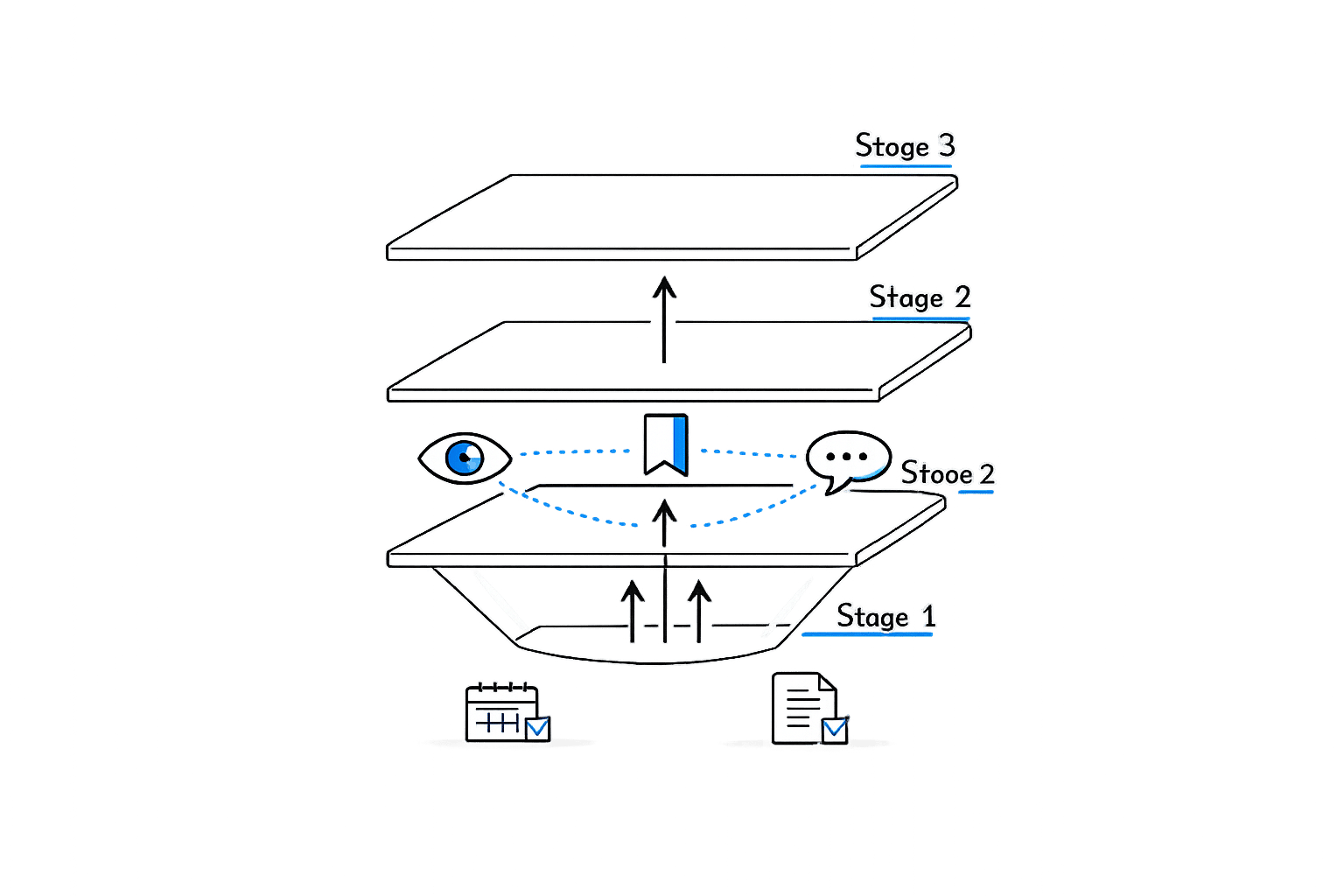
LinkedIn's algorithm in 2026 focuses on professional relevance and engagement quality to determine which posts get visibility. Here's a quick summary of how it works and how to optimize your content:
- Three-Stage Process: Filters spam, tests posts with 2–5% of your network, and expands reach based on early engagement.
- Top Ranking Factors:
- Dwell Time: Posts where users spend over 61 seconds perform far better.
- Substantive Comments: Multi-sentence comments carry more weight than likes.
- Saves: A save is worth 5x more than a like.
- Early Engagement: Posts need 5–10% engagement within the first 60–90 minutes.
- Profile Matters: 50% of reach is influenced by your posting history, niche consistency, and profile details.
- Best Content Formats: Top AI tools for carousels (PDFs) lead with a 7% engagement rate, followed by native video and text posts. Polls are less effective.
- Avoid External Links: Posts with links lose up to 60% reach. Use "link in the comments" sparingly.
Quick Tips:
- Post 3–5 times a week, ideally on Tuesday–Thursday, 7–9 AM ET.
- Focus on 3–5 niche topics to build authority.
- Use short paragraphs, micro-headings, and 1,300–2,500 characters.
- Engage with comments quickly, especially in the first hour.
The key to success is understanding LinkedIn's algorithm, creating content that holds attention, and building a consistent posting routine aligned with your professional niche. Using LinkedIn AI scheduling tools can help maintain this consistency without manual effort.
How the LinkedIn Algorithm Works
The Feed Ranking Pipeline
LinkedIn's algorithm uses a three-stage process to determine which posts appear in your feed. First, it filters out spam and low-quality content with an impressive 93% accuracy. Posts that make it past this stage are shown to a small percentage of your network - roughly 2–5% of your connections. If these initial viewers engage with the post (achieving 5–10% engagement within 60–120 minutes), it signals quality, prompting the algorithm to push the content to a broader audience.
What’s different in the 2025/2026 version of the pipeline is how LinkedIn retrieves potential posts. Instead of relying on keyword matches, it now uses semantic matching powered by large language models (LLMs). This allows the algorithm to surface posts based on meaning rather than exact wording. For example, a post about "supply chain resilience" might appear for someone focused on "logistics operations", even if the specific terms don’t overlap.
Once posts pass these initial stages, the algorithm evaluates them using more than 300 signals to determine their quality and reach.
Key Ranking Signals
The algorithm doesn’t just measure engagement; it quantifies the quality of that engagement, and some signals carry far more weight than others.
Dwell time tops the list as the most influential factor. Posts where users spend over 61 seconds tend to see a 15.6% engagement rate, compared to just 1.2% for posts skimmed in under 3 seconds. On the flip side, low dwell time acts as a negative signal, potentially hurting the reach of future posts, not just the current one.
The algorithm also evaluates the substance of interactions. Thoughtful, multi-sentence comments carry significantly more weight than quick responses like "Great post!". Similarly, saves are a major indicator of value - they carry 5x the weight of a like and 2x the weight of a standard comment.
| Signal | Algorithmic Weight | Impact on Reach |
|---|---|---|
| Dwell Time | Highest | High - indicates content quality |
| Substantive Comments | Very High | High - sparks deeper conversations |
| Saves | High | High - signals long-term value |
| Early Velocity | High | Critical - determines Stage 2 distribution |
| Likes/Reactions | Low | Minimal - seen as low-effort engagement |
| External Links | Negative | Severe - reduces reach by 50–70% |
People-First vs. Post-First Ranking
Interestingly, LinkedIn doesn’t just focus on what you post - it also evaluates who you are as a professional. According to the Algorithm Insights Report, 50.1% of a post’s reach is influenced by profile-based factors, such as your follower history, posting frequency, and topical consistency. In contrast, only 29.5% of reach is determined by the performance of the individual post itself.
"The 50.1% is where compounding lives. It's also where the Interest Graph quietly decides who you are before any single post is judged." - Richard van der Blom, Author of the Algorithm Insights Report
This "people-first ranking" is powered by LinkedIn’s 360Brew AI model, a system with 150 billion parameters. Creators often use AI tools for LinkedIn posts to maintain this consistency across different regions. It builds a detailed picture of your professional identity by analyzing your job title, skills, industry, and past content themes. Creators who consistently focus on one or two specific topics train the algorithm to recognize them as experts, which helps their posts reach the right audience more effectively. As LinkedIn Engineer Hristo Danchev explains:
"Under the hood, we rank millions of posts at any given time, while balancing freshness with relevance across a constantly evolving content bank."
The bottom line? Your profile and posting history play a significant role in how far your content goes - even before anyone clicks on your latest post.
sbb-itb-9f5fe42
How to Optimize Posts for More Engagement
How to Write Posts That Drive Real Engagement
The first 140–210 characters of your post carry the most weight. This snippet determines whether users click or scroll past, acting as a critical signal for algorithms. Once users click, their dwell time - how long they spend on your content - becomes the next key metric.
Knowing how to create social media posts efficiently is key, but formatting also plays a huge role in keeping readers engaged. Stick to short paragraphs (1–2 sentences) and break up text with micro-headings every 8–12 lines. A long, unbroken wall of text often leads to users skipping your post, which hurts dwell time and signals the algorithm to deprioritize your content. For length, aim for 1,300–2,500 characters. This range is long enough to provide value but concise enough to hold attention.
Want to spark interaction? Ask targeted questions like: "What’s the biggest misconception about [your topic]?" Specific questions encourage thoughtful responses. Algorithms evaluate the quality of comments using natural language processing (NLP), and comments with 15+ words carry approximately 15x the weight of a like. More meaningful comments mean better reach.
Once your post is live, the first hour becomes critical for engagement. Let’s dive into why that window matters so much.
Why the First Hour After Posting Matters
The first 60–90 minutes after publishing is when the algorithm determines whether your post should reach a broader audience.
"73% of a post's total lifetime impressions are determined in this first phase [0–90 minutes]." - LinkedIn Engineering Blog
During this period, LinkedIn tests your post with a small group of your most active connections - typically 2–5%. If your engagement rate hits 5–10% in this timeframe, your post is far more likely to gain traction.
Timing is everything. For professionals in the U.S., the Tuesday through Thursday, 7–9 AM ET window consistently outperforms by 34%. Late afternoons (3–8 PM) are also becoming popular as many users check LinkedIn after work. Before posting, spend 15–30 minutes engaging with others in your niche. This boosts your visibility and primes your network to notice your post.
Stick around on LinkedIn for at least an hour after publishing. Responding to comments quickly makes a big difference. Comments in the first 5 minutes can amplify your post’s reach by 4.2x, and if your post gets 15 meaningful comments within the first hour, it can reach 10x more people than if those same comments trickle in over 12 hours.
But what happens after that crucial first hour? Let’s look at ways to keep your post relevant beyond day one.
How to Keep a Post Visible After the First Day
Most posts hit their peak within 48 hours, but some can resurface weeks later if they regain engagement.
Saves are an underrated metric for extending a post’s lifespan. A post with 20 saves often outperforms one with 200 likes when it comes to sustained visibility. Saves indicate that your content has lasting value, so focus on creating posts people want to revisit. Think frameworks, checklists, or step-by-step guides - anything practical and actionable. If engagement slows down, consider adding a follow-up comment with fresh insights to re-trigger visibility.
Engage with every comment thoughtfully. Replies with at least 15 substantive words deepen the conversation and show the algorithm that your post is sparking professional discussions. This also ensures your post appears in the feeds of your commenters' connections. As Heidi Suutari explains:
"One thoughtful 25-word comment in the first 30 minutes outweighs 50 likes that trickle in over 24 hours."
One last tip: Avoid editing your post within the first hour. Making changes too early can reset its distribution score. If you need to fix a typo, wait at least two hours before editing.
How to Make Your Content More Relevant to the Algorithm
How to Pick and Stick to a Content Niche
LinkedIn's algorithm builds something called Creator Authority - a signal that grows stronger when you consistently post about specific professional topics over time. The more focused your content is, the better the algorithm can match it with the right audience.
If you jump from leadership one week to crypto the next, and then pivot to personal development, it weakens your signal. Instead, focus on 3–5 core content pillars - areas where you have expertise - and stick to them. Data shows that niche-specific content experienced a 34% increase in reach year-over-year in 2026, while broad, unfocused content saw a 21% decline. The takeaway? Depth matters more than variety.
"Think about what kind of knowledge you have to offer to help people. That is the kind of thing that will likely get you to reach the right audience as well." - Alice Xiong, Director of Product Management at LinkedIn
To strengthen your niche, ensure your profile aligns with the topics you’re posting about.
How to Align Your Profile with Your Content
Your LinkedIn profile isn’t just a résumé - it’s a signal of your relevance. Profile-based factors account for 50.1% of what drives post impressions. In other words, the algorithm evaluates your credibility before showing your content to others.
Start with your headline. It’s one of the first things people notice, and it helps them decide if your content aligns with your expertise.
"If people don't know you, they'll look at your name and headline, and they'll match that to what you're saying. They're trying to understand your credibility and expertise." - Laura Lorenzetti, Senior Director and Executive Editor at LinkedIn News
Your "About" section should tell a clear story that supports the topics you post about. Update your Skills to reflect your content themes - endorsed skills in relevant areas can directly boost your ranking. Complete profiles also get 30% more weekly views than incomplete ones. Activating Creator Mode can further establish you as a dedicated content creator by shifting your profile’s focus to "Follow", which helps grow your audience in your niche.
How to Use Hashtags and Keywords the Right Way
Hashtags in 2026 are primarily tools for categorizing content. LinkedIn’s algorithm uses semantic reasoning to understand the context of your posts, so natural keyword usage is more effective than stuffing hashtags.
Stick to 3–5 specific, niche hashtags per post, such as #B2BContentStrategy instead of broad ones like #Business. Using more than 10 hashtags may cause your post to be flagged as spam, reducing its reach.
For keywords, incorporate industry-specific terms naturally, especially in the first few lines of your post. The algorithm can identify related concepts, so even if your post mentions "supply chain resilience", it might still appear for users interested in "logistics optimization". Consistently using similar language across posts helps the algorithm recognize your content identity over time.
"Hashtags categorize your content and boost discoverability, but overusing them can look spammy... they're a nice to have, not a need to have." - Laura Lorenzetti, Senior Director and Executive Editor at LinkedIn News
15 Algorithm Hacks to Get LinkedIn VISIBILITY in 2026
Choosing the Right Content Format for LinkedIn
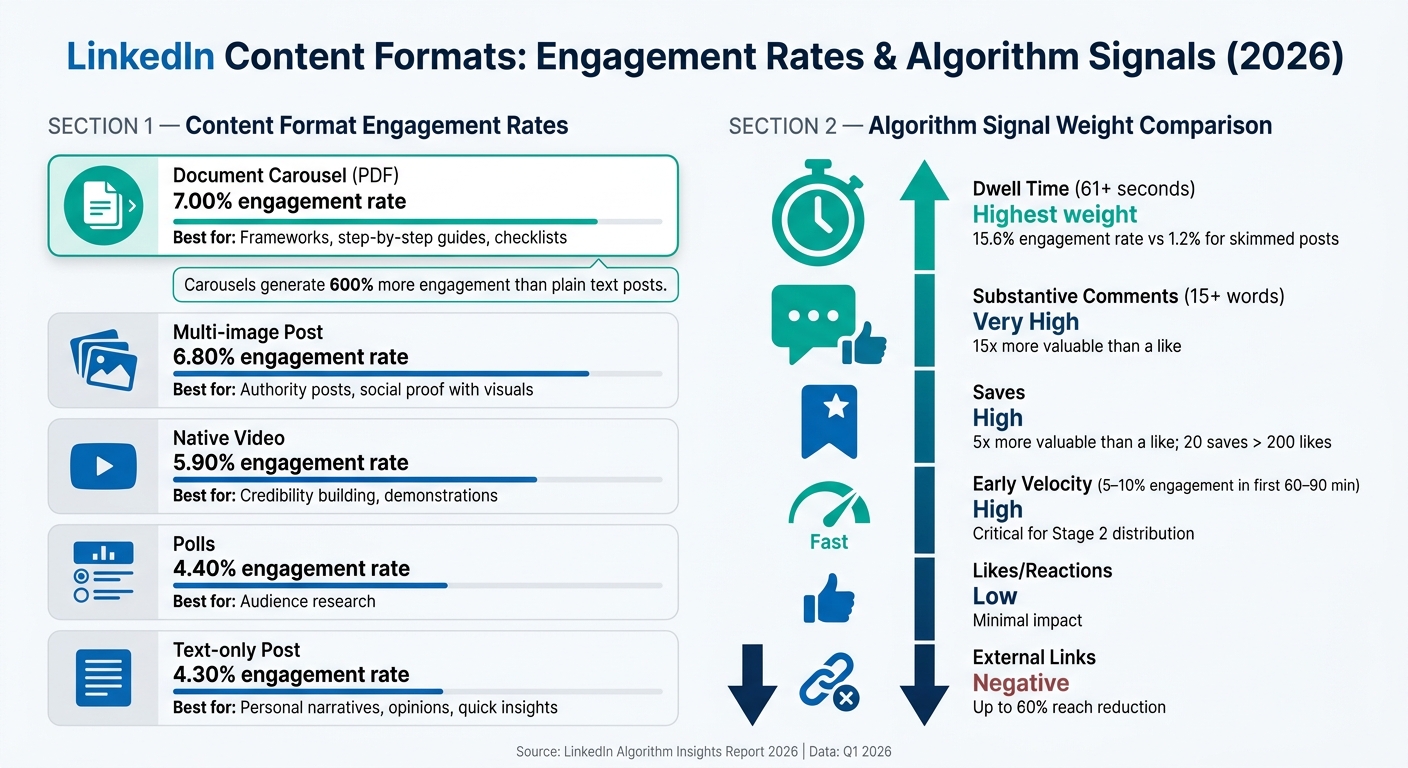
LinkedIn Content Formats: Engagement Rates & Algorithm Signals (2026)
How Different Content Formats Perform on LinkedIn
On LinkedIn, the format you choose for your content plays a big role in how far it reaches and how much engagement it gets. The platform's algorithm measures how much attention and value each post delivers, and this influences its visibility. Among the top performers, document carousels (PDFs) lead the pack with an impressive 7.00% engagement rate in Q1 2026 - a 14% increase compared to the previous year. These posts generate around 600% more engagement than plain text posts because the swipeable slides encourage users to spend more time on them.
Following carousels, native video ranks high, pulling in 84% more engagement than text-only posts, especially when the videos are under 90 seconds. Text-only posts, though simpler, performed well too, with 34% higher average reach compared to image posts in 2026, making them ideal for personal stories or quick insights. On the other hand, polls saw a sharp decline in reach, dropping 67%, as LinkedIn's algorithm now favors content that requires more effort and delivers higher value.
| Format | Engagement Rate (Q1 2026) | Best Use Case |
|---|---|---|
| Document Carousel | 7.00% | Frameworks, step-by-step guides, checklists |
| Multi-image | 6.80% | Authority posts, social proof with visuals |
| Native Video | 5.90% | Credibility building, demonstrations |
| Polls | 4.40% | Audience research |
| Text-only | 4.30% | Personal narratives, opinions, quick insights |
Data Source:
Next, let’s dive into how to maximize these formats for better performance.
Best Practices for Carousels and Long-Form Posts
When it comes to carousels and long-form posts, the secret to success is keeping your audience engaged enough to scroll or read further.
For carousels, aim for 10–15 slides to provide depth while holding attention. Start strong with a headline on the first slide to hook the reader, and wrap up with a clear call to action on the final slide. A great example of this strategy in action is healthcare data scientist Dr. Sana Mukhtar, who grew her LinkedIn following from 780 to 18,000 in early 2026 by posting 8-slide carousel summaries of complex research papers three times a week. Her carousels not only boosted engagement but also led to two keynote speaking invitations and $120,000 in consulting offers.
For long-form text posts, stick to 1,300–2,500 characters (about 250–450 words). The first 140–210 characters - the part visible before the "See more" link - are crucial. Use this space to share a sharp insight, an unexpected statistic, or a curiosity-sparking statement. To keep readers engaged, use the "Hook + Story + Lesson" structure and break up your text with frequent line breaks for better readability on mobile devices, which account for 80% of LinkedIn traffic.
"Right now, content lives and dies on the newsfeed very quickly." - Tim Jurka, Senior Director of Engineering, LinkedIn
Interestingly, saves carry more weight than likes. A post with just 20 saves can outperform one with 200 likes in terms of reach. To encourage saves, focus on creating frameworks, checklists, and templates that readers will want to bookmark for future use. These types of posts tend to get a boost from the algorithm.
How to Handle External Links Without Losing Reach
LinkedIn's algorithm prefers content that keeps users on the platform. Posts with external links can face a reach penalty of up to 60%.
A common workaround is to place the link in the first comment and mention it at the end of your post (e.g., "Link in the comments"). While this helps retain most of your reach, data from 2026 shows this method is becoming less effective over time. A better long-term approach is to focus on delivering value directly in your post - what some creators call "zero-click content" - and save links for your profile's Featured section or direct messages.
"Half your LinkedIn reach is decided before you hit post." - Richard van der Blom, Founder, Just Connecting
If driving traffic off-platform is a must, be aware of the trade-off. Use external links sparingly and strategically, ensuring the value you provide in the post itself is enough to justify any reach penalties.
How to Build a Consistent LinkedIn Posting Workflow
A steady posting routine sends the right signals to LinkedIn's algorithm, helping your content gain traction.
How Often You Should Post on LinkedIn
For 2026, aim to post 3–5 times per week. Increasing your frequency from just one post to 2–4 posts weekly can generate about 1,234 additional impressions per post. However, posting every single day may backfire, reducing your average reach by 26% due to audience fatigue.
Avoid posting twice within a 24-hour period, as this can trigger distribution penalties. Timing is another key factor. The best times to post are 7:30–8:30 AM and 12:30–1:30 PM (local time), with Tuesday through Thursday being the most active days. Late afternoon slots, like 3–5 PM, are also becoming more effective as professionals check LinkedIn after work.
Consistency is critical. Stick to a regular posting schedule for 90 days to establish a strong "topic fingerprint", which helps LinkedIn distribute your content more effectively.
"Topic Authority now matters more than follower count." - Melanie Goodman, LinkedIn Consultant
How to Use LinkedIn Analytics to Improve Your Posts
To refine your strategy, monitor key metrics like impressions, engagement rate, and the reach of your content among followers versus connections. On average, content reaches 25–30% of followers, compared to just 10–15% of connections. This means growing your follower base - not just your connections - can significantly boost your organic reach.
Pay close attention to the posts that generate the most saves and meaningful comments (comments with 10+ words). These actions signal high value to LinkedIn’s algorithm. For instance, a post with 20 saves can outperform one with 200 likes in terms of distribution. Repurpose your best-performing posts into new formats - like turning a text post into a carousel - to increase your overall reach by 23%.
If you notice engagement dropping across several posts, it might indicate audience fatigue. This is a good time to switch things up. Try a "pattern interrupt" by changing your format or exploring a fresh topic to re-engage your audience.
Streamlining your content creation process is the next step to staying consistent.
How Draft AI Can Speed Up Your Content Creation
Consistency in posting often hinges on streamlining your content creation process. Enter Draft AI, a tool designed to simplify LinkedIn content creation. Whether you provide raw data, a voice note, or details from your blog, it can generate polished LinkedIn posts, carousels, and scripts in just minutes.
One standout feature is its ability to adapt to your personal writing style. This is crucial because posts flagged as purely AI-generated tend to receive 30% less organic reach and 55% lower engagement on LinkedIn. By keeping your authentic voice intact, Draft AI ensures your posts resonate with your audience.
Draft AI also helps with brainstorming. Share your niche or business focus, and it will generate a variety of content ideas with attention-grabbing hooks. You can swipe through these ideas - saving the ones you like - to keep your content calendar full. With the Pro plan ($15/month), you get unlimited generations and topics, eliminating the creative roadblocks that often derail consistency.
Key Takeaways for Getting More Visibility on LinkedIn
By 2026, LinkedIn has shifted its focus to prioritize professional relevance and expertise over flashy, viral tactics. Every post you share goes through a three-step process: a quality check, a test run with a small portion of your network, and a broader rollout based on how it performs early on. This means nailing that initial engagement is absolutely critical.
Engagement quality plays a huge role in boosting reach. Interactions like thoughtful comments and saves carry much more weight than simple likes. For example, a detailed comment (15+ words) is valued at roughly 15× more than a like, and a single save is worth about 5× a like. These meaningful interactions not only increase your content’s visibility but also strengthen its relevance over time.
Building relevance isn’t an overnight process. By sticking to a focused topic for at least 90 days, you help the algorithm recognize your expertise and ensure your content reaches the right audience. Your overall professional identity and posting history play a big part in shaping your reach long-term. As Priya Nair from LinkedInsider explains:
"The 50th post from a coherent account distributes better to the right people than the 5th, regardless of individual post performance."
To further improve your visibility, adopt smart posting habits. Use external links, hashtags, and social media formatting wisely to avoid penalties that could limit your reach.
Consistency is key, and having a streamlined content creation process can make it easier to maintain. Tools like Draft AI can transform raw ideas, voice notes, or blog details into polished LinkedIn posts and carousels in just minutes - all while keeping your personal writing style intact.
FAQs
How can I increase dwell time on my LinkedIn posts?
Want to keep readers engaged with your content longer? Focus on making your posts scannable and engaging. Here’s how to do it:
- Start with a strong hook: Grab attention right from the first few lines. This encourages users to click "see more" and dive into your content.
- Use short paragraphs and line breaks: Long blocks of text can be overwhelming. Break things up to make your content easier to read.
- Add micro-headings every 8–12 lines: These act as visual cues, helping readers quickly find the information they’re looking for.
- Incorporate visuals like tables or templates: These elements break up text and add variety, keeping readers interested.
- Leverage carousels: Carousels are a powerful way to present information in bite-sized chunks, keeping users swiping and engaged.
For an extra edge, tools like Draft AI can help you craft viral hooks and organize your content for maximum impact.
What should I do in the first hour after posting to boost reach?
The first 60–90 minutes, often called the golden hour, are crucial for maximizing reach. During this window, prioritize genuine engagement - comments with at least 10 words carry more weight than simple likes. Take the time to respond quickly and thoughtfully to comments to spark meaningful conversations. Also, resist the urge to edit your post during this period, as doing so can disrupt the distribution signals and impact visibility.
How can I share links without hurting my LinkedIn post visibility?
The LinkedIn algorithm tends to limit the visibility of posts that include external links. Why? Because those links take users off the platform, something LinkedIn wants to avoid.
To work around this, skip the auto-generated link preview. Instead, paste your link in the first comment and mention it in your post. While this approach might still slightly reduce your reach, it’s far better than putting the link directly in your post.
Need help crafting posts that grab attention and play nice with LinkedIn’s algorithm? Consider using Draft AI to create engaging, platform-optimized content.


