AI vs. Manual Carousel Design: Comparison
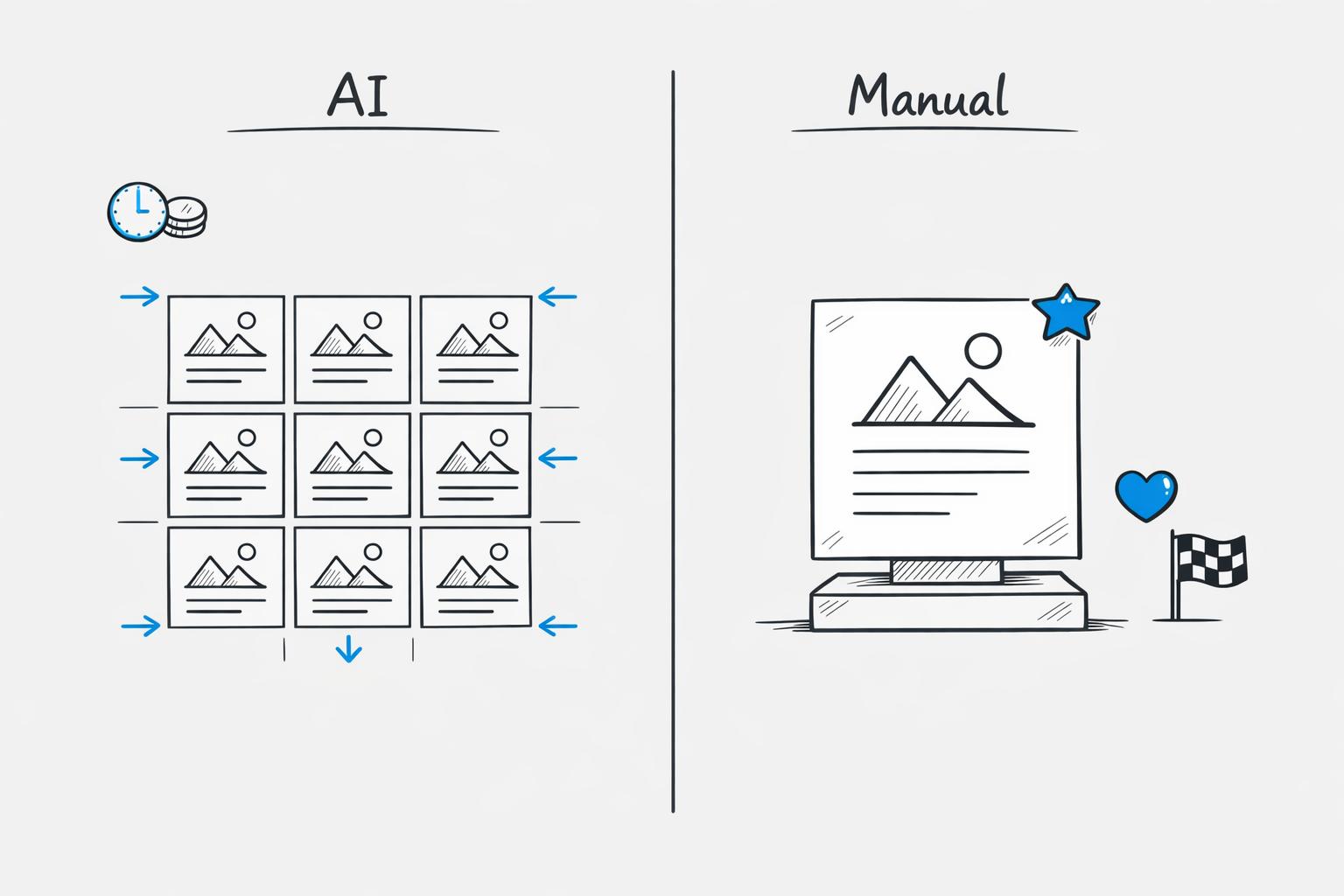
When deciding how to create social media carousels, it boils down to speed, cost, and engagement. Top AI tools for carousel design are faster and cheaper, producing carousels in minutes for less than $1 per post. Manual design, while time-intensive and pricier ($75–$300 per post), delivers higher engagement rates (4.2% vs. 3.4% for AI). Here’s a quick breakdown:
- AI Carousel Design: Best for high-volume, quick-turnaround content. Saves time (18 minutes vs. 2–4 hours) and costs less with subscription plans starting at $7/month. However, designs can feel repetitive and may need human tweaks.
- Manual Carousel Design: Ideal for standout campaigns or posts requiring originality. Offers full control over visuals and better typography but demands design expertise and more time.
Quick Comparison:
| Metric | AI Design | Manual Design |
|---|---|---|
| Engagement Rate | 3.4% | 4.2% |
| Completion Rate | 71% | 67% |
| Production Time | ~18 minutes | 2–4 hours |
| Cost | <$1 per post | $75–$300 per post |
Takeaway: Use AI for routine, data-driven content and manual design for high-impact, visually distinct campaigns, or leverage carousel templates for small businesses to balance speed and quality. Many brands combine both methods - AI for 80–85% of output and manual design for the remaining 15–20%.
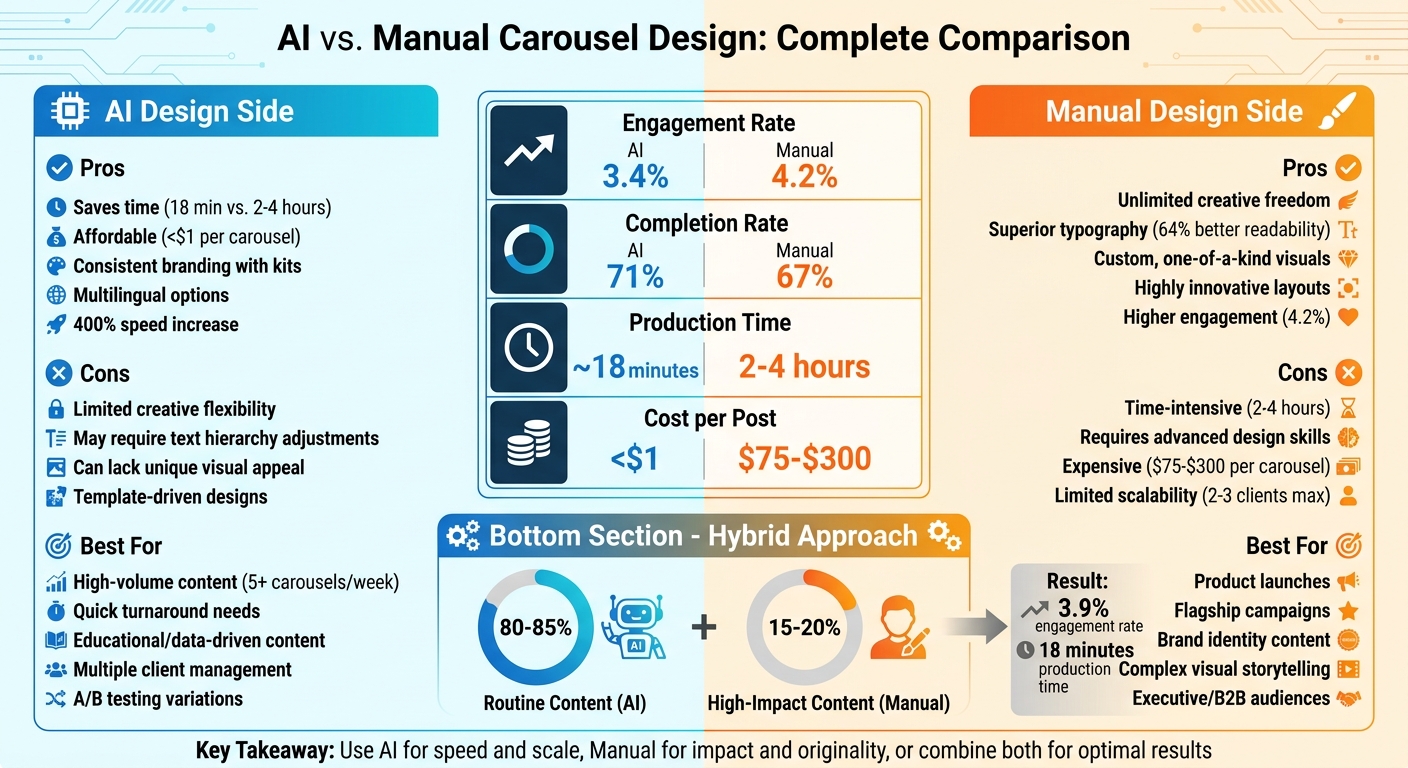
AI vs Manual Carousel Design: Performance Metrics and Cost Comparison
How to Create Viral Carousel Posts Using 100% AI
sbb-itb-9f5fe42
AI Carousel Design Explained
AI carousel tools are designed to analyze thousands of high-performing social media posts, uncovering patterns that drive engagement. They use natural language processing (NLP) to transform raw input - like a voice note, blog URL, or even a simple idea - into neatly structured, swipeable slides.
How AI Tools Work
The process starts with your input, which could be a topic, article link, or voice recording. The AI then extracts the key points and organizes them into a logical sequence: a hook to grab attention, body content to inform, and a call-to-action to encourage interaction. Along the way, the tool automatically adjusts layouts and applies your brand kit. By uploading your logo, fonts, and colors, you ensure every slide aligns with your branding. This automation doesn’t just save time - it also makes content creation more personal and efficient. For instance, Draft AI lets you input details about your business or blog, generating a variety of swipeable content ideas that you can refine and turn into polished carousels.
Main Features of AI Carousel Design
One of the standout benefits is the time saved. AI tools can speed up production by up to 400%. What once required 2–4 hours of work now takes just 5–20 minutes.
"Designers now complete tasks in 15–20 minutes instead of 3–4 hours, enabling greater output with less burnout." - Muneeb Awan, Founder of PostNitro
These tools don’t just excel in speed - they also offer advanced features like multilingual translation and writing style customization. Platforms like Draft AI analyze your past posts to learn your tone and style, generating content that feels authentically yours. With support for multiple languages and layout adjustments for different reading directions, these tools are particularly effective for global audiences. For example, localized carousels have been shown to boost audience retention by 18% and increase shares by 22% in emerging markets. Together, these features highlight how AI is reshaping the way carousels are created and shared.
Manual Carousel Design Explained
Creating a manual carousel design is all about starting from scratch and relying on your creativity and attention to detail. Tools like Adobe Photoshop, Illustrator, or Figma are typically used for more advanced projects, while Canva works well for simpler tasks. Unlike AI tools that automate much of the process, manual design requires you to make every decision yourself - from selecting fonts and colors to arranging elements on each slide.
Steps in Manual Design
Designing a manual carousel involves a structured and time-intensive process. It starts with brainstorming the concept and crafting concise copy for each slide, ideally limiting text to 20–30 words per slide. From there, you design each slide individually, sourcing images and ensuring visual consistency throughout. It's also crucial to consider platform-specific dimensions - such as 1,080x1,080 pixels for Instagram and 1,200x1,500 pixels for LinkedIn - and optimize for mobile devices to ensure text remains readable on smaller screens.
Because of the need for both creativity and technical precision, completing a professional carousel typically takes 2 to 4 hours. When factoring in designer time and stock photo costs, the total expense usually falls between $150 and $300 per carousel.
Creative Freedom in Manual Design
The biggest advantage of manual design is the complete creative control it offers. You're free from the constraints of templates or algorithms, allowing you to bring any visual idea to life. Whether it's custom illustrations, complex infographics, or other unique elements, manual design can achieve results that AI tools simply can't replicate. This flexibility is especially important for flagship campaigns, product launches, or content that defines your brand's identity.
Manual designs also tend to perform better in terms of engagement, achieving an average rate of 4.2% on platforms like Instagram and LinkedIn, compared to 3.4% for AI-generated content. They also excel in typography, with better text hierarchy and readability in 64% of analyzed carousels.
"Manual design methods deliver unparalleled creative freedom and customization options, perfect for unique campaigns requiring specific visual elements or complex layouts." - Qurratulain Awan, Digital Marketing Expert
However, this creative freedom has its challenges. Manual design requires expertise in areas like visual hierarchy, color theory, and typography - skills that take time to master. For businesses managing multiple social media accounts, the time commitment can become overwhelming as content demands grow. Even so, when precision and a distinct visual identity are top priorities, manual design remains the go-to choice. It’s this careful, deliberate approach that sets manual design apart, even as we compare it to the ways AI tools speed up content creation.
AI vs. Manual Carousel Design: Side-by-Side Comparison
Let's break down how AI and manual methods stack up across the metrics that matter most to marketers and content creators.
Performance Metrics Compared
When it comes to how these methods perform, the numbers tell an interesting story. AI-generated carousels see a 71% completion rate, meaning more viewers swipe through to the end compared to the 67% completion rate for manually designed carousels. However, manual designs deliver a higher engagement rate, averaging 4.2%, compared to 3.4% for AI-generated content.
The biggest gap is in production time. Creating a carousel manually takes 2 to 4 hours, while AI tools can complete the same task in about 18 minutes, including a quick human review. That’s a 400% boost in speed. Cost is another factor: manual design can run between $75 and $300 per carousel, depending on labor or outsourcing costs, while AI tools operate on subscriptions starting at $7 to $50 per month.
| Metric | AI Carousel Design | Manual Carousel Design |
|---|---|---|
| Engagement Rate | 3.4% average | 4.2% average |
| Completion Rate | 71% | 67% |
| Production Time | ~18 minutes per carousel | 2–4 hours per carousel |
| Cost per Post | <$1 (subscription-based) | $75–$300 |
AI Carousel Design: Pros and Cons
Automated content creation tools shine when speed and scalability are priorities. A single marketer using AI can manage content for over 10 clients, compared to just 2 or 3 with manual methods. These tools are also beginner-friendly, allowing users without design skills to create polished carousels through simple interfaces and automated formatting.
That said, AI has its drawbacks. The designs often stick to familiar patterns, which can feel repetitive or formulaic. Text hierarchy issues are another concern, as raw AI output may need human tweaking for readability. Tools like Draft AI address these limitations by offering customizable templates and options to align designs with your brand’s tone and style, ensuring the final product feels authentic and professional.
| Pros | Cons |
|---|---|
| Saves time (18 min vs. 2–4 hours) | Limited creative flexibility |
| Affordable (<$1 per carousel) | May require text hierarchy adjustments |
| Consistent branding with kits | Can lack unique visual appeal |
| Multilingual options | Relies on template-driven designs |
Manual Carousel Design: Pros and Cons
For brands that prioritize originality and custom aesthetics, manual design remains the go-to choice. Designers have complete freedom to create intricate illustrations, unique layouts, and detailed infographics. Manual designs also tend to excel in text hierarchy and typography - 64% of manually crafted carousels are noted for their superior readability.
But this creative freedom comes with challenges. Manual design requires expertise in areas like color theory and visual hierarchy, skills that take years to master. It’s also less scalable; the time and cost involved - $75 to $300 per carousel - mean marketers can only handle a few clients at a time.
| Pros | Cons |
|---|---|
| Unlimited creative freedom | Time-intensive (2–4 hours) |
| Superior typography and readability | Requires advanced design skills |
| Custom, one-of-a-kind visuals | Expensive ($75–$300 per carousel) |
| Highly innovative layouts | Limited scalability (2–3 clients max) |
The data highlights a clear divide: AI is faster, cheaper, and better for high-volume tasks, while manual design excels in engagement and creativity. Many successful brands now use a hybrid approach, relying on AI for about 80–85% of their routine content and reserving manual design for high-impact campaigns that define their brand identity. This balance ensures both efficiency and originality, setting the stage for exploring the best use cases for each method.
When to Use AI vs. Manual Carousel Design
Deciding between AI-driven and manual carousel design depends on factors like how much content you need, your deadlines, budget, and creative objectives.
Best Situations for AI Design
AI tools shine when you’re juggling tight schedules and high content demands. If you need to churn out multiple carousels weekly without exhausting your team, AI can be a lifesaver. It’s especially useful for high-volume workflows or managing content for multiple clients. For instance, a digital marketing agency managing five clients cut over 20 hours of work per week in March 2025 by using AI carousel tools, increasing their content output by 300%.
AI also proves its worth when speed is critical - think breaking news or time-sensitive updates. What used to take hours can now be done in minutes. Plus, it’s great for creating educational, data-driven content like tips, statistics, or how-to guides. Tools like Draft AI can turn raw data or even voice notes into polished carousels in no time, complete with customizable templates and brand kits to keep your visuals on point.
Another perk? AI lets you experiment with multiple designs quickly. You can generate different variations for A/B testing hooks or layouts, helping you find what resonates most with your audience. Platforms like Draft AI also make it easy for non-designers to create professional-looking, region-specific content by adjusting text and layouts for different markets.
While AI is perfect for efficiency and routine tasks, it’s not always the best choice for projects that demand a personal, creative touch.
Best Situations for Manual Design
Manual design is the go-to option when you need to make a big splash. Whether it’s launching a new product, announcing a rebrand, or rolling out a major campaign, these are moments where creativity and originality matter most. Manual designs often drive higher engagement, making them ideal for flagship content.
Some projects require a level of complexity that AI just can’t handle yet. Custom illustrations, intricate layouts, and sophisticated visual storytelling are where human designers excel. They bring the kind of creative judgment and precision that templates simply can’t replicate. For example, manual design is essential for ensuring clarity in text-heavy or visually complex stories.
If you’re creating high-stakes B2B content aimed at executive audiences, manual design - or professional tools like Adobe Creative Suite or Figma - offers complete creative control. This ensures your content aligns perfectly with brand guidelines and delivers the polished look expected at this level.
Many brands find success by blending the two methods. They rely on AI for about 80–85% of routine content while reserving manual design for the 15–20% of projects that define their brand. This approach helps maintain a steady flow of content while still delivering standout moments that set your brand apart.
Combining AI and Manual Design for Better Results
Many brands are discovering the power of combining AI with manual design to elevate their content creation process. By leveraging both, they can achieve faster production while maintaining a personal, creative touch. A common strategy involves an 80/20 split: AI takes care of 80–85% of routine content tasks, while human designers focus on the remaining 15–20% - the high-impact pieces that require strategic thought and creative precision. This balance allows businesses to capitalize on AI's efficiency without sacrificing the unique flair that manual design brings.
How to Use Both Methods Together
Start by letting AI handle the groundwork. Tools like Draft AI can quickly turn raw data, voice notes, or blog posts into carousel drafts, complete with slide outlines and initial layouts, in just minutes.
Once the draft is ready, it's time for manual refinement. Begin by rewriting the first slide to make it more engaging and improve swipe-through rates. Then, tweak the visual hierarchy - ensure headlines are 2–3 times larger than the body text to naturally guide the reader's eye. Finally, replace generic, summary-style language with conversational copy that reflects your unique voice, and add personal insights. This approach not only speeds up the process but also creates content that resonates more deeply with your audience.
Benefits of Using Both Methods
The results speak for themselves. Carousels created with this hybrid method achieved a 3.9% engagement rate - higher than the 3.4% seen with AI-only designs and nearly on par with fully manual designs at 4.2%. Plus, the time savings are significant: production time drops from an average of 2.3 hours for manual creation to just 18 minutes when using this combined approach. It's a win-win for efficiency and effectiveness. To ensure your workflow remains consistent, follow a content creation checklist.
Conclusion: Choosing the Right Approach
There’s no universal solution here - the best choice depends on your goals, time constraints, and resources.
If you’re churning out five or more carousels each week, AI tools can be a game-changer. They speed up production by 78% and cut costs by 65-85%, saving about 9.5 hours weekly for teams producing at that scale. On the flip side, if your posting schedule is more occasional, these time savings might not matter as much, and manual design could be a better fit.
The purpose of your content also plays a big role in deciding your approach. For high-impact content - like product launches, flagship campaigns, or intricate storytelling - manual design still has the upper hand. While manual designs see a 7% higher engagement rate, refining AI-generated content can help close this gap. That’s why many successful brands are blending both methods rather than sticking to just one.
Your team’s capabilities are another factor. If you don’t have a dedicated designer, AI tools can create polished carousels without requiring any design expertise. But if you do have designers, AI can handle routine tasks, allowing them to focus on the 15-20% of content that demands deeper creativity and strategic effort.
The numbers tell a clear story: combining the speed of AI with the creativity of manual design delivers the best results. Use AI for educational posts, trend-driven content, and quick A/B tests, while manual design is ideal for establishing brand identity and standing out in the crowd. Striking the right balance between efficiency and creativity is the secret to building a strong personal or brand presence.
FAQs
When should I use AI vs. manual carousel design?
Using AI for carousel design can be a game-changer when you’re pressed for time or need to maintain consistent branding across visuals. It’s perfect for creating polished, professional designs that are both engaging and error-free, making it especially helpful for scaling your social media efforts efficiently.
On the other hand, manual design is the way to go when you need highly customized, intricate, or unique visuals. For the best results, consider a hybrid approach - combining the speed and precision of AI with the creative touch of human designers. This way, you can harness the strengths of both to create standout content.
How do I keep AI carousels from looking generic?
To make your AI carousels feel less generic, focus on aligning them with your brand's identity. Choose fonts, colors, and visuals that reflect your unique style. Opt for clear typography, well-organized layouts, and attractive color palettes to create a polished look. Add personalized branding elements, custom visuals, and messaging tailored to your audience to set your carousels apart. Tools like Draft AI can simplify the design process while still giving you the creative flexibility to keep your carousels fresh and engaging.
What should I manually edit in an AI-generated carousel?
When working on an AI-generated carousel, take the time to refine both the visuals and the text to reflect your brand's identity. Start by tweaking the layout, colors, fonts, and images to align with your branding guidelines. Then, focus on editing the copy to ensure it’s clear, accurate, and matches your brand's tone of voice. These manual adjustments can boost creativity, keep the slides consistent, and make the content more relevant to your audience and campaign objectives. The result? A carousel that delivers your message effectively.


